Author

Sumit Bahl

Browsing

As our world changes at a rapid pace, it’s important to keep up with the latest tech trends and specializations. This is crucial, but it’s not simple to do. Hence, to better equip you for the year 2021, we’ve conducted in-depth industry research and created our specific list of the top 10 tech specialties in demand right now.

 To better equip you for the year 2021, we’ve conducted in-depth industry research and created our specific list of the top 10 tech specialties in demand right now.

Artificial Intelligence and Machine Learning

Digital intelligence is reshaping everything from health and transport to commerce, administration, and leisure. More and more work is being done by robots. Cars that drive themselves already on the road, and virtual assistants who act like humans are also becoming more commonplace. Because of the sheer number of AI/ML specialists needed to make this kind of change, it’s ranked as the top emerging career on LinkedIn’s annual report for 2018.

For AI/ML professionals, the essential abilities are a combination of TensorFlow, Python, Java, R as well as Natural Language Processing in their armory.

Data Science

AI/ML technology and data science go hand in hand, and data science is frequently an essential component of it. That being said, the field is sufficiently distinct and large to warrant its own entry on this list.

Last year demonstrated how big data may influence global processes and assist the international community in responding to contemporary problems by offering practical answers.

Businesses are still the primary users of data science services. According to refnitiv.com, business demand for data experts has increased by nearly a third since 2018.

Given that next-generation technology is largely reliant on efficient data gathering, processing, and analysis, it’s obvious that data science is a critical component of technological development in all its forms.

IoT

Weaving a mesh of linked smart devices into our everyday activities on many levels is required for effective data gathering and deployment of digital intelligence technologies like artificial intelligence.

Thus, the Internet of Things is still a hot subject in the world of technology and the advancement of that technology.

Thus, IoT research is moving from nice-to-haves to more utilitarian applications in many critical areas related to human activity. Automated warehouses and automated monitoring and shipment are being more integrated into transportation. The healthcare industry is being transformed by remote monitoring and management, wearables, and contact-tracing technologies. Diverse sectors of the manufacturing industry are putting smart industrial technology and machinery into place.

There will be 27 billion connected devices worldwide by 2021, or roughly 3.5 gadgets per person worldwide, according to a Cisco study. The global IoT industry is projected to reach $520 billion by then.

Cloud Computing

All of the above-mentioned complicated computations require a tremendous amount of computer power. In 2021, cloud computing is expected to be another essential skill set.

Due to the sheer ease and superior speed that cloud computing provides while revolutionizing computer resource use, it is gaining enormous traction.

As far as cloud platforms go: AWS, Microsoft Azure, and Google Cloud Platform are all worthy of consideration. Three of today’s biggest cloud service companies will be a significant influence in 2021 when it comes to technological advancement.

More than 90% of all public businesses in the globe are utilizing virtual technology, with 94% percent in the cloud this year, according to an evaluation by HostingTribunal.

Cybersecurity

That much (often reasonable) data has to be operated at a position where there aren’t any physical barriers to safeguard the service users. A person’s identity becomes more at risk the more data they keep and access online.

Global cybersecurity expenditure has recovered during the epidemic, after significantly decreasing in 2019/2020. According to threatpost.com, the market shows no signs of slowing down any time soon.

As a result, cybersecurity professionals will be in great demand far beyond 2021.

Particular emphasis is being paid to areas such as cloud data protection and application monitoring, which are among the top cybersecurity sub-niches. With new security models like zero trust security, this is a great market to invest in. 

Blockchain

Even though it’s closely related to internet safety, Blockchain is deserving of its own spot on our list. That would be, of course, due to the current cryptocurrency surge.

A crypto-revolution is taking place right before our eyes, despite the fact that blockchain is still relatively new. The value of the technology is increasing rapidly as some of the world’s largest tech companies begin to invest in it.

Bitcoin’s skyrocketing price, along with reports that more and more companies are opening their doors to crypto operations, makes it clear that the IT market’s need for blockchain specialists will grow rapidly in the near future.

Mobile Development

All of the foregoing, from the perspective of the customer, only makes complete sense when combined with the digital platform that captures the majority of user attention and time: mobile devices.

According to StackOverflow, the market for mobile developers will be among the greatest in the whole IT development spectrum by 2022, with yearly mobile app downloads expected to exceed $258 billion (an increase of nearly 50% in five years).

Given the 5+ billion smartphone users worldwide, mobile development will continue to be important for some time to come.

The most money is being made per line of code by cross-platform development tools (like React Native).

AR/VR

When considering future technology and innovation, we can’t ignore AR/VR as a critical tool for ushering in a new era.

The healthcare crisis of last year has been a significant external factor driving the shift to an “all-remote” paradigm in technology. As a consequence, the AR industry exploded, reaching a value of $15 billion, as per statistics from marketsandmarkets.com.

A lack of Covid-related capabilities has forced consumer-centric businesses to reevaluate conventional methods of performing everyday activities including communication, leisure, shopping, and travel.

But the healthcare industry is stepping up its use of virtual reality in a big way. Here, the use of augmented reality has already demonstrated tremendous benefits in employee training, surgery, general care, pediatrics, and many other niches of the medical industry.

DevOps

Most of the other technologies on this list will be successful only if the development procedures are optimized. As a result, DevOps will be very important far into the year 2021.

In this respect, Infrastructure Automation, Application Release Orchestration, Application Performance Monitoring, and Cloud Management Platforms are receiving more attention, as well as a significant emphasis on agility and adaptability to irregular goals.

Python

On our list, the last but not least is Python, the market’s most in-demand scripting language at the moment. The authorized AI/ML software backbone is unquestionably the finest option for any data-related application in 2021.

The fact remains that JavaScript is worth noting since its popularity rivals that of programming languages like Python. In spite of this, the number of Python-based projects compared to the total number of programmers available makes it the clear winner in the market.

Conclusion 

There you have it! The top upcoming tech niches. While most aren’t new, they have made commendable strides recently and have come to the forefront of the industry. 

Every business is on the lookout for the next sales funnel strategy that will boost their conversion and revenue. Although there are several strategies you can choose from; however, not all of them can generate the kind of results you might desire. In some cases, the issue is not necessarily with the strategy, but as a result of your business incompatibility with the chosen strategy.

Hence, it is important to have several options to choose from. Since we know this all too well, we have compiled a list of proven sales funnel strategies that are guaranteed to work. You can assess these options and determine which ones will be suitable for your business. 

1. Upselling

If you are asking “what is an upsell?”, then allow us to answer that question. This approach is great for boosting your sales funnel average order. 

Upselling involves offering an additional service or product to the original sale which the customer can get both products at either the same price or somewhat price.

In most cases, this additional sale is added in the middle of the sales funnel. It is also an exclusive offer and always has a time limit. With the time limit, customers will be more eager to purchase since they know that they can lose out on the deal. 

The efficiency of this tactic is dependent on two major factors which are:

I. Customers are already in a buying mindset. 

As a result, they are open to making a further purchase if the deal is suitable for them.

II. The customers have already entered their payment and shipping details.

Hence, they will not be worried about starting the process again. 

As we said, this tactic is great for boosting your average order value. However, you must ensure that the product or service which you are using as the upsell complements the original sales.

Sales Funnel Strategies

2. Downselling 

Downselling comes after upselling. A downsell is a popup offer that comes up after a customer refuses to purchase your upsell. The downsell is usually at a lesser price than the upsell and it could either be the initial upsell product or another product that is similar to the upsell. 

A downsell is a great way to make an upsell more appealing after it has been rejected initially. 

3. Order Bumps

An order bump is simply a product or service that a customer can include in their order when they are about to send the order with just one click. Order bumps are usually found on the page for “Confirm Your Order”.

You have the option of having either a single order bump or several order bumps. However, ensure that the products are relevant or complementary to the buyer’s main purchase. For example, if they are buying pants, offering them a matching belt is a great order bump. In such a case, most customers will be willing to place such additional orders. 

If you are looking for a strategy to get the best out of your already existing customers, then order bumps are the best way to go.

4. Lead Magnets

Lead generation requires a great strategy, and what better strategy is there than a lead magnet. What are lead magnets you might ask? We have the answer…

A lead magnet is a gift or free offer that you give to potential customers to get their contact information such as email address, phone number, etc. in return. Most folks focus on just emails to avoid looking desperate and scaring away such leads. 

Most individuals will not hand over their email address simply because you asked nicely. Therefore, for this approach to work, the lead magnet you are offering must be something your target market considers appealing. 

A lead magnet is usually aimed at a particular target audience as this is the only way to attract great leads. If you make your lead magnet so generalized, the lead you will get may not end up as sales because your main product might not be appealing to such folks. 

A lead magnet is a way to get potential customers to eventually buy your main product. Therefore, if the individuals you attract through your lead magnet are not interested in your product, then the entire process has not fulfilled its purpose. Click here to learn more about lead magnets.

Some lead magnets you could offer include:

  • Free masterclass
  • Free checklist
  • Free E-book
  • Free downloadable material, etc…

Sales Funnel Strategies

5. The Soap Opera Sequence

Once you get the email of the lead, it would be not ideal to send them an email asking them to buy your product: Such an approach ends up failing most of the time. What you need to do is make use of the soap opera sequence. Allow us to explain…

This technique follows the pattern of soap operas:

  • Each new episode resolves the suspense created in the last episode
  • Another suspense is created in the new episode
  • The new episode then ends without resolving the suspense created
  • Then the whole process is repeated…

This is the pattern your email must adopt:

  • Your first email should create suspense and excitement that will make them eager to read the next email
  • Then your second email should resolve the suspense in the first email while creating a new suspense 
  • You can then repeat the process for as long as you like until you are sure that you have created trust in the hearts of your potential customers
  • It is when you have gained their trust you can then ask them to make a purchase. 

This way, you ease them into the product after several emails while building trust, authority, and even loyalty in their hearts. 

Bonus: Challenge Funnels

Challenge funnels are fun and a great way to establish a seller-buyer relationship. This strategy involves creating a challenge that you invite your customers to participate in. Whatever the challenge you choose, ensure it is relevant to your main product.

Conclusion

In the article above, we shared 5 sales funnel strategies you can make use of to boost your business’ conversion and revenue.

In today’s time, it is very common to use laptops and computer systems, because nowadays, even small kids also need the computer system to do their homework. In offices, schools, companies, everywhere computers are present by using them students learn new things, elders do their work, in big companies with them lots of work are done and for many purposes, the laptops and computer devices are used. And that’s the reason that these are common among people nowadays. However, these devices are used for work, but one can do any work on them like study, office work, playing games, listen to songs, and other works by connecting them with other devices. 

And that’s why there are high chances that your monitor or desktop will get damage or impaired because of use for more time or continue. But if you think about buying a new device or monitor then you have to spend lots of money on buying the new monitor. For saving you money and get a new monitor, you can look for buying the DLAB Monitor- The Best Portable 4k Touchscreen Monitor and get its lots of benefits. One can use the DLab monitors according to their use and also enjoying it to work with them. 

Benefits of having the DLab Monitor

There are lots of benefits of using the DLab monitor and these are:

  • Use it for playing games
  • Listen to music with a good sound base
  • Use its touch screen and enjoy it
  • It is lightweight so one can carry it with them with ease.
  • This is the best portable touch screen monitor.
  • Use it as an iPad.
  • Convert it to your smartphone.
  • Its 4k resolution is good for photos and checks them with high-quality vision.
  • Also, you can connect it with any type of device with ease. 

Who can use the DLab monitor?

The DLab monitor is a multipurpose monitor that anyone can use. But still many people have a question that who can use this and for whom it is good to use. Let’s see who can use this monitor:

  • Students

The DLab monitor is best for the students. As it is lightweight and as well as has the best screen resolution. So when they study on it they don’t have any problem seeing it or their eyes will not get any bad effect even they study continuing for two or three hours. 

  • Developers

It seems that developers need more than a screen for developing any software or others. They need the screen from where they will get the fast response and can do their work with easiness and comfortably. With this monitor, they will get full graphical fidelity and also enjoy their work to do with the use of it. 

  • Gamers

There are lots of people who are game lovers and they always look for the device which gives them feel that they are playing the game in reality. For this, it is the best device or monitor to use for playing their favorite games. Its 4k Touch screen monitor helps them to enjoy the game as they are playing it in reality. 

  • Designers

Designers can use this monitor for their work and make the design. With this monitor, they can see everything in clear and also with its best screen resolution which gives the clear result for their design. This one is the best 4k monitor for designers and they can enjoy it for their designing with ease. 

  • Photographers

Photographers always look for the device which gives them a better result for managing their photos and gives them a perfect view for their photos. And the DLab monitor has a 4k resolution and is ultra-bright compatible so it will be the best device or monitor for the photographers for maintaining their photos and give them a perfect view. 

This is the best monitor to use for any kind of work and different people. So, one can use it for any work and purpose. As this device has many features and all of them are helpful to do any kind of work and without any issue to the people. Therefore, one has no problem doing work with it and the best thing is that one can carry this with them where ever they go. 

DLab monitor is not just for laptop or computer device to use it as a monitor, but it is multipurpose that means one can do any work and convert it into any device according to their need, as read in the above. So, if someone wants to buy a new monitor then they can look for it and get the best results to use it for their work. Check out its specifications at www.dlmonitor.com

The latest MIUI 12.0.10.0 update for Redmi 9 Power starts rolling out via OTA. The update brings the latest security patch to the device. Follow the below guide to Download MIUI 12.0.10.0 India Stable ROM for Redmi 9 Power.

MIUI 12.0.10.0 India Stable ROM for Redmi 9 Power is a stable version and can be flashed via Recovery or via Fastboot. You can download MIUI 12.0.10.0 for Redmi 9 Power from below.

You can Download Redmi 9 Power MIUI 12.0.10.0.QJQINXM ROM from below and also manually check for the update by going to Settings -> About Phone -> System updates -> Check for update. Download MIUI 12.0.10.0 Stable ROM for Redmi 9 Power from below.

Changelog

[Other]

  • Optimization: Increased system stability
  • Optimization: Reduced system lag

Note:-

  • This Firmware file is only for Redmi 9 Power. Don’t try this on any other device.
  • Follow the steps correctly otherwise you may brick your device. We are not responsible for any damage to your phone.
  • It may erase your data, so it is advisable to take a complete backup of your phone for a safer side.
  • Ensure that your phone has at least 50-60% charged to prevent the accidental shutdown in between the process.

Download MIUI 12.0.10.0 India Stable ROM for Redmi 9 Power

  • Redmi 9 Power MIUI 12.0.10.0 OTA update – Download
  • MIUI 12.0.10.0 Recovery ROM for Redmi 9 Power – Download
  • MIUI 12.0.10.0 Fastboot ROM for Redmi 9 Power – Coming Soon

How to Install MIUI 12.0.10.0 India Stable ROM on Redmi 9 Power –

To install MIUI 12.0.10.0 update for Redmi 9 Power download either Recovery ROM or Fastboot ROM from above and use the below method to install this on your device.

Method 1 – Recovery Mode

Recovery Mode

  1. Download Recovery ROM for Redmi 9 Power from above and save it on your device.
  2. Now launch the ‘Updater‘ app on your device.
  3. Click on the three-dot menu (‘…’ icon) at the top-right corner, and select the ‘choose update package‘.
  4. Browse through the files and select the package ending with .zip extension.
  5. Done. Your device will reboot on the latest version.

Method 2 – Fastboot Mode

1) First, Download Mi Flash Tool, extract it, and install it on your PC.

2) Now download Fastboot ROM for Redmi 9 Power for your device.

3) Now boot your device into Fastboot mode by pressing the ‘Volume Down + Power‘ button.

4) Connect your device to the PC via a micro USB cable.

5) Now extract the Fastboot ROM and copy its path on the PC.

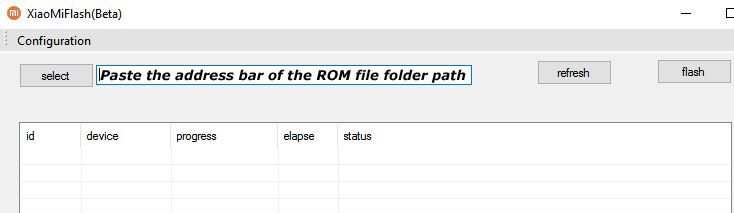
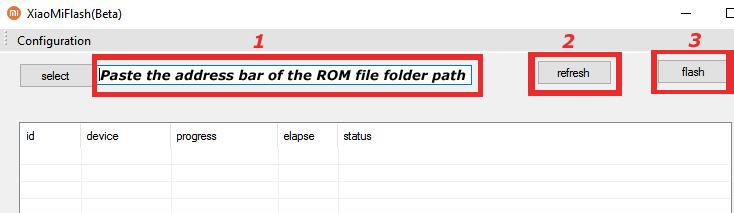
6) Now open MI Flash Tool and Paste the address bar of the ROM file folder path copied from above.

Mi Flash

7) First, click on the ‘Refresh‘ button (It will automatically recognize your device) and then click on the ‘Flash‘ button to flash MIUI 12 ROM on your Devices.

Mi Flash

8) Wait for some time to complete the process.

9) Done. Your device will boot on the latest version.

Wrapping Up:

Download MIUI 12.0.10.0 India Stable ROM for Redmi 9 Power and flash it via recovery or fastboot to update it manually. Comment below if you have any doubts.

The latest MIUI 12.5.3.0 update for Mi 10 starts rolling out via OTA. The update brings the August security patch to the device. Follow the below guide to Download MIUI 12.5.3.0 India Stable ROM for Mi 10.

MIUI 12.5.3.0 India Stable ROM for Mi 10 is a stable version and can be flashed via Recovery or via Fastboot. You can wait for the OTA or download MIUI 12.5.3.0 for Mi 10  from below.

You can Download Mi 10 MIUI 12.5.3.0.RJBINXM ROM from below and also manually check for the update by going to Settings -> About Phone -> System updates -> Check for update. Download MIUI 12.5 ROM for Mi 10 from below.

Changelog:

[System]

  • Optimization: Updated Android Security Patch to August 2021. Increased system security.

[Lock screen]

  • Fix: Using fingerprints in some apps locked the device

Note:-

  • This Firmware file is only for Mi 10. Don’t try this on any other device.
  • Follow the steps correctly otherwise you may brick your device. We are not responsible for any damage to your phone.
  • It may erase your data, so it is advisable to take a complete backup of your phone for a safer side.
  • Ensure that your phone has at least 50-60% charged to prevent the accidental shutdown in-between the process.

Download MIUI 12.5.3.0 India Stable ROM for Mi 10

  • MIUI 12.5.3.0 OTA for Mi 10  – Download
  • MIUI 12.5.3.0 Recovery ROM for Mi 10 – Download
  • MIUI 12.5.3.0 Fastboot ROM for Mi 10  – Download

How to Install MIUI 12.5.3.0 India Stable ROM on Mi 10 –

To install MIUI 12.5.3.0 update for Mi 10 download either Recovery ROM or Fastboot ROM from above and use the below method to install this on your device.

Method 1 – Recovery Mode

Recovery Mode

  1. Download Android 11 ROM for Mi 10from above and save it on your device.
  2. Now launch the ‘Updater‘ app on your device.
  3. Click on the three-dot menu (‘…’ icon) at the top-right corner, and select the ‘choose update package‘.
  4. Browse through the files and select the package ending with .zip extension.
  5. Done. Your device will reboot on the latest version.

Method 2 – Fastboot Mode

1) First, Download Mi Flash Tool, extract it and install it on your PC.

2) Now download MIUI 12.5 ROM for Mi 10 for your device.

3) Now boot your device into Fastboot mode by pressing the ‘Volume Down + Power‘ button.

4) Connect your device to the PC via a micro USB cable.

5) Now extract the Fastboot ROM and copy its path on the PC.

6) Now open MI Flash Tool and Paste the address bar of the ROM file folder path copied from above.

Mi Flash

7) First, click on the ‘Refresh‘ button (It will automatically recognize your device) and then click on the ‘Flash‘ button to flash MIUI 12 ROM on your Devices.

Mi Flash

8) Wait for some time to complete the process.

9) Done. Your device will boot on the latest version.

Wrapping Up:

Download MIUI 12.5.3.0 India Stable ROM for Mi 10 and flash it via recovery or fastboot to update it manually. Comment below if you have any doubts.

Have any questions? Do let us know that in the comments below. Stay connected with us via Facebook and Twitter to read more such helpful posts.

The latest MIUI 12.5.5.0 update for POCO X3 GT starts rolling out via OTA. The update brings the August security patch to the device. Follow the below guide to Download MIUI 12.5.5.0 Global Stable ROM for POCO X3 GT.

MIUI 12.5.5.0 Global Stable ROM for POCO X3 GT is a stable version and can be flashed via Recovery or via Fastboot. You can wait for the OTA or download MIUI 12.5.5.0 for POCO X3 GT from below.

You can Download POCO X3 GT MIUI 12.5.5.0.RKPMIXM ROM from below and also manually check for the update by going to Settings -> About Phone -> System updates -> Check for update. Download MIUI 12.5.5.0 ROM for POCO X3 GT from below.

Note:-

  • This Firmware file is only for POCO X3 GT. Don’t try this on any other device.
  • Follow the steps correctly otherwise you may brick your device. We are not responsible for any damage to your phone.
  • It may erase your data, so it is advisable to take a complete backup of your phone for a safer side.
  • Ensure that your phone has at least 50-60% charged to prevent the accidental shutdown in-between the process.

Download MIUI 12.5.5.0 Global Stable ROM for POCO X3 GT

  • MIUI 12.5.5.0 OTA for POCO X3 GT – Download
  • MIUI 12.5.5.0 Recovery ROM for POCO X3 GT – Download
  • MIUI 12.5.5.0 Fastboot ROM for POCO X3 GT – Download

How to Install MIUI 12.5.5.0 Global Stable ROM on POCO X3 GT –

To install MIUI 12.5.5.0 update for POCO X3 GT download either Recovery ROM or Fastboot ROM from above and use the below method to install this on your device.

Method 1 – Recovery Mode

Recovery Mode

  1. Download Android 11 Recovery ROM for POCO X3 GT from above and save it on your device.
  2. Now launch the ‘Updater‘ app on your device.
  3. Click on the three-dot menu (‘…’ icon) at the top-right corner, and select the ‘choose update package‘.
  4. Browse through the files and select the package ending with .zip extension.
  5. Done. Your device will reboot on the latest version.

Method 2 – Fastboot Mode

1) First, Download Mi Flash Tool, extract it and install it on your PC.

2) Now download MIUI 12.5 ROM for POCO X3 GT for your device.

3) Now boot your device into Fastboot mode by pressing the ‘Volume Down + Power‘ button.

4) Connect your device to the PC via a micro USB cable.

5) Now extract the Fastboot ROM and copy its path on the PC.

6) Now open MI Flash Tool and Paste the address bar of the ROM file folder path copied from above.

Mi Flash

7) First, click on the ‘Refresh‘ button (It will automatically recognize your device) and then click on the ‘Flash‘ button to flash MIUI 12 ROM on your Devices.

Mi Flash

8) Wait for some time to complete the process.

9) Done. Your device will boot on the latest version.

Wrapping Up:

Download MIUI 12.5.5.0 Global Stable ROM for POCO X3 GT and flash it via recovery or fastboot to update it manually. Comment below if you have any doubts.

Have any questions? Do let us know that in the comments below. Stay connected with us via Facebook and Twitter to read more such helpful posts.

The latest MIUI 12.5.4.0 update for POCO X3 Pro starts rolling out via OTA. The update brings the August 2021 security patch. Follow the below guide to Download MIUI 12.5.4.0 India Stable ROM for POCO X3 Pro.

MIUI 12.5.4.0 India Stable ROM for POCO X3 Pro is a stable version and can be flashed via Recovery or via Fastboot. You can wait for the OTA or download MIUI 12.5.4.0 for POCO X3 Pro from below.

You can Download POCO X3 Pro MIUI 12.5.4.0.RJUINXM ROM from below and also manually check for the update by going to Settings -> About Phone -> System updates -> Check for update. Download MIUI 12.5.4.0 ROM for POCO X3 Pro from below.

Changelog –

[System]

  • Optimization: Updated Android Security Patch to August 2021. Increased system security.

Note:-

  • This Firmware file is only for POCO X3 Pro. Don’t try this on any other device.
  • Follow the steps correctly otherwise you may brick your device. We are not responsible for any damage to your phone.
  • It may erase your data, so it is advisable to take a complete backup of your phone for a safer side.
  • Ensure that your phone has at least 50-60% charged to prevent the accidental shutdown in-between the process.

Download MIUI 12.5.4.0 India Stable ROM for POCO X3 Pro

  • MIUI 12.5.4.0 OTA for POCO X3 Pro – Download
  • MIUI 12.5.4.0 Recovery ROM for POCO X3 Pro – Download
  • MIUI 12.5.4.0 Fastboot ROM for POCO X3 Pro – Download

How to Install MIUI 12.5.4.0 India Stable ROM on POCO X3 Pro –

To install MIUI 12.5.4.0 update for POCO X3 Pro download either Recovery ROM or Fastboot ROM from above and use the below method to install this on your device.

Method 1 – Recovery Mode

Recovery Mode

  1. Download MIUI 12.5.4.0 Recovery ROM for POCO X3 Pro from above and save it on your device.
  2. Now launch the ‘Updater‘ app on your device.
  3. Click on the three-dot menu (‘…’ icon) at the top-right corner, and select the ‘choose update package‘.
  4. Browse through the files and select the package ending with .zip extension.
  5. Done. Your device will reboot on the latest version.

Method 2 – Fastboot Mode

1) First, Download Mi Flash Tool, extract it and install it on your PC.

2) Now download MIUI 12.5 ROM for POCO X3 Pro for your device.

3) Now boot your device into Fastboot mode by pressing the ‘Volume Down + Power‘ button.

4) Connect your device to the PC via a micro USB cable.

5) Now extract the Fastboot ROM and copy its path on the PC.

6) Now open MI Flash Tool and Paste the address bar of the ROM file folder path copied from above.

Mi Flash

7) First, click on the ‘Refresh‘ button (It will automatically recognize your device) and then click on the ‘Flash‘ button to flash MIUI 12 ROM on your Devices.

Mi Flash

8) Wait for some time to complete the process.

9) Done. Your device will boot on the latest version.

Wrapping Up:

Download MIUI 12.5.4.0 India Stable ROM for POCO X3 Pro and flash it via recovery or fastboot to update it manually. Comment below if you have any doubts.

Have any questions? Do let us know that in the comments below. Stay connected with us via Facebook and Twitter to read more such helpful posts.

The latest MIUI 12.5.3.0 update for POCO F3 starts rolling out via OTA. The update brings MIUI enhancements and many other features. Follow the below guide to Download MIUI 12.5.3.0 Global Stable ROM for POCO F3.

MIUI 12.5.3.0 Global Stable ROM for POCO F3 is a stable version and can be flashed via Recovery or via Fastboot. You can wait for the OTA or download MIUI 12.5.3.0 for POCO F3 from below.

You can Download POCO F3 MIUI 12.5.3.0.RKHMIXM ROM from below and also manually check for the update by going to Settings -> About Phone -> System updates -> Check for update. Download MIUI 12.5.3.0 ROM for POCO F3 from below.

Changelog –

[MIUI12.5 Enhanced]

  • Swift performance. More life between the charges.
  • Focused algorithms: Our new algorithms will dynamically allocate system resources based on specific scenes, ensuring smooth experience on all models.
  • Atomized memory: Ultra-fine memory management mechanism will make RAM usage more efficient.
  • Liquid storage: New sensitive storage mechanisms will keep your system vibrant and responsive as time goes by.

[Lock screen]

  • Fix: Using Face unlock and Fingerprint unlock simultaneously led to crashes in some cases
  • Fix: Lock screen notifications disappeared after an ended call

[Status bar, Notification shade]

  • Fix: Cleaner animations weren’t displayed correctly

Note:-

  • This Firmware file is only for POCO F3. Don’t try this on any other device.
  • Follow the steps correctly otherwise you may brick your device. We are not responsible for any damage to your phone.
  • It may erase your data, so it is advisable to take a complete backup of your phone for a safer side.
  • Ensure that your phone has at least 50-60% charged to prevent the accidental shutdown in-between the process.

Download MIUI 12.5.3.0 Global Stable ROM for POCO F3

  • MIUI 12.5.3.0 OTA for POCO F3 – Download
  • MIUI 12.5.3.0 Recovery ROM for POCO F3 – Download
  • MIUI 12.5.3.0 Fastboot ROM for POCO F3 – Download

How to Install MIUI 12.5.3.0 Global Stable ROM on POCO F3 –

To install MIUI 12.5.3.0 update for POCO F3 download either Recovery ROM or Fastboot ROM from above and use the below method to install this on your device.

Method 1 – Recovery Mode

Recovery Mode

  1. Download MIUI 12.5 Recovery ROM for POCO F3 from above and save it on your device.
  2. Now launch the ‘Updater‘ app on your device.
  3. Click on the three-dot menu (‘…’ icon) at the top-right corner, and select the ‘choose update package‘.
  4. Browse through the files and select the package ending with .zip extension.
  5. Done. Your device will reboot on the latest version.

Method 2 – Fastboot Mode

1) First, Download Mi Flash Tool, extract it and install it on your PC.

2) Now download MIUI 12.5 fastboot ROM for POCO F3 for your device.

3) Now boot your device into Fastboot mode by pressing the ‘Volume Down + Power‘ button.

4) Connect your device to the PC via a micro USB cable.

5) Now extract the Fastboot ROM and copy its path on the PC.

6) Now open MI Flash Tool and Paste the address bar of the ROM file folder path copied from above.

Mi Flash

7) First, click on the ‘Refresh‘ button (It will automatically recognize your device) and then click on the ‘Flash‘ button to flash MIUI 12 ROM on your Devices.

Mi Flash

8) Wait for some time to complete the process.

9) Done. Your device will boot on the latest version.

Wrapping Up:

Download MIUI 12.5.3.0 Global Stable ROM for POCO F3 and flash it via recovery or fastboot to update it manually. Comment below if you have any doubts.

Have any questions? Do let us know that in the comments below. Stay connected with us via Facebook and Twitter to read more such helpful posts.

The latest MIUI 12.5.3.0 update for Mi 11X starts rolling out via OTA. The update brings lots of new features and fixes bugs. Follow the below guide to Download MIUI 12.5.3.0 India Stable ROM for Mi 11X.

MIUI 12.5.3.0 India Stable ROM for Mi 11X is a stable version and can be flashed via Recovery or via Fastboot. You can download MIUI 12.5.3.0 for Mi 11X from below.

You can Download Mi 11X MIUI 12.5.3.0.RKHINXM ROM from below and also manually check for the update by going to Settings -> About Phone -> System updates -> Check for update. Download MIUI 12.5.3.0 Stable ROM for Mi 11X from below.

Mi 11X MIUI 12.5.3.0 Changelogs:

[MIUI12.5 Enhanced]

  • Swift performance. More life between the charges.
  • Focused algorithms: Our new algorithms will dynamically allocate system resources based on specific scenes, ensuring smooth experience on all models.
  • Atomized memory: Ultra-fine memory management mechanism will make RAM usage more efficient.
  • Liquid storage: New sensitive storage mechanisms will keep your system vibrant and responsive as time goes by.

[Lock screen]

  • Fix: Using Face unlock and Fingerprint unlock simultaneously led to crashes in some cases
  • Fix: Lock screen notifications disappeared after an ended call

[Status bar, Notification shade]

  • Fix: Cleaner animations weren’t displayed correctly

Note:-

  • This Firmware file is only for Mi 11X. Don’t try this on any other device.
  • Follow the steps correctly otherwise you may brick your device. We are not responsible for any damage to your phone.
  • It may erase your data, so it is advisable to take a complete backup of your phone for a safer side.
  • Ensure that your phone has at least 50-60% charged to prevent the accidental shutdown in-between the process.

Download MIUI 12.5.3.0 India Stable ROM for Mi 11X

  • Mi 11X MIUI 12.5.3.0 OTA update – Download
  • MIUI 12.5.3.0 Recovery ROM for Mi 11X – Download
  • MIUI 12.5.3.0 Fastboot ROM for Mi 11X – Coming Soon

How to Install MIUI 12.5.3.0 India Stable ROM on Mi 11X –

To install MIUI 12.5.3.0 update for Mi 11X download either Recovery ROM or Fastboot ROM from above and use the below method to install this on your device.

Method 1 – Recovery Mode

Recovery Mode

  1. Download Android 11 ROM for Mi 11X from above and save it on your device.
  2. Now launch the ‘Updater‘ app on your device.
  3. Click on the three-dot menu (‘…’ icon) at the top-right corner, and select the ‘choose update package‘.
  4. Browse through the files and select the package ending with .zip extension.
  5. Done. Your device will reboot on the latest version.

Method 2 – Fastboot Mode

1) First, Download Mi Flash Tool, extract it and install it on your PC.

2) Now download Fastboot ROM for Mi 11X for your device.

3) Now boot your device into Fastboot mode by pressing the ‘Volume Down + Power‘ button.

4) Connect your device to the PC via a micro USB cable.

5) Now extract the Fastboot ROM and copy its path on the PC.

6) Now open MI Flash Tool and Paste the address bar of the ROM file folder path copied from above.

Mi Flash

7) First, click on the ‘Refresh‘ button (It will automatically recognize your device) and then click on the ‘Flash‘ button to flash MIUI 12 ROM on your Devices.

Mi Flash

8) Wait for some time to complete the process.

9) Done. Your device will boot on the latest version.

Wrapping Up:

Download MIUI 12.5.3.0 India Stable ROM for Mi 11X and flash it via recovery or fastboot to update it manually. Comment below if you have any doubts.

The latest MIUI 12.5.2.0 update for POCO X2 starts rolling out via OTA. The update brings the August 2021 security patch. Follow the below guide to Download MIUI 12.5.2.0 India Stable ROM for POCO X2.

MIUI 12.5.2.0 India Stable ROM for POCO X2 is a stable version and can be flashed via Recovery or via Fastboot. You can download MIUI 12.5.2.0 for POCO X2 from below.

You can Download POCO X2 MIUI 12.5.2.0.RGHINXM ROM from below and also manually check for the update by going to Settings -> About Phone -> System updates -> Check for update. Download MIUI 12.5.2.0 Stable ROM for POCO X2 from below.

Changelogs:

[System]

  • Optimization: Updated Android Security Patch to August 2021. Increased system security.

Note:-

  • This Firmware file is only for POCO X2. Don’t try this on any other device.
  • Follow the steps correctly otherwise you may brick your device. We are not responsible for any damage to your phone.
  • It may erase your data, so it is advisable to take a complete backup of your phone for a safer side.
  • Ensure that your phone has at least 50-60% charged to prevent the accidental shutdown in-between the process.

Download MIUI 12.5.2.0 India Stable ROM for POCO X2

  • POCO X2 MIUI 12.5.2.0 OTA update – Download
  • MIUI 12.5.2.0 Recovery ROM for POCO X2 – Download (Mi Pilot Only)
  • MIUI 12.5.2.0 Fastboot ROM for POCO X2 – Coming Soon

How to Install MIUI 12.5.2.0 India Stable ROM on POCO X2 –

To install MIUI 12.5.2.0 update for POCO X2 download either Recovery ROM or Fastboot ROM from above and use the below method to install this on your device.

Method 1 – Recovery Mode

Recovery Mode

  1. Download MIUI 12.5 ROM for POCO X2 from above and save it on your device.
  2. Now launch the ‘Updater‘ app on your device.
  3. Click on the three-dot menu (‘…’ icon) at the top-right corner, and select the ‘choose update package‘.
  4. Browse through the files and select the package ending with .zip extension.
  5. Done. Your device will reboot on the latest version.

Method 2 – Fastboot Mode

1) First, Download Mi Flash Tool, extract it and install it on your PC.

2) Now download Fastboot ROM for POCO X2 for your device.

3) Now boot your device into Fastboot mode by pressing the ‘Volume Down + Power‘ button.

4) Connect your device to the PC via a micro USB cable.

5) Now extract the Fastboot ROM and copy its path on the PC.

6) Now open MI Flash Tool and Paste the address bar of the ROM file folder path copied from above.

Mi Flash

7) First, click on the ‘Refresh‘ button (It will automatically recognize your device) and then click on the ‘Flash‘ button to flash MIUI 12 ROM on your Devices.

Mi Flash

8) Wait for some time to complete the process.

9) Done. Your device will boot on the latest version.

Wrapping Up:

Download MIUI 12.5.2.0 India Stable ROM for POCO X2 and flash it via recovery or fastboot to update it manually. Comment below if you have any doubts.