
Author

Sumit Bahl

Browsing

The latest MIUI 12.5.8.0 update for Redmi Note 10 Pro starts rolling out via OTA. The update brings the August 2021 security patch. Follow the below guide to Download MIUI 12.5.8.0 Global Stable ROM for Redmi Note 10 Pro.

MIUI 12.5.8.0 Global Stable ROM for Redmi Note 10 Pro is a stable version that can be flashed via Recovery or Fastboot.

You can Download Redmi Note 10 Pro MIUI 12.5.8.0.RKFMIXM ROM from below and also manually check for the update by going to Settings -> About Phone -> System updates -> Check for update. Download MIUI 12.5.8.0 Stable ROM for Redmi Note 10 Pro from below.

Changelog:

[System]

  • Optimization: Updated Android Security Patch to August 2021. Increased system security.

Note:-

  • This Firmware file is only for Redmi Note 10 Pro. Don’t try this on any other device.
  • Follow the steps correctly otherwise you may brick your device. We are not responsible for any damage to your phone.
  • It may erase your data, so it is advisable to take a complete backup of your phone for a safer side.
  • Ensure that your phone has charged at least 50-60% to prevent the accidental shutdown in between the process.

Download MIUI 12.5.8.0 Global Stable ROM for Redmi Note 10 Pro

  • Redmi Note 10 Pro MIUI 12.5.8.0 OTA – Download
  • MIUI 12.5.8.0 Recovery ROM for Redmi Note 10 Pro – Download (Mi Pilot only)
  • MIUI 12.5.8.0 Fastboot ROM for Redmi Note 10 Pro – Download

How to Install MIUI 12.5.8.0 Global Stable ROM on Redmi Note 10 Pro

To install MIUI 12.5.8.0 update for Redmi Note 10 Pro download either Recovery ROM or Fastboot ROM from above and use the below method to install this on your device.

Method 1 – Recovery Mode

Recovery Mode

  1. Download MIUI 12.5 Recovery ROM for Redmi Note 10 Pro from above and save it on your device.
  2. Now launch the ‘Updater‘ app on your device.
  3. Click on the three-dot menu (‘…’ icon) at the top-right corner, and select the ‘choose update package‘.
  4. Browse through the files and select the package ending with the .zip extension.
  5. Done. Your device will reboot on the latest version.

Method 2 – Fastboot Mode

1) First, Download Mi Flash Tool, extract it and install it on your PC.

2) Now download MIUI 12.5 Fastboot ROM for Redmi Note 10 Pro for your device.

3) Now boot your device into Fastboot mode by pressing the ‘Volume Down + Power‘ button.

4) Connect your device to the PC via a micro USB cable.

5) Now extract the Fastboot ROM and copy its path on the PC.

6) Now open MI Flash Tool and Paste the address bar of the ROM file folder path copied from above.
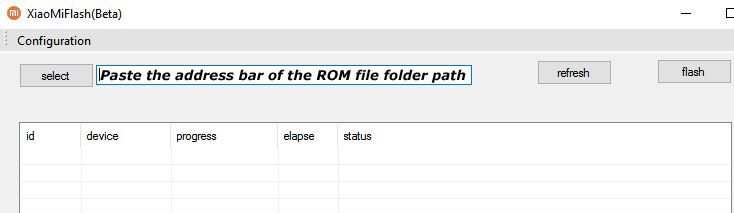
Mi Flash

7) First, click on the ‘Refresh‘ button (It will automatically recognize your device) and then click on the ‘Flash‘ button to flash MIUI 12 ROM on your Devices.
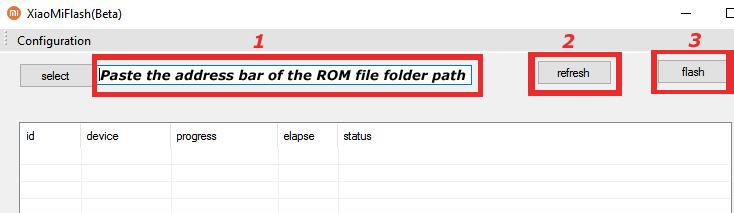
Mi Flash

8) Wait for some time to complete the process.

9) Done. Your device will boot on the latest version.

Wrapping Up:

Download MIUI 12.5.8.0 Global Stable ROM for Redmi Note 10 Pro and flash it to update it manually. Comment below if you have any doubts.

Have any questions? Do let us know that in the comments below. Stay connected with us via Facebook and Twitter to read more such helpful posts.

The latest MIUI 12.0.5.0 update for POCO M3 Pro starts rolling out via OTA. The update improves system stability and bring June security patch. Follow the below guide to Download MIUI 12.0.5.0 India Stable ROM for POCO M3 Pro.

MIUI 12.0.5.0 India Stable ROM for POCO M3 Pro is a stable version and can be flashed via Recovery or via Fastboot. You can download MIUI 12.0.5.0 for POCO M3 Pro from below.

You can Download POCO M3 Pro MIUI 12.0.5.0.RKSINXM ROM from below and also manually check for the update by going to Settings -> About Phone -> System updates -> Check for update. Download MIUI 12.0.5.0 Stable ROM for POCO M3 Pro from below.

Note:-

  • This Firmware file is only for POCO M3 Pro. Don’t try this on any other device.
  • Follow the steps correctly otherwise you may brick your device. We are not responsible for any damage to your phone.
  • It may erase your data, so it is advisable to take a complete backup of your phone for a safer side.
  • Ensure that your phone has at least 50-60% charged to prevent the accidental shutdown in-between the process.

Download MIUI 12.0.5.0 India Stable ROM for POCO M3 Pro

  • POCO M3 Pro MIUI 12.0.5.0 OTA update – Download
  • MIUI 12.0.5.0 Recovery ROM for POCO M3 Pro – Download
  • MIUI 12.0.5.0 Fastboot ROM for POCO M3 Pro – Coming Soon

How to Install MIUI 12.0.5.0 India Stable ROM on POCO M3 Pro –

To install MIUI 12.0.5.0 update for POCO M3 Pro download either Recovery ROM or Fastboot ROM from above and use the below method to install this on your device.

Method 1 – Recovery Mode

Recovery Mode

  1. Download Recovery ROM for POCO M3 Pro from above and save it on your device.
  2. Now launch the ‘Updater‘ app on your device.
  3. Click on the three-dot menu (‘…’ icon) at the top-right corner, and select the ‘choose update package‘.
  4. Browse through the files and select the package ending with .zip extension.
  5. Done. Your device will reboot on the latest version.

Method 2 – Fastboot Mode

1) First, Download Mi Flash Tool, extract it and install it on your PC.

2) Now download Fastboot ROM for POCO M3 Pro for your device.

3) Now boot your device into Fastboot mode by pressing the ‘Volume Down + Power‘ button.

4) Connect your device to the PC via a micro USB cable.

5) Now extract the Fastboot ROM and copy its path on the PC.

6) Now open MI Flash Tool and Paste the address bar of the ROM file folder path copied from above.

Mi Flash

7) First, click on the ‘Refresh‘ button (It will automatically recognize your device) and then click on the ‘Flash‘ button to flash MIUI 12 ROM on your Devices.

Mi Flash

8) Wait for some time to complete the process.

9) Done. Your device will boot on the latest version.

Wrapping Up:

Download MIUI 12.0.5.0 India Stable ROM for POCO M3 Pro and flash it to update it manually. Comment below if you have any doubts.

The latest OxygenOS 11.0.6.6 for OnePlus Nord CE starts rolling out. The new OxygenOS 11.0.6.6 update for OnePlus Nord CE brings optimized camera effects and updated security patches. Download OxygenOS 11.0.6.6 for OnePlus Nord CE from below.

The OxygenOS 11.0.6.6 for OnePlus Nord CE is rolling out via OTA (over-the-air) in a phase-wise manner and many users already getting the update. You can wait for the OTA updates, or you can Update manually with the below method.

The new OxygenOS 11.0.6.6 update for the OnePlus Nord CE 5G brings many changes (Check the complete changelogs from below). We provide you the OxygenOS 11.0.6.6 OTA file which you can flash on your device. So if you want to update your OnePlus to the latest version then Download OxygenOS 11.0.6.6 for the OnePlus Nord CE from below.

Changelogs –

  • System
    • Improved system performance
    • Updated Android security patch to 2021.07
    • Upgrade Google GMS to 2021.06
  • Camera
    • Optimized camera effects to take a better photo

Note:-

  • This method is only for the OnePlus Nord CE.
  • Full ROM can be flashed via TWRP as well.
  • Follow the steps correctly otherwise, you may brick your device. We Guidegeekz.com is not responsible for any damage to your phone.
  • Charge your device to 60- 70% to prevent it from accidental shutdown.
  • Take a complete backup of everything important.

Download OxygenOS 11.0.6.6 for OnePlus Nord CE

  • OxygenOS 11.0.6.6 OTA update for OnePlus Nord CE – Download
  • OxygenOS 11.0.6.6 Full ROM for OnePlus Nord CE – Download

How to Install OxygenOS 11.0.6.6 Update on OnePlus Nord CE

For Non-Rooted Users

Method 1

  1. First, enable the USB debugging option from the setting ->developer option. To enable Developer Options, go to About phone and tap the Build Number 7 times.
  2. Download ADB and Fastboot and install them on your PC.
  3. Download OxygenOS 11.0.6.6 OTA from above Copy ROM to a folder where adb installed.
  4. Now Turn Off your phone and boot into recovery mode.
  5. Choose Apply update from ADB
  6. Now Connect your phone to your Laptop/PC
  7. On ROM folder press shift+right click and click on the open command here.
  8. Now check your connection status by typing the below command
    adb devices
    if your device is listed, you’re ready to flash the ROM
  9. Now Install OxygenOS 11.0.6.6 OTA on the OnePlus Nord CE 5G by typing the below command
    adb sideload File-Name.zip 
  10. Now, wait until the process completes, and then Reboot the phone.
  11. Done!

Method 2

  1. Download OxygenOS 11.0.6.6 OTA zip file from above and save it on your internal phone memory.
  2. Now Switch off your device and boot into the Recovery mode.
  3. To boot the OnePlus Nord into recovery mode press and hold ‘Power + Volume Down’ button.
  4. Now your phone boot into the Stock recovery.
  5. Now Select ‘Apply Update’ and select ‘Choose from Internal Storage
  6. Browse the OTA zip file which you download and save on your phone before.
  7. Select the zip file, and it will Install OxygenOS 11.0.6.6 OTA update file on your device.
  8. Now wait until the process complete and then reboot your device.
  9. Done.

For Rooted Users

  1. First Unlock your device bootloader and Install TWRP on your Device. Skip this step if already installed TWRP.
  2. Reboot your device into Recovery mode and create a Nandroid backup (Recommended) of your device for the safer side, if anything goes wrong.
  3. Now wipe your cache files from Goto Wipe>Advanced Wipe>Select Wipe cache and Dalvik cache and swipe to confirm it.
  4. Now, Go to Install and locate the OOS 11.0.6.6 Full Rom Zip & swipe to Install the ROM file
  5. Now Flash the Magisk again to maintain the root (Optional).
  6. Wipe Dalvik & Cache again.
  7. Done! Reboot System and Enjoy.

Wrapping Up:

That’s all this is the complete guide to Download OxygenOS 11.0.6.6 for OnePlus Nord CE 5G (OTA + Full ROM). Have any questions? Do let us know that in the comments below. Stay connected with us via Facebook and Twitter to read more such helpful posts.

The latest OxygenOS 11.1.5.5 for OnePlus Nord starts rolling out. The new OxygenOS 11.1.5.5 update for OnePlus Nord brings the latest August 2021 security patches and a couple of Ambient Display features. Download OxygenOS 11.1.5.5 for OnePlus Nord from below.

The OxygenOS 11.1.5.5 for OnePlus Nord is rolling out via OTA (over-the-air) in a phase-wise manner and many users already getting the update. You can wait for the OTA updates, or you can Update OnePlus Nord to OxygenOS 11.1.5.5 manually with the below method.

The new OxygenOS 11.1.5.5 update for the OnePlus Nord brings many changes (Check the complete changelogs from below). We provide you the OxygenOS 11.1.5.5 OTA file which you can flash on your device. So if you want to update your OnePlus to the latest version then Download OxygenOS 11.1.5.5 for the OnePlus Nord from below. Check below what’s new in OxygenOS 11.1.5.5.

OxygenOS 11.1.5.5 Features and Changelogs –

  • System
    • Updated Android security patch to 2021.08
    • Improved system stability
  • Ambient Display
    • Newly added the screenshot feature for AOD
    • Newly added Bitmoji AOD, co-designed with Snapchat, which will liven up the ambient display with your personal Bitmoji avatar. Your avatar will update throughout the day based on your activity and things happening around you (Path: Settings – Customizations – Clock on ambient display – Bitmoji)

Note:-

  • This method is only for the OnePlus Nord.
  • Full ROM can be flashed via TWRP as well.
  • Follow the steps correctly otherwise, you may brick your device. We Guidegeekz.com is not responsible for any damage to your phone.
  • Charge your device to 60- 70% to prevent it from accidental shutdown.
  • Take a complete backup of everything important.

Download OxygenOS 11.1.5.5 for OnePlus Nord

  • OxygenOS 11.1.5.5 OTA update for OnePlus Nord – GlobalEUIndia
  • OxygenOS 11.1.5.5 Full ROM for OnePlus Nord – GlobalEUIndia

How to Install OxygenOS 11.1.5.5 Update on OnePlus Nord

For Non-Rooted Users

Method 1

  1. First, enable the USB debugging option from the setting ->developer option. To enable Developer Options, go to About phone and tap the Build Number 7 times.
  2. Download ADB and Fastboot and install them on your PC.
  3. Download OxygenOS 11.1.5.5 OTA from above Copy ROM to a folder where adb installed.
  4. Now Turn Off your phone and boot into the recovery mode.
  5. Choose Apply update from ADB
  6. Now Connect your phone to your Laptop/PC
  7. On ROM folder press shift+right click and click on the open command here.
  8. Now check your connection status by typing the below command
    adb devices
    if your device is listed, you’re ready to flash the ROM
  9. Now Install OxygenOS 11.1.5.5 OTA on the OnePlus Nord by typing the below command
    adb sideload File-Name.zip 
  10. Now, wait until the process completes, and then Reboot the phone.
  11. Done!

Method 2

  1. Download OxygenOS 11.1.5.5 OTA zip file from above and save it on your internal phone memory.
  2. Now Switch off your device and boot into the Recovery mode.
  3. To boot the OnePlus Nord into recovery mode press and hold ‘Power + Volume Down’ button.
  4. Now your phone boot into the Stock recovery.
  5. Now Select ‘Apply Update’ and select ‘Choose from Internal Storage
  6. Browse the OTA zip file which you download and save on your phone before.
  7. Select the zip file, and it will Install OxygenOS 11.1.5.5 OTA update file on your device.
  8. Now wait until the process complete and then reboot your device.
  9. Done.

For Rooted Users

  1. First Unlock your device bootloader and Install TWRP on your Device. Skip this step if already installed TWRP.
  2. Reboot your device into Recovery mode and create a Nandroid backup (Recommended) of your device for the safer side, if anything goes wrong.
  3. Now wipe your cache files from Goto Wipe>Advanced Wipe>Select Wipe cache and Dalvik cache and swipe to confirm it.
  4. Now, Go to Install and locate the OOS 11.1.5.5 Full Rom Zip & swipe to Install the ROM file
  5. Now Flash the Magisk again to maintain the root (Optional).
  6. Wipe Dalvik & Cache again.
  7. Done! Reboot System and Enjoy.

Wrapping Up:

That’s all this is the complete guide to Download OxygenOS 11.1.5.5 for OnePlus Nord (OTA + Full ROM). Have any questions? Do let us know that in the comments below. Stay connected with us via Facebook and Twitter to read more such helpful posts.

The latest Android 11 based MIUI 12.0.1.0 update for Poco M2 Pro starts rolling out via OTA. The update brings the August security patch to the device. Follow the below guide to Download MIUI 12.0.1.0 India Stable ROM for Poco M2 Pro.

MIUI 12.0.1.0 India Stable ROM for Poco M2 Pro is a stable version and can be flashed via Recovery or via Fastboot. You can download MIUI 12.0.1.0 for Poco M2 Pro from below.

You can Download Poco M2 Pro MIUI 12.0.1.0.RJPINXM ROM from below and also manually check for the update by going to Settings -> About Phone -> System updates -> Check for update. Download MIUI 12.0.1.0 Stable ROM for Poco M2 Pro from below.

Changelogs:

[System] 

  • Updated Android Security Patch to August 2021. Increased system security.
  • Stable MIUI based on Android 11

Note:-

  • This Firmware file is only for Poco M2 Pro. Don’t try this on any other device.
  • Follow the steps correctly otherwise you may brick your device. We are not responsible for any damage to your phone.
  • It may erase your data, so it is advisable to take a complete backup of your phone for a safer side.
  • Ensure that your phone has at least 50-60% charged to prevent the accidental shutdown in between the process.

Download MIUI 12.0.1.0 India Stable ROM for Poco M2 Pro

  • Poco M2 Pro MIUI 12.0.1.0 OTA update – Download
  • MIUI 12.0.1.0 Recovery ROM for Poco M2 Pro – Download (Mi Pilot Only)
  • MIUI 12.0.1.0 Fastboot ROM for Poco M2 Pro – Coming Soon

How to Install MIUI 12.0.1.0 India Stable ROM on Poco M2 Pro –

To install Android 11 update for Poco M2 Pro download either Recovery ROM or Fastboot ROM from above and use the below method to install this on your device.

Method 1 – Recovery Mode

Recovery Mode

  1. Download Android 11 ROM for Poco M2 Pro from above and save it on your device.
  2. Now launch the ‘Updater‘ app on your device.
  3. Click on the three-dot menu (‘…’ icon) at the top-right corner, and select the ‘choose update package‘.
  4. Browse through the files and select the package ending with .zip extension.
  5. Done. Your device will reboot on the latest version.

Method 2 – Fastboot Mode

1) First, Download Mi Flash Tool, extract it and install it on your PC.

2) Now download Android 11 Fastboot ROM for Poco M2 Pro for your device.

3) Now boot your device into Fastboot mode by pressing the ‘Volume Down + Power‘ button.

4) Connect your device to the PC via a micro USB cable.

5) Now extract the Fastboot ROM and copy its path on the PC.

6) Now open MI Flash Tool and Paste the address bar of the ROM file folder path copied from above.

Mi Flash

7) First, click on the ‘Refresh‘ button (It will automatically recognize your device) and then click on the ‘Flash‘ button to flash MIUI 12 ROM on your Devices.

Mi Flash

8) Wait for some time to complete the process.

9) Done. Your device will boot on the latest version.

Wrapping Up:

Download Android 11 based MIUI 12.0.1.0 India Stable ROM for Poco M2 Pro and flash it to update it manually. Comment below if you have any doubts.

The latest MIUI 12.0.9.0 update for Redmi 9C NFC starts rolling out via OTA. The update brings the August 2021 security patch. Follow the below guide to Download MIUI 12.0.9.0 Global Stable ROM for Redmi 9C NFC.

MIUI 12.0.9.0 Global Stable ROM for Redmi 9C NFC is a stable version and can be flashed via Recovery or via Fastboot. You can wait for the OTA or download MIUI 12.0.9.0 for Redmi 9C NFC from below.

You can Download Redmi 9C MIUI 12.0.9.0.QCSMIXM ROM from below and also manually check for the update by going to Settings -> About Phone -> System updates -> Check for update. Download MIUI 12.0.9.0 Stable ROM for Redmi 9C NFC from below.

Changelog

– [System]

  • Updated Android Security Patch to August 2021. Increased system security.

Note:-

  • This Firmware file is only for Redmi 9C NFC. Don’t try this on any other device.
  • Follow the steps correctly otherwise you may brick your device. We are not responsible for any damage to your phone.
  • It may erase your data, so it is advisable to take a complete backup of your phone for a safer side.
  • Ensure that your phone has at least 50-60% charged to prevent the accidental shutdown in-between the process.

Download MIUI 12.0.9.0 Global Stable ROM for Redmi 9C NFC

  • MIUI 12.0.9.0 OTA for Redmi 9C NFC – Download
  • MIUI 12.0.9.0 Recovery ROM for Redmi 9C NFC – Download
  • MIUI 12.0.9.0 Fastboot ROM for Redmi 9C NFC – Coming Soon

How to Install MIUI 12.0.9.0 Global Stable ROM on Redmi 9C NFC –

To install MIUI 12.0.9.0 update for Redmi 9C download either Recovery ROM or Fastboot ROM from above and use the below method to install this on your device.

Method 1 – Recovery Mode

Recovery Mode

  1. Download MIUI 12 Recovery ROM for Redmi 9C from above and save it on your device.
  2. Now launch the ‘Updater‘ app on your device.
  3. Click on the three-dot menu (‘…’ icon) at the top-right corner, and select the ‘choose update package‘.
  4. Browse through the files and select the package ending with .zip extension.
  5. Done. Your device will reboot on the latest version.

Method 2 – Fastboot Mode

1) First, Download Mi Flash Tool, extract it and install it on your PC.

2) Now download MIUI 12 Fastboot ROM for Redmi 9C for your device.

3) Now boot your device into Fastboot mode by pressing the ‘Volume Down + Power‘ button.

4) Connect your device to the PC via a micro USB cable.

5) Now extract the Fastboot ROM and copy its path on the PC.

6) Now open MI Flash Tool and Paste the address bar of the ROM file folder path copied from above.

Mi Flash

7) First, click on the ‘Refresh‘ button (It will automatically recognize your device) and then click on the ‘Flash‘ button to flash MIUI 12 ROM on your Devices.

Mi Flash

8) Wait for some time to complete the process.

9) Done. Your device will boot on the latest version.

Wrapping Up:

Download MIUI 12.0.9.0 Global Stable ROM for Redmi 9C and flash it to update it manually. Comment below if you have any doubts.

The latest MIUI 12.5 update for Mi 11 Lite starts rolling out via OTA. The update is based on Android 11 and brings lots of new features and improvements and an August security patch. Follow the below guide to Download MIUI 12.5.2.0 India Stable ROM for Mi 11 Lite.

MIUI 12.5.2.0 India Stable ROM for Mi 11 Lite is a stable version and can be flashed via Recovery or via Fastboot. You can wait for the OTA or download MIUI 12.5.2.0 for Mi 11 Lite from below.

You can Download Mi 11 Lite MIUI 12.5.2.0.RKQINXM ROM from below and also manually check for the update by going to Settings -> About Phone -> System updates -> Check for update. Download MIUI 12.5 ROM for Mi 11 Lite from below.

Changelog:

[System] 

  • New: Response to gestures is now instant.
  • New: With 20 times more rendering power, there are now few limits to what you can see on your screen.
  • New: With custom device model adjustments, any phone becomes faster after the upgrade.
  • Optimization: MIUI became lighter, faster, and more durable.
  • Updated Android Security Patch to August 2021. Increased system security.

[Notes]

  • New: Compose mind maps with complex structures.
  • New: New tools for doodling and sketching.
  • New: Press and hold a sketch to adjust the strokes automatically.
  • New: A gesture shortcut now allows you to create notes, tasks, and excerpts anywhere.
  • New: Excerpts save text, URLs, and images to Notes in a few simple taps.
  • New: Dynamic layouts bring the typography in Notes to a new level.
  • All-new Notes.

Note:-

  • This Firmware file is only for Mi 11 Lite. Don’t try this on any other device.
  • Follow the steps correctly otherwise you may brick your device. We are not responsible for any damage to your phone.
  • It may erase your data, so it is advisable to take a complete backup of your phone for a safer side.
  • Ensure that your phone has at least 50-60% charged to prevent the accidental shutdown in-between the process.

Download MIUI 12.5.2.0 India Stable ROM for Mi 11 Lite

  • MIUI 12.5.2.0 OTA for Mi 11 Lite – Download
  • MIUI 12.5.2.0 Recovery ROM for Mi 11 Lite – Download
  • MIUI 12.5.2.0 Fastboot ROM for Mi 11 Lite – Download

How to Install MIUI 12.5.2.0 India Stable ROM on Mi 11 Lite –

To install MIUI 12.5.2.0 update for Mi 11 Lite download either Recovery ROM or Fastboot ROM from above and use the below method to install this on your device.

Method 1 – Recovery Mode

Recovery Mode

  1. Download Android 11 ROM for Mi 11 Lite from above and save it on your device.
  2. Now launch the ‘Updater‘ app on your device.
  3. Click on the three-dot menu (‘…’ icon) at the top-right corner, and select the ‘choose update package‘.
  4. Browse through the files and select the package ending with .zip extension.
  5. Done. Your device will reboot on the latest version.

Method 2 – Fastboot Mode

1) First, Download Mi Flash Tool, extract it and install it on your PC.

2) Now download MIUI 12.5 ROM for Mi 11 Lite for your device.

3) Now boot your device into Fastboot mode by pressing the ‘Volume Down + Power‘ button.

4) Connect your device to the PC via a micro USB cable.

5) Now extract the Fastboot ROM and copy its path on the PC.

6) Now open MI Flash Tool and Paste the address bar of the ROM file folder path copied from above.

Mi Flash

7) First, click on the ‘Refresh‘ button (It will automatically recognize your device) and then click on the ‘Flash‘ button to flash MIUI 12 ROM on your Devices.

Mi Flash

8) Wait for some time to complete the process.

9) Done. Your device will boot on the latest version.

Wrapping Up:

Download MIUI 12.5.2.0 India Stable ROM for Mi 11 Lite and flash it to update it manually. Comment below if you have any doubts.

Have any questions? Do let us know that in the comments below. Stay connected with us via Facebook and Twitter to read more such helpful posts.

The latest Android 11 based MIUI 12.5.1.0 update for Redmi Note 10 starts rolling out via OTA. The update is based on Android 11 and brings lots of new features, improvements, and June 2021 Security patches. Follow the below guide to Download MIUI 12.5.1.0 India Stable ROM for Redmi Note 10.

MIUI 12.5.1.0 India Stable ROM for Redmi Note 10 is a stable version and can be flashed via Recovery or via Fastboot. You can download MIUI 12.5.1.0 for Redmi Note 10 from below.

You can Download Redmi Note 10 MIUI 12.5.1.0.RKGINXM ROM from below and also manually check for the update by going to Settings -> About Phone -> System updates -> Check for update. Download MIUI 12.5.1.0 Stable ROM for Redmi Note 10 from below.

Changelogs:

[System]

  • New: Response to gestures is now instant.
  • New: With 20 times more rendering power, there are now few limits to what you can see on your screen.
  • New: With custom device model adjustments, any phone becomes faster after the upgrade.
  • Optimization: MIUI became lighter, faster, and more durable.
  • Updated Android Security Patch to June 2021. Increased system security.

[Notes]

  • New: Compose mind maps with complex structures.
  • New: New tools for doodling and sketching.
  • New: Press and hold a sketch to adjust the strokes automatically.
  • New: A gesture shortcut now allows you to create notes, tasks, and excerpts anywhere.
  • New: Excerpts save text, URLs, and images to Notes in a few simple taps.
  • New: Dynamic layouts bring the typography in Notes to a new level.
  • All-new Notes.

Note:-

  • This Firmware file is only for Redmi Note 10. Don’t try this on any other device.
  • Follow the steps correctly otherwise you may brick your device. We are not responsible for any damage to your phone.
  • It may erase your data, so it is advisable to take a complete backup of your phone for a safer side.
  • Ensure that your phone has at least 50-60% charged to prevent the accidental shutdown in between the process.

Download MIUI 12.5.1.0 India Stable ROM for Redmi Note 10

  • MIUI 12.5.1.0 OTA update for Redmi Note 10 – Download
  • MIUI 12.5.1.0 Recovery ROM for Redmi Note 10 – Download
  • MIUI 12.5.1.0 Fastboot ROM for Redmi Note 10 – Coming Soon

How to Install MIUI 12.5.1.0 India Stable ROM on Redmi Note 10 –

To install MIUI 12.5.1.0 update for Redmi Note 10 download either Recovery ROM or Fastboot ROM from above and use the below method to install this on your device.

Method 1 – Recovery Mode

Recovery Mode

  1. Download MIUI 12.5 ROM for Redmi Note 10 from above and save it on your device.
  2. Now launch the ‘Updater‘ app on your device.
  3. Click on the three-dot menu (‘…’ icon) at the top-right corner, and select the ‘choose update package‘.
  4. Browse through the files and select the package ending with .zip extension.
  5. Done. Your device will reboot on the latest version.

Method 2 – Fastboot Mode

1) First, Download Mi Flash Tool, extract it and install it on your PC.

2) Now download Fastboot ROM for Redmi Note 10 for your device.

3) Now boot your device into Fastboot mode by pressing the ‘Volume Down + Power‘ button.

4) Connect your device to the PC via a micro USB cable.

5) Now extract the Fastboot ROM and copy its path on the PC.

6) Now open MI Flash Tool and Paste the address bar of the ROM file folder path copied from above.

Mi Flash

7) First, click on the ‘Refresh‘ button (It will automatically recognize your device) and then click on the ‘Flash‘ button to flash MIUI 12 ROM on your Devices.

Mi Flash

8) Wait for some time to complete the process.

9) Done. Your device will boot on the latest version.

Wrapping Up:

Download MIUI 12.5.1.0 India Stable ROM for Redmi Note 10 and flash it to update it manually. Comment below if you have any doubts.

The latest MIUI 12.5.4.0 update for Redmi 10 starts rolling out via OTA. The update is based on Android 11 and brings lots of new features and improvements. Follow the below guide to Download MIUI 12.5.4.0 Global Stable ROM for Redmi 10.

MIUI 12.5.4.0 Global Stable ROM for Redmi 10 is a stable version and can be flashed via Recovery or via Fastboot. You can wait for the OTA or download MIUI 12.5.4.0 for Redmi 10 from below.

You can Download Redmi 10 MIUI 12.5.4.0.RKUMIXM ROM from below and also manually check for the update by going to Settings -> About Phone -> System updates -> Check for update. Download MIUI 12.5.4.0 Stable ROM for Redmi 10 from below.

Note:-

  • This Firmware file is only for Redmi 10. Don’t try this on any other device.
  • Follow the steps correctly otherwise you may brick your device. We are not responsible for any damage to your phone.
  • It may erase your data, so it is advisable to take a complete backup of your phone for a safer side.
  • Ensure that your phone has at least 50-60% charged to prevent the accidental shutdown in-between the process.

Download MIUI 12.5.4.0 Global Stable ROM for Redmi 10

  • MIUI 12.5.4.0 OTA for Redmi 10 – Download
  • MIUI 12.5.4.0 Recovery ROM for Redmi 10 – Download
  • MIUI 12.5.4.0 Fastboot ROM for Redmi 10 – Download

How to Install MIUI 12.5.4.0 Global Stable ROM on Redmi 10 –

To install MIUI 12.5.4.0 update for Redmi 10 download either Recovery ROM or Fastboot ROM from above and use the below method to install this on your device.

Method 1 – Recovery Mode

Recovery Mode

  1. Download MIUI 12.5 Recovery ROM for Redmi 10 from above and save it on your device.
  2. Now launch the ‘Updater‘ app on your device.
  3. Click on the three-dot menu (‘…’ icon) at the top-right corner, and select the ‘choose update package‘.
  4. Browse through the files and select the package ending with .zip extension.
  5. Done. Your device will reboot on the latest version.

Method 2 – Fastboot Mode

1) First, Download Mi Flash Tool, extract it, and install it on your PC.

2) Now download MIUI 12.5 Fastboot ROM for Redmi 10 for your device.

3) Now boot your device into Fastboot mode by pressing the ‘Volume Down + Power‘ button.

4) Connect your device to the PC via a micro USB cable.

5) Now extract the Fastboot ROM and copy its path on the PC.

6) Now open MI Flash Tool and Paste the address bar of the ROM file folder path copied from above.

Mi Flash

7) First, click on the ‘Refresh‘ button (It will automatically recognize your device) and then click on the ‘Flash‘ button to flash MIUI 12 ROM on your Devices.

Mi Flash

8) Wait for some time to complete the process.

9) Done. Your device will boot on the latest version.

Wrapping Up:

Download MIUI 12.5.4.0 Global Stable ROM for Redmi 10 and flash it to update it manually. Comment below if you have any doubts.

Have any questions? Do let us know that in the comments below. Stay connected with us via Facebook and Twitter to read more such helpful posts.

The latest Android 11 based MIUI 12.5.1.0 update for Poco M2 starts rolling out via OTA. The update is based on Android 11 and brings lots of new features, improvements, and August 2021 Security patches. Follow the below guide to Download MIUI 12.5.1.0 India Stable ROM for Poco M2

MIUI 12.5.1.0 India Stable ROM for Poco M2 is a stable version and can be flashed via Recovery or via Fastboot. You can download MIUI 12.5.1.0 for Poco M2 from below.

You can Download Poco M2 MIUI 12.5.1.0.RJRINXM ROM from below and also manually check for the update by going to Settings -> About Phone -> System updates -> Check for update. Download MIUI 12.5.1.0 Stable ROM for Poco M2 from below.

Changelogs:

[System]

  • New: Response to gestures is now instant.
  • New: With 20 times more rendering power, there are now few limits to what you can see on your screen.
  • New: With custom device model adjustments, any phone becomes faster after the upgrade.
  • Optimization: MIUI became lighter, faster, and more durable.
  • Updated Android Security Patch to August 2021. Increased system security.
  • Stable MIUI based on Android 11

[Notes]

  • New: Compose mind maps with complex structures.
  • New: New tools for doodling and sketching.
  • New: Press and hold a sketch to adjust the strokes automatically.
  • New: A gesture shortcut now allows you to create notes, tasks, and excerpts anywhere.
  • New: Excerpts save text, URLs, and images to Notes in a few simple taps.
  • New: Dynamic layouts bring the typography in Notes to a new level.
  • All-new Notes.

Note:-

  • This Firmware file is only for Poco M2. Don’t try this on any other device.
  • Follow the steps correctly otherwise you may brick your device. We are not responsible for any damage to your phone.
  • It may erase your data, so it is advisable to take a complete backup of your phone for a safer side.
  • Ensure that your phone has at least 50-60% charged to prevent the accidental shutdown in between the process.

Download MIUI 12.5.1.0 India Stable ROM for Poco M2

  • MIUI 12.5.1.0 OTA update for Poco M2– Download
  • MIUI 12.5.1.0 Recovery ROM for Poco M2– Download (Mi Pilot Only)
  • MIUI 12.5.1.0 Fastboot ROM for Poco M2 – Coming Soon

How to Install MIUI 12.5.1.0 India Stable ROM on Poco M2 –

To install MIUI 12.5.1.0 update for Poco M2 download either Recovery ROM or Fastboot ROM from above and use the below method to install this on your device.

Method 1 – Recovery Mode

Recovery Mode

  1. Download MIUI 12.5 ROM for Poco M2 from above and save it on your device.
  2. Now launch the ‘Updater‘ app on your device.
  3. Click on the three-dot menu (‘…’ icon) at the top-right corner, and select the ‘choose update package‘.
  4. Browse through the files and select the package ending with .zip extension.
  5. Done. Your device will reboot on the latest version.

Method 2 – Fastboot Mode

1) First, Download Mi Flash Tool, extract it and install it on your PC.

2) Now download Fastboot ROM for Poco M2 for your device.

3) Now boot your device into Fastboot mode by pressing the ‘Volume Down + Power‘ button.

4) Connect your device to the PC via a micro USB cable.

5) Now extract the Fastboot ROM and copy its path on the PC.

6) Now open MI Flash Tool and Paste the address bar of the ROM file folder path copied from above.

Mi Flash

7) First, click on the ‘Refresh‘ button (It will automatically recognize your device) and then click on the ‘Flash‘ button to flash MIUI 12 ROM on your Devices.

Mi Flash

8) Wait for some time to complete the process.

9) Done. Your device will boot on the latest version.

Wrapping Up:

Download MIUI 12.5.1.0 India Stable ROM for Poco M2 and flash it to update it manually. Comment below if you have any doubts.