Author

Sumit Bahl

Browsing

Hi, community. When I read about IT outsourcing, I understand that this term means something very different in various countries in the world. 

At the same time, the most common reasons for problems with outsourcing will be insufficiently developed requirements, overestimated expectations and the lack of indicators and criteria by which the work of the outsourcer is assessed. These reasons account for 99% of complaints from all dissatisfied customers. In this article, I suggest you look at the criteria by which it is supposed to choose an AngularJS web application development company. But first, let’s find out why AngularJS is the best fit for your development.

AngularJS – best fit for web development in your company

There are dozens of programming languages ​​and frameworks that need attention from talented developers and newbies. It is difficult to choose which one to add to your toolbox. While you are weighing your options, take a few minutes to review Angular. This is a JavaScript framework from Google, which is designed for developing single page applications.

The lightweight, fast and affordable front-end framework AngularJS has won the respect of a huge number of developers. It enables you to build interactive and dynamic web applications that require much less effort and code.

So what’s so special about Angular?

Angular is a structural framework for dynamic web applications that allows you to use HTML as a template language and then extend the HTML syntax to express application components. With data binding and dependency injection, you can eliminate most of the code you would have to write.

Key facts about Angular:

  • The template language used is JavaScript.
  • Although JavaScript is the main language for AngularJS, applications can also be written using languages ​​such as Dart or TypeScript, which is used in the newest versions.
  • Angular is a product made by Google.
  • Angular focuses on developing single page applications, i.e. SPA solutions (Single Page Application). Popular social media apps (Twitter, Instagram and Facebook) can serve as examples.
  • Angular provides a client-side MVC framework that helps you to launch and to build dynamic applications with modern quality and new approaches.
  • Angular applications are cross-browser compatible. The framework automatically handles JavaScript code appropriate for each browser.
  • Clean and accurate user interface design.
  • Simple routing.
  • Angular’s framework makes it easy to extend HTML syntax and easily create reusable components from directives.

Overall, Angular is a framework for building large-scale, high-performance, and easy-to-maintain web applications.

Also, it’s worth noting that Angular offers server-side rendering, which speeds up loading of the start page and therefore improves SEO by making it easier to crawl dynamic pages. Fast page rendering dramatically improves the experience of next generation web applications written in Angular. Also, using this framework, you can:

  • Easy to test code
  • Easily create personalized Document Object Models (DOM).
  • Data modeling is limited to using small data models, making the code simple and easy to test.

Angular has been and remains one of the most popular client frameworks around. There is no doubt that Angular is different from other frameworks, and it takes more time and effort to delve into it.

What are the criteria that you should pay attention for when choosing AngularJS development company?

Customer satisfaction. Customers are willing to pay more if the service is of a high standard. If customers are not satisfied with the level of service, rest assured that they will start making their claims and may go to your competitors. A company should focus on customer satisfaction and demand the same from the outsourcer.

Certainty and measurability. The success of outsourcing depends not only on how well you have defined your requirements, but how well you can measure how they are being met. If you cannot clearly define what you need, how can an outsourcer meet (and even more so exceed) your expectations? You must set clear indicators.

Cost savings. Outsourcing is in most cases a financially attractive alternative to insourcing. If cost reduction is one of the key metrics, then you need to discuss this with the outsourcer. The easiest way to reduce costs is to replace the most experienced (and therefore expensive) specialists witha a bit cheaper labor, or distribute their responsibilities among other employees. But this leads to a decrease in the quality of service. End users may suffer if this issue is not discussed in advance.

Risk sharing. It is necessary for the outsourcer to share financial and other risks with you. If the outsorcerer’s services meet your requirements and exceed your expectations, pay him additional remuneration. But the opposite must also be foreseen. If the outsourcer provides services below the established level, this should face certain fines.

Timing and quality. It is necessary to very accurately and deliberately approach the issue of the expected delivery time and quality of services. It is not enough to indicate that all service requests will be honored within 8 hours of being contacted. For reliability, add a metric to track the number of repeat requests with the same problem. So you will be sure not only in terms of time, but also in the quality of services. This should be specified in the service level agreement.

Growth prospects. An outsourcer must match your growth prospects, so pay attention not only to its current capabilities, but also to its expandability. Just as you need time to grow, an outsourcer needs time to respond to your growing needs. It is unlikely that he has the resources that the outsourcer is ready to provide on demand. Partnering with an outsourcer assumes that he shares your strategy and goals (without compromising the company’s mission).

Stability and volatility. Successful outsourcing firms maintain stable and mature systems and applications, so legacy operations (which tend to change very little) are an excellent indicator of successful outsourcing. Variability refers to changing requirements, changes in functionality, and a dynamic customer base. Volatility leads to instability, which leads to problems that lead to downtime and additional costs, all of which lead to customer dissatisfaction. Think about what to outsource. The operations that are least subject to change are more manageable, both in terms of implementation and financing.

Competence and personnel. This is a strategic question. Decide which services and applications you intend to outsource are business critical and whether the intellectual property associated with them should be owned by the company. Based on your decision, you can select staff in accordance with the needs of the business.

Flexibility. Outsourcing is associated with additional formalities that slow down the work. Therefore, if the requirements of your business change frequently, it may be difficult for an outsourcer to quickly respond to them. Set a timeline for changes. This, among other things, will give the outsourcer the opportunity to effectively resolve recruitment issues. The sooner you address these issues, the better your chances of success.

To sum up, these were all the aspects that are crucial in the choice of the AngularJS development company. Hiring developers out there will be a good investment. Good luck!

If you thought the current crisis has very much swept the board clean regarding opportunities, you may need to think again. While physical retail and the high streets stores have taken a real hit, and any business that serviced events and holidaymakers have been decimated, there are still growth areas where demand for jobs still outstrips supply.

Medical Professionals

You won’t be surprised by the first of these, and that is in the healthcare and well-being industry. Apart from the very obvious current demand (a need that looks, unfortunately, to be ongoing) for frontline medical professionals, there is also a need for secondary and tertiary care.

The knock-on effects of modern life, accelerated by the current crisis have highlighted the need for counselors and physical therapists, addiction specialists, and a host of back-up services to frontline care. The rise in care work among an aging population could also be a new career for those displaced by the large number of retail outlet closures.

E-commerce Business

High street retail was already being supplanted by online retail. However, the current situation has accelerated that by 5 or even 10 years. The millions of products picked packed and shipped every day from the warehouses of the biggest online retailers have created a demand for workers in that industry.

The 24-hour operating schedules in these warehouses have led to round the clock employment opportunities at both full and part-time levels. However, these are typically lower-paid positions that are not that attractive to a large number of job seekers.

Cloud Platforms

Another industry that has a high demand is IT. While this not be news to you, the fact that within that ‘in-demand’ industry there is an even more ‘in-demand’ industry should be. Over the last five years, a large number of businesses (and the majority of start-ups) are choosing to augment or even replace their physical IT resources with cloud-based alternatives.

This new technology brings versatility to a lot of new and existing businesses but also creates many roles working within the various alternative cloud platforms. All of the large software companies have their versions, but the biggest and most popular is Amazon’s AWS cloud platform.

As you would expect, the growth in the use of cloud platforms and AWS, in particular, has created the kind of skills gap that can be useful to those displaced by the current crisis or looking to move into a better paying career. The first step is to complete some sort of certification, such as an AWS cloud practitioner, before choosing your specialty such as development, security, or architecture.

Various Career Paths

The large variety of services offered by a platform like AWS creates a host of different career paths, and with those services being added to regularly, the opportunities are increasing on a day-by-day basis. A large number of these roles can be performed remotely so the chances of your career being stalled by the continuation, or re-occurrence of the present crisis is minimal.

For more and more businesses, video marketing has become a cornerstone of their advertising efforts. Known to appeal to online users, video is a clear visual testament of what your firm can do, and what benefits potential customers can take from it.

One of the biggest advantages of animated video is that you can mix humor, facts, animation, fiction, and role playing as tools to draw out the value that your firm can offer. You can create a series of short clips as opposed to one long video, and these can be used to capture peoples’ attention over a longer period of time.

You can bring your team to life, and let people know more about who they would be working with if they decided to work with your firm. Most importantly of all, animated videos enable you to put the potential buyer in the shoes of a customer and realize the benefits of working with your firm. This can be achieved with product demonstrations, or short video clips of how your services work.

How to get started with animated video

If you have decided to go ahead and produce some video content, then congratulations, you have made a big decision in the evolution of your company. But having done so, there are some things to take into account as you begin formulating your plan and taking it to the next level.

For your first step into video, it is unwise to attempt the project yourself. In the same way that you would not try to make a car for yourself, if you have no experience of video it is unwise to try to make a DIY one. After all, your video will be reflecting your brand, so compromising on quality is not the best choice.

Choosing to use an animated videos production company is a wise decision, and it need not cost you the earth. Hiring the right type of video production firm will be a massive benefit to your brand, and can immediately help you to punch above your weight with your marketing.

Using animated video effectively to portray your brand values

Animated video enables you to portray your business in exactly the way you believe it should be positioned. Whether you choose to focus on telling a story, putting yourself in your customers’ shoes, or making your video memorable with insight or humor, animated video gives you all kinds of options.

It is also an ideal opportunity to demonstrate to your potential customers that you know and understand the challenges they are facing, and how you can alleviate them.

Video is also an extremely effective way of targeting only the people who you believe you have the best opportunity to sell to. You can target your video on social media platforms such as YouTube, Facebook and LinkedIn. This enables you to apply sophisticated targeting that ensures that you get the most bang for your buck, and gets the right eyes on your content. Having a clear call to action at the end of your video can also work wonders for your conversions.

Background music is such a crucial part of any multimedia content. It makes your video more creative without dragging things out or adding to the runtime. Finding quality background music for video can be a huge challenge. Most of the music tracks you find online are not copyright-free.

If you use music without the permission of the owner, you might face copyright issues. And obtaining the license to use copyrighted music can be time-consuming and expensive. If you don’t want that Google takes down your video then either you give credit to their music in the video description or the end slate or get royalty free music for video.

What is Royalty-Free Music?

There are two types of music you found on the internet, free music for YouTube videos and royalty-free music. With free music, you can download the music for free, but it’s not necessarily free to use. You might face copyright issues.

Royalty-free music doesn’t mean that the music is free. You have to spend a one-time licensing fee, and you can use the music for free in a video whenever you want to. There are lots of websites out there that offer different categories of songs, licensing options, and music experience. A company like HookSounds an easier, faster, and cheaper way to get access to songs that you can use in your videos.

How to Get Royalty Free Music For Video

The HookSounds site is filled with hundreds of royalty-free tracks that can be used by anyone for any purpose. It is a simple site with an easy interface, a great selection of music, and a useful search function. Users can browse the catalog by artists, tags, moods, and more, which makes the navigation easy and smooth.

Features of HookSounds :

  • Easy to use UI: The design of this music site is very user-friendly. You can browse the catalog by music, artists, tags, moods, and more. You can click the play button to listen to music for a while and also you can download the music direct from the homepage. Also, each music track has a clear and detailed description of the usage.Get Royalty Free Music for Video
  • No Copyright Claim: With HookSounds, you won’t face copyright issues. The service owns the copyright to all its tracks. You get a lifetime license for downloaded music, and if you come across any issue, they will handle it directly for you, without the need for any other party involved.
  • Exclusive Music: HookSounds offers music that you can use for whatever purpose you need. All the HookSounds music is exclusive, and you won’t find them anywhere else on the internet other than on the HookSounds website. Get Royalty Free Music for Video
  • Access the Full Library: If you get the subscription from HookSounds, you get access to the entire library with unlimited downloads. You can download as many tracks as you want.
  • Sound Effects: HookSounds also start offering sound effects in addition to music. This is part of its existing service so that any existing subscriber will have access to them as part of their existing plan.Get Royalty Free Music for Video
  • Pricing: HookSounds offers a variety of price plans depending on what you need. You can choose either individual licenses for one-off products, so you don’t need to pay for more than you need or for commercial purposes. You can choose from Premium, Business, or Enterprise and a monthly subscription start from $29/month.Get Royalty Free Music for Video

Wrapping Up:

If you want to get royalty-free music for a video project, HookSounds is one of the best options. Just sign up for the website, there is an entire list of royalty-free background music for videos waiting for you to discover.

Have any questions? Do let us know that in the comments below. Stay connected with us via Facebook and Twitter to read more such helpful posts.

As per the notification from the ministry of road transport and highways, HSRP was made mandatory from 1 October 2020. A fine of 5000 to 10000 INR will be charged in case of violation. This rule has been following by all the states and made number plate registration mandatory. The HSRPs are designed to be intuitive, informative with the objective to identify the stolen and vehicles with duplicate number plates easily. Any new or old vehicle owner can Get High Security Number Plate Online through the official website at bookmyhsrp.com.

The High-Security registration plate (HSRP) has chip-embedded number plates that store the ownership details of a vehicle along with its engine and chassis numbers in a national database. HSRP Online application at Book MY HSRP Portal is very easy and can be completed by anyone.

There is an online process to fill the registration form to get HSRP and select the schedule to fix it as per your convenience. Remember the days of new challan rates in case of not having pollution certificates, remember the crowd at pollution certificate issuer shops, I think you got my point. Don’t be late and hurry up. If you are applying now then you will get a date after 1 week. Check the below steps to get High Security Registration Plates for Vehicles online.

How to Get High Security Number Plate Online

Apply for a high-security registration plate is easy now. All you have to visit the official website, select your vehicle, and few additional details like Vehicle Number, Engine Number, Chassis Number, Owner Name, Address, Mobile Number, Vehicle Class, Vehicle Type, Fuel type, etc. Check How to Get High Security Number Plate Online from below.

1) Documents needed before starting the registration process

Before starting the registration process, you need the RC of your vehicle, a working internet connection, and your debit card, UPI, or net banking password for the online transactions. In case you have not linked your mobile number with your RC then do it from the Parivahan website.

You might face an error in the case of an unlinked mobile number (mainly for second-hand vehicles). If you are living in Delhi _NCR and not receiving online challan messages, then you must link your mobile number with RC. You might have a pile of online challans on your vehicle.

2)  Visit the official website and fill in basic details

  • Firstly you have to visit the official Book My HSRP portal to apply for HSRP online.
  • Click on the link, choose the yellow box “High security registration plate with color sticker”.
  • Select your vehicle type from a two-wheeler, three-wheeler, four-wheeler, heavy motor vehicle, or commercial vehicle.
  • Now select the make of your vehicle by using the search option or you can scroll the options.

3) Choose your State

Now select the name of the State as either Uttar Pradesh or Delhi. If you own a vehicle of Delhi registered number and living in UP, then choose UP not Delhi otherwise you will feel the pain of traveling to Delhi to get your work done and vice versa for UP residence. Delhi users opt for home delivery also.

4) Fill in additional details

  • Once you choose your state, you need to choose from the Private Vehicle or Commercial Vehicle.
  • Now Select the fuel type from Petrol, Diesel, Electric vehicle, CNG, or CNG+ Petrol from the given options.

5) Fill booking details for HSRP 

Now you have to fill in the Vehicle Information. Here your RC will come in use, Enter the Registration Number, Registration Date, Chassis Number, Engine Number, Email ID, Mobile Number, and the Vehicle Number using your RC.

Remember you need to fill only the last five digits (including any special character) in the chassis number and engine number. Fill in the contact information with the correct mobile number as further communications will be done on this number.

booking details for HSRP 

6) Selecting Delivery, Dealer information, and appointment slot for HSRP

  • If you want home delivery of HSRP then check here. If your pin code is on the list then home delivery is possible, otherwise, you have to take a dealer appointment.
  • Select the nearest location or dealer. Dealers have authorized service centers of different vehicle manufactures.
  • After selecting the dealer, you can select the appointment slot. Slots are of 2 hours time interval and availability is subject to conditions.

7) Make Payment

Finally, you are all set to make payment through online mode. Currently, the COD option is not available so you have to pay using UPI, Debit card, net banking, and wallets. After the payment, your order will be confirmed through the mail and phone number and you will receive a receipt of the same.

How to Track your HRSP order

The applicants can also check the status of their appointment booking or track your HRSP order from the official bookmyhsrp website.

Track your HRSP order

  • To check the status of HSRP Registration visit bookmyhsrp tracking page.
  • Now enter the Order Number, Vehicle Registration Number, Captcha Code.
  • Click on the Search button to display the status of your HSRP order.

How to Reschedule Appointment or Cancel your HRSP order

Applicants can also reschedule appointments or cancel the booking online.

  • To reschedule the HRSP appointment, visit bookmyhsrp reschedule appointment page.
  • Now enter the Order Number, Vehicle Registration Number, Captcha Code, and click on the search button.Reschedule Appointment
  • To cancel your HRSP order, visit the bookmyhsrp order cancellation page.
  • Now enter the Order Number, Vehicle Registration Number, Captcha Code, and click on the search button.Cancel your HRSP order

How to Check High Security Number Plate is Original or not

Fake HSRP plates are being sold indiscriminately in the market. If you fraudulently got a fake number plate, you may have to pay a heavy fine. But you can check whether the high-security number plate in your vehicle is real or fake by yourself.

The original HSRP plate has information on vehicle engine number, chassis number, etc. Also, these plates are made of aluminum and have a chrome-based hologram of the Ashok Chakra in the size of 20 mm x 20 mm. The plate has a hologram that contains CHAKRA in blue color and a 10 digit pin inscribed, which is made through a laser.

To check High Security Number Plate is Original or not, you need to check if it has the hologram Ashok Chakra, blue ‘IND’, inscribed ‘INDIA’. After that, check for other characteristics to be sure. You can check this document for more details.Check High Security Number Plate is Original or not

Wrapping Up:

Here we share the detailed guideline on how to get High Security Number Plate online in India. If you violate the rules and drive with an old number plate then a fine of 5000 to 10000 INR will be charged. So better to spend 696 INR now and enjoy your life.

Have any questions? Do let us know that in the comments below. Stay connected with us via Facebook and Twitter to read more such helpful posts.

Cameras in today’s Android phones have improved a lot. It allows you to capture some fantastic pictures and allows you to efficiently unlock new learning with the help of Augmented reality (AR) apps. However, the stock camera app won’t be sufficient to explore the full capabilities of your phone’s camera; that’s why we share the 7 Best Camera Apps for Fun and Educational Purpose.

There are tons of third-party camera apps available on the play store. Out of those, we researched to find out some unique applications. These secret tips, tricks, and hack of camera phones can make your phone experience more interesting and solve many day-to-day problems. If you are looking for something interesting and new, check these 7 Best Camera Apps and hacks.

7 Best Camera Apps for Fun and Educational Purpose

There are multiple apps available out there that make photography a lot more fun using some fun Android camera apps. So, here are the 7 Best Camera Apps for Fun and Educational Purpose in 2020 that will drastically change the way you use your camera.

1) HD Zoom Camera

HD Zoom Camera 

Is photography your first love? Don’t have the budget to buy a DSLR or an expensive phone? Then Professional Ultra Full HD DSLR Camera and video application are prepared for you. This will be the best and most excellent application on your mobile phone. With the newest shape and impeccable design, you are indispensable. You will feel like you are using an HD camera. You will feel like you are using a camera app with a zoom camera.

Zoom camera can give you the best zooming experience, support the best zooming quality, and a mind-blowing camera with HDR effects.

It is completely free, works without the internet. It has unique filters and effects for your photos; immerse your beautiful memories with a stunning camera.

[su_button url=”https://play.google.com/store/apps/details?id=com.appbreakers.hdcamera” target=”blank” style=”soft” background=”#dc5e49″ size=”7″ center=”yes” rel=”nofollow”]Download HD Zoom Camera[/su_button]

2) AR ruler App – tape Measure and camera to plan

Are you going to buy a cover for AC or need the size of Bed before purchasing a mattress or need to check the size of online orders received at home or length in three-dimension need to be taken before buying furniture

This application is a one-stop solution for all your problems. You neither need a measurement tape nor another helping hand. Alone you can do it all just by using your phone camera. This app allows to tape measure linear sizes in cm,m, mm, inches, feet, and yard. 2D measurement is free on this app, for 3D measurement, you need to pay.

AR ruler App features –

  • Distance meter – To measure the distance from the camera to a fixed point on a 3D plane.
  • Angle – Help you to measure corners on 3D planes.
  • Area and perimeter – Helps you to measure the perimeter and area of the room.
  • Path – It allows us to calculate the length of the path and more.

[su_button url=”https://play.google.com/store/apps/details?id=com.grymala.aruler” target=”blank” style=”soft” background=”#dc5e49″ size=”7″ center=”yes” rel=”nofollow”]Download AR ruler App[/su_button]

3) LeafSnap -Plant identification 

When it comes to capturing some beautiful pictures, most of us headed towards gardens to capture beautiful-looking colorful flowers. But sometimes, our curiosity doesn’t let us die after capturing a beautiful but unknown flower.

Why should struggle hard after discovering a beautiful wildflower or unusual looking shrub? Instead of wasting your time trawling through websites or asking your Gardner friends, take a snap, and this app will work for you for the rest.

This app can currently recognize 90 % of all known species of plants and trees. This will cover all the species you will encounter while traveling on earth. This app comes with advanced artificial intelligence, which can instantly identify thousands of plants, flowers, fruits, and trees. This app can be enjoyed free as well as in premium mode.

[su_button url=”https://play.google.com/store/apps/details?id=plant.identification.snap” target=”blank” style=”soft” background=”#dc5e49″ size=”7″ center=”yes” rel=”nofollow”]Download LeafSnap App[/su_button]

4) Text Scanner – Extract text from images 

This application is simple to use. You don’t need to manually copy text from an image, screenshots, documents on the internet, any ebook or PDF files. This app will do this work for you in just a tap. Just turn your android phone into a Text scanner. Scan /extract text from images /photos /pictures by using the phone’s camera and edit, copy/paste required text to destination.

This app comes with the most advanced OCR technology and detects the language automatically. It supports more than 100 languages. You can easily share scanned text with other apps. This app, too, comes with a free and paid version. The free version comes with in-app advertisements and some restricted features.

[su_button url=”https://play.google.com/store/apps/details?id=image.to.text.ocr” target=”blank” style=”soft” background=”#dc5e49″ size=”7″ center=”yes” rel=”nofollow”]Download Text Scanner App[/su_button]

5) FxGuru : movie FX Director 

FxGuru

Have a camera phone but shoot boring videos! Are you not a fan of Hollywood movies? Did you ever try to shoot a video with VFX effects just like Transformers or Avengers? If the answer is “Yes,” then this app is made for you.

Download this app for great special effects for mobile video. Add the fun and excitement of big-budget Hollywood horror, sci-fi, and action movie special effects to any video. This app offers groundbreaking features for you to impress, scare, or even prank your friends.

You can unleash your creativity with more prolonged effects and cinematic filters for more drama and suspense. Direct like a pro by using MotionMatch technology and virtual decals to add realistic movement while filming.

It has many free and paid effects available like Ghosts, zombies, werewolves, UFOs, Aliens, Dragons, earthquakes, floods, animals, vehicles, and Holidays. You can use the free version as developers provide the free effect of the day. So try a randomly selected effect for free every day.

[su_button url=”https://play.google.com/store/apps/details?id=com.picadelic.fxguru” target=”blank” style=”soft” background=”#dc5e49″ size=”7″ center=”yes” rel=”nofollow”]Download FxGuru App[/su_button]

6) Photomath 

Photomath

This is a must-use app for a student. Scan a math equation using your phone camera and find a step by step solution using the Photomath app. It’s free and works without the internet. So, you can read by turning off data, all social media notifications and still can take the help of the Photomath app to solve your math problems with step by step explanation.

This app covered you from basic arithmetic to advanced calculus and geometry.

Key Features 

  1. Word problem explanations
  2. No internet or data required for equation-based problems
  3. Free to use 
  4. Step by step explanations for every solution
  5. Exclusive how-to animations 
  6. Scroll through multiple solving methods per problem 
  7. Multi-functional scientific calculator
  8. Interactive graphs 

[su_button url=”https://play.google.com/store/apps/details?id=com.microblink.photomath” target=”blank” style=”soft” background=”#dc5e49″ size=”7″ center=”yes” rel=”nofollow”]Download Photomath App[/su_button]

7) Reverse Movie FX 

Reverse Movie FX 

Are you impressed by magic tricks videos in which it seems that time turned back in the opposite direction? If It always remained a secret for you to know how they shoot these videos? How can they shoot events in reverse frames? Then, this app is for you. Reverse Movie FX is an application where you can create a reverse video that seems like a magic trick.

You need to record a video of someone in action like walking, talking, drinking juice, or some other idea that comes to your creative mind. You need to the fragment of the video, which you need to reverse. This app will reverse that fragment, and you will see your friends spitting the juice out, people walking backward!

You can add music ,keep reversed+original( loop) ,original + reversed (loop) . Give it a try; you will be amazed!

[su_button url=”https://play.google.com/store/apps/details?id=com.mobile.bizo.reverse” target=”blank” style=”soft” background=”#dc5e49″ size=”7″ center=”yes” rel=”nofollow”]Download Reverse Movie FX App[/su_button]

Wrapping Up:

If you are looking for unique app ideas or looking for something interesting to do with your phone’s camera then you should try these 7 Best Camera Apps for Fun and Educational.

Have any questions? Do let us know that in the comments below. Stay connected with us via Facebook and Twitter to read more such helpful posts.

Are you searching for discounts on online deals for buying a SAMSUNG phone? Have you gone through all major online sites like Amazon, Flipkart, Sanpdeal, and more? Did you compared prices and found the best deal?

Wait …!!!!

We have something for you based on our research.

Remember,

MONEY SAVED IS MONEY EARNED.

As soon as a SAMSUNG phone dispatched from the manufacturing site, each hand starts sharing the profit, and the price of the phone starts increasing. When the phone reached the last customer means you, you pay a share of each profit.

So, why don’t buy directly from SAMSUNG?

Cut the profit of each hand.

Download the SAMSUNG Shop App from the play store

[su_button url=”https://play.google.com/store/apps/details?id=com.samsung.ecomm.global.in&hl=en_IN” target=”blank” style=”soft” background=”#dc5e49″ size=”7″ center=”yes” rel=”nofollow”]Download Samsung Shop app[/su_button]

We picked Samsung Galaxy M31s (6 GB RAM,128 GB storage ) as an example to show the savings which you can make by following the step to step guide.

First, let us see the price on different online site :

  1. SAMSUNG Galaxy M31s price on Amazon :
  2. SAMSUNG Galaxy M31s price on Flipkart :
  3. SAMSUNG Galaxy M31s price on SAMSUNG Shop :

Price is the same on Amazon and SAMSUNG shop and Saving is INR 3500 on both.

You can avail of credit/debit card discounts, wallet offers on Amazon. But you need to wait for these deals, as these are available during sales or big billion days.

But SAMSUNG Shop is full of offers for first-time customers and offers on different banks’ credit and debit cards.

Let’s see how to avail them.

STEP BY STEP GUIDE TO AVAIL ADDITIONAL DISCOUNTS:

1. Download the SAMSUNG SHOP application from the play store and create a login using your mobile number.

2. You will get discount coupons for different items sold by SAMSUNG Shop. Copy code for Mobile phones coupons. Discount is different for the different price ranges.

INR 700 off on SAMSUNG Galaxy M31s .

3. Use an SBI credit card to avail of a flat 10 % discount on the remaining price. Other offers are also available on PAYTM, AIRTEL WALLET, OlaMoney, Mobikwik.

SBI discount will be INR 1880.

Collectively you saved INR 2580 after INR 3500 off on MRP amounting to INR 6080 in total.

4. You can exchange your old phone while buying the new phone. This process will seamlessly be co-ordinated by Cashify with auto-generated orders.

5. No cost EMI options too available like other online apps.

Apart from this, you will get :

1. 50 % off on Samsung Care+ Accidental and Liquid Damage.

2. You can refer your friend after your first purchase. They will get an extra 5% off.

3. You can buy other items on Samsung Shop too, using the same steps which will cost you less than anywhere else.

Wrapping Up:

We strive to help our readers find the best deals on all Samsung devices. The prices, details, and availability of the products and deals in this post may be subject to change at anytime. Be sure to check that they are still in effect before making a purchase.

Image search or recognition, also known as computer vision, allows the application to use a specific learning algorithm to understand a picture or video. In this scenario, the image is data because these incorporate algorithms that perform the required task to generate the results for matching the query.

Another use for the reverse image search is in the medical field. Artificial intelligence is using image recognition to observe and decipher x-ray diagnosis based solely on the image. Some other aspects, such as the introduction of pictures, including image restoration, object recognition, and reconstruction of the scene, are also a part.

Use Online Image Search Tools

Reverse Image Search helps you quickly find the same visual images all over the web. Upload photos from your desktop into Google photos, and it will show related pictures used on other sites along with different sizes of the same image instantly.

Journalists can use the option of a reverse photo to find the image source or know the approximate date when the idea took place on the Internet. Photographers can use the “search by image” feature to learn about other sites that use their pictures without permission. In short, it is useful for many internet users.

  • Reverse Image Search

Do you want to find pictures on the Internet? Reverse image search makes it superfast and easy to search for images for personal use or work. Upload a photo or enter the link of an image, or select a picture from Dropbox or Google Images.

Every image that you upload on the image search tool is 100% safe and secure. They do not share or sell your photos and also do not store your content in their database. So you can be sure that your information is in safe hands.

With their web crawling expertise of the developers, this web-based app can target specific websites. This online utility provides exceptional services to browse for automotive, e-commerce, real estate, consumer goods, and pharmaceutical things, and much more.

  • TinEye

TinEye offers several computer vision, image recognition, and image search API inverted and solutions to assist you and make your images searchable. They help you solve your image search; they scale enterprises, small businesses, or startups.

Use TinEye reverse image search in your mobile to meet your image verification and compliance needs. Check whether the image is a stock photo, verifying user-generated content, or find out if your image appears online.

Keep track of where your company’s image appears online. Let your users take photos from the label and immediately match your collection’s reference image, including vintage and various identifications for wine and other products. Also, work with beer and label spirits.

  • Bing Image Search

Bing and Google are the main search engines with huge repositories when it comes to finding photo and reverse image search is no different. Meanwhile, Google’s interface can appear bland for some people; the Bing interface is rich and colorful. Image search may be one thing that Bing is better than Google. It is considered by hundreds of online users.

By using AI of the reverse image search in the form of a neural network, it can process many pixels of the image. The more pictures are fed into the system so that it can learn to identify similar objects. The only drawback to the Bing image search is that you cannot search an image with sound.

Like Google, the search can filter photos by color, type, layout, image size, and – crucial for anyone looking for Creative Commons licensed images – license. Unlike Google, Bing filter options available on the search results page, so you do not have to navigate away from the page.

  • Yandex image search

Yandex, which is similar to Google, is a gold mine for a reverse image search. The tool provides an additional measure of the same visual appearance and many the results in which the same image displays on the page. Yandex tends to be the most robust search engine for matching faces and identifying locations.

If you have a photo of a clear Riverbend place in Europe, it’s most likely where you will find some of the results. This advanced image search tool must identify extensive image data that must be analyzed and exploited to protect their image and marketing, especially for brands. If the brand refuses to adapt, they can skip this valuable new data pool opportunity offered.

Conclusion

These tools can help businesses boost brand awareness or create new possibilities and business models in the market and support the company to classify and understand the image’s relevant information that can turn into profits for your company.

Hence the introduction of the image is a steering wheel to navigate through a sea of ​​unlimited data. In short, users have their reverse image search tools that they can implement in various industries, for in-depth tailored to the customers’ specific needs.

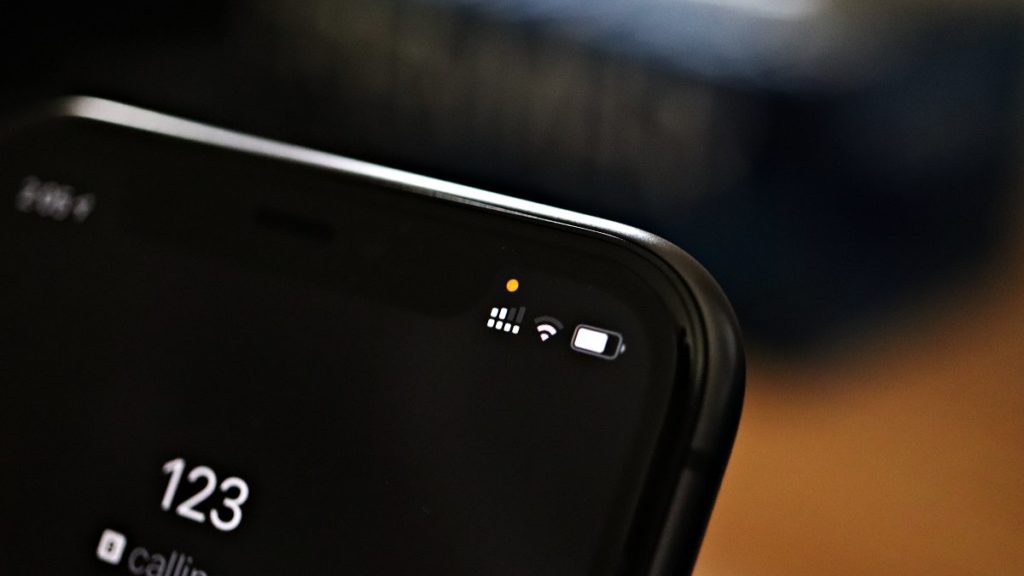
Recent iOS14 update brings several new features including the new privacy features. The update new indicators in the status bar that shows an app has access to your camera or microphone. A green dot indicates an app is accessing your camera while an orange dot tells you when an app is currently accessing your microphone. These dots are actually informational indicators that help protect your privacy. Currently, this feature is available only on iPhone’s but luckily there is a way to Get iOS 14 Privacy Indicator Dots on Android Phones.

You can get iOS 14’s camera and microphone indicator on Android Phones via a third-party app called Access Dots. This app adds the same iOS 14 style indicators to the top right corner of your screen whenever any third-party app uses your phone’s camera or microphone. Like iOS, an orange indicator signifies mic access, and green is for the camera. The app also brings the feature to change the dot color or size. Check Access Dots features from below.

Access Dots Features

  • Display Access Dots whenever the phone’s camera/microphone is engaged by a third-party App.
  • Maintain an Access Log, which can be accessed from the App’s main settings screen. The Access Log shows when the camera/microphone was accessed, which App was in the foreground at the time of access initiation and how long did the access last.
  • Assign any color to either of the Access Dots.
  • On Android 10+, Access Dots by default sticks beside your camera cutout (if your device has.) You can configure the location of Access Dots to the point of specifying X/Y coordinates.
  • The size of the Access Dots can be adjusted.

How to Get iOS 14 Privacy Indicator Dots on Android Phones

To get iOS 14’s visual camera and microphone indicator to Android phones running Android 7 and later, you need to download and install an app Access Dots. Once installed on your device, you can easily configure the app to show orange and green dots on your device. Check the below steps to Get iOS 14 Privacy Indicator Dots on Android Phones.

  1. Download and Install Access Dots on your device.
  2. Once installed, open the app and switch on the toggle.
  3. It will ask you to enable Access Dots in the Accessibility menu, enable it.
  4. By default, the App is configured to show iOS 14 style colored access dots which is green for camera and orange for microphone access.
  5. You can go to app settings to configure dots color and size.

Wrapping Up:

If you want to get the iOS14 privacy indicator on Android phone then Access Dots is the app for you. It warns you when any app accesses your phone’s camera and microphone. Access Dots can keep a log of when apps use the camera and mic.

Have any questions? Do let us know that in the comments below. Stay connected with us via Facebook and Twitter to read more such helpful posts.

Adding emergency information on the Android lock screen could be a lifesaver for many people. The emergency info will be very helpful in cases of an accident, if someone finds you unconscious or if you are unable to speak for any reason. If you add emergency information on Android lock screen, then in case of such emergency first responder, a helpful stranger, or a cop could view your emergency information and call directly from the lock screen.

Most of the Android devices have an option to add emergency contact info from the phone’s settings or in the contacts app. You can add a link to personal emergency info to your Android phone lock screen, like your blood type, allergies, medical condition, or emergency phone number. Follow the below guide to Add Emergency Information on Android Lock Screen.

How to Add Emergency Information on Android Lock Screen

Many Android devices have an option to add emergency contact information option in the About phone of phone’s setting. However, different brand has different locations. Here we share all ways to add and show emergency information on Android lock screen.

1) Show Emergency Info on Android Phones (Oneplus, Pixel, Motorola, etc.)

In most cases, this method will work. If you have any device, first try this setting and set up your emergency information. Check the below steps to add emergency info on Pixel or Stock (and custom ROMs) Android Phones.

  1. Open your phone’s Settings.
  2. Tap About phone and open Emergency information (In some cases, you can find this option here: settings -> Users and Accounts -> Emergency Information).
  3. Now edit your medical information and add emergency contacts.
  4. You can also add your name, address, blood type, allergies, medications, medical notes, and contacts.
  5. To clear or remove the emergency information, tap on the three-dot menu on the top right, and tap Clear all.

2) Add emergency contact info on Samsung Device

Setting up emergency details on Samsung devices is quite easy. Samsung users can find the option in the Phone app. In the Contacts tab, you’ll find the emergency section where you can enter your medical conditions, blood group, or allergies.

  1. Open the Contacts app on your device.
  2. Go to My card, and you will find two options Medical Info and emergency contacts.
  3. Open Medical Info and add your medical condition, allergies, blood group, and current medical condition.
  4. Now go back and your emergency contacts.
  5. Now in case of emergency, anyone can access your emergency contacts and Medical Info from the lock screen -> Emergency -> Emergency information -> Medical Info/Emergency contacts.

3) Add Emergency Contacts on Huawei smartphone

Similar to the Samsung phone, Huawei also has an option to add an emergency contact option in the Phone app. Check How to add emergency contacts to your Huawei smartphone from below.

  1. Open the Contacts app on your device.
  2. Go to My Card (My profile) and open Emergency Information.
  3. Now add your personal information, emergency contacts, and all your medical information.
  4. You can access these details from your lock screen -> Emergency and then Emergency Information.

4) Adding Emergency Info on Redmi/Mi Device

Like other OEMs, Mi or Redmi device has a dedicated option to add emergency info from the phone’s setting where you can input various emergency info about yourself, medical details, and emergency contacts. Check the below steps to add emergency contact on Redmi or Mi devices.

  1. Go to Phone settings.
  2. Select the lock screen and password.
  3. Go to advanced settings.
  4. Select Lock screen information and add the necessary information there.
  5. Once completed, your personalized message or contact details will appear on your lock screen at all times.

How to view your emergency information

Adding emergency information on an Android device is an easy task; accessing it during an actual emergency is much easier. To view the emergency contact information on Android, swipe up on the lock screen and then tap Emergency (Twice). Check the below steps to access emergency information from Android lock screen.

  1. From the lock screen, swipe up.
  2. Tap Emergency.
  3. Now tap Emergency information.
  4. Tap that same button again.
  5. If a person has entered the emergency information, then you should find the details.
  6. If the emergency contacts are listed, you can also call them from the lock screen without unlocking the phone.

How to Add Emergency Info on Android Lock Screen using Third-Party App

If your specific device isn’t listed above and you want to add medical info on your device lock screen, you can use third-party apps like ICE, Medical ID, etc. These apps can include data like your blood type, allergies, and current medications as a widget on your locked screen. So if you don’t have built-in emergency functions on your phone, then follow the below steps.

  1. Download and install Medical ID or ICE (In case of emergency) on your device.
  2. Open the app and give all necessary permissions.
  3. Now enter all details you want to show on your lock screens such as allergic reactions, medications, blood type, and emergency contacts.
  4. If the app prompts the app to add a Medical ID/ICE banner/icon/widget on your lock screen, Grant it.
  5. Done! You can navigate to your passcode screen to see your filled emergency info.ICE

Wrapping Up:

Setting up emergency information on your Android lock screen will take only a few minutes, but this could save your life in case of an emergency. Make sure you and your family have emergency medical information and contact numbers readily available.

Have any questions? Do let us know that in the comments below. Stay connected with us via Facebook and Twitter to read more such helpful posts.