
Author

Sumit Bahl

Browsing

You must be irritated by the pop-up ads you are receiving in your chrome tab whenever you open it. That’s why you are here as today we will tell you how to disable chrome notification popups permanently. This problem is a very common one and yes you have created this problem by your own unconsciously. Whenever you open a website that intends to send you the notifications of their newly posted content you clicked yes on the dialogue box that’s where you have created a problem for yourself. Now don’t worry we will tell you a step by step procedure which will help you resolve this problem in no time. You just have to follow the steps mentioned in this guide. Follow the steps orderly and your problem will be solved in no time.

Why Notification pop-ups

It is a technique to withdraw some more traffic on a website. An owner of a blog that you are visiting will try to make you a permanent reader of their blog and in this practice, the bloggers will try to send you the notifications of their newly posted contents so that you will visit them again. Whenever you visit a site that has enabled the notifications pop-ups will ask you for permission to send you the new post or offer their website is offering if you allow that you will receive notifications from that website regularly on your chrome tab.

This is a simple marketing practice that almost all website owners own. Sometimes these notifications can be helpful for you but only sometimes otherwise it will almost annoy you by popping here and there in your chrome window while opening it. This technique is not only practiced by some small websites. Also, some big business tycoons like Flipkart and Amazon also use it to increase their revenue sometimes. They send some exciting and jaw-dropping offers inside these popups and the people are convinced to click it and explore it.

Now disabling it is a very simple process and if you don’t know you can follow the steps written below on How to Disable Chrome Notification Popups. Follow it orderly if you want an expected result otherwise you won’t be able to Disable Chrome Notification Popups.

How to Disable Chrome Notification Popups

  1. Open up your computer then open Chrome.
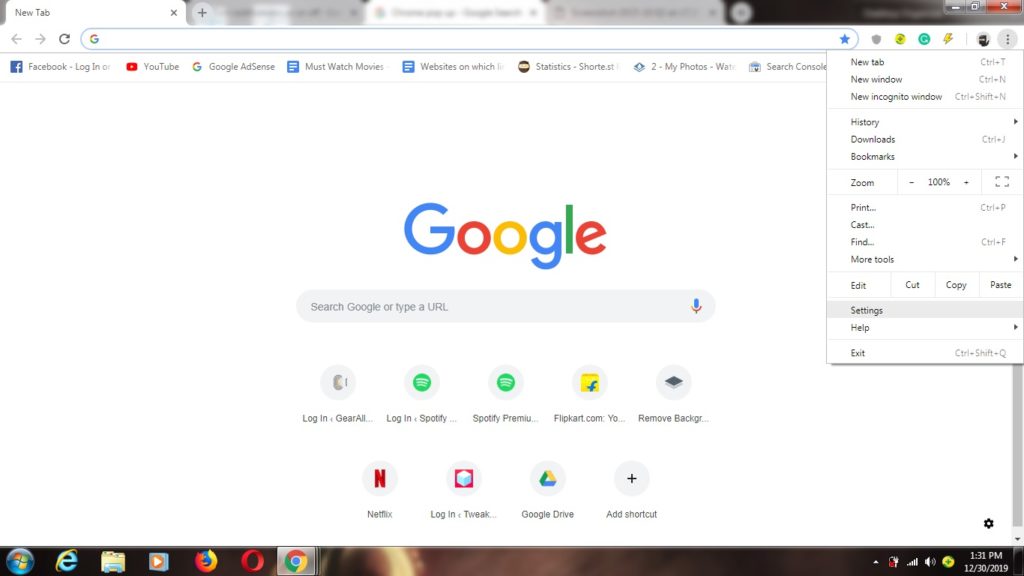
  2. You can see a three-dot menuMore in the top right corner click it and open settings  and then Settings.
  3. In the settings tab get down to the bottom and select Advanced.
  4. Search for “Privacy and security,” and under that click Site/Content settings.
  5. Select Notifications.
  6. Choose to block or allow notifications:
    • Block all: If you want to block all the notifications from the site you will be visiting in the future then select Ask before sending.
    • Block a site: If you want to block the notifications from a particular website you can by following this: Next to “Block,” click Add. Now Enter the site and click Add.
    • Allow a site: IF you want to allow the pop-ups from some particular websites then you can follow this: Next to “Allow,” click Add. Now Enter the site and click Add.

That’s all on how to How to Disable Chrome Notification Popups by your own. We think that this guide will solve your problem. If yes then do share this guide with your knowns if they are facing the same problems. If your problem is not resolved you can tell us in the comment section we will try to solve your query as soon as possible. Visit regularly to know more amazing things and guide which can help you. Thanks for stopping by. See you again soon.

Outdoor activities in this time are vanishing, people do not have time to skip there electronic gadgets and indoor technological luxuries so they could do something related to enjoying and having fun beyond the boundaries of home. Some people are still used to going for outdoor activities mostly in summer or winter breaks and they usually pursued a healthy lifestyle than normal people, these people take their children to many outdoor activities like hiking, camping or any sports related activity so, if you are one of them and planning for any trip completely focused on outdoor activities, while packing everything for your trip do not forget to add kids headlamp in your stuff packing.

Kids headlamp are mostly used when people are going for any night trip which is full of many adventures and searching and children are also very excited for such trips which are full of fun and curiosity so, mostly people used to consider that the headlamps are only made for adults and for those who are more than the age of adults, this misconception is completely wrong because kids headlamp are taking part in the market of kids’ stuff and are becoming easily available for everyone.

As far as children are concerned, companies are manufacturing these kids headlamp in variety of colors and designs which are highly attractive and mostly kids want them even if they are not heading towards any night trip or adventure. These headlamps are highly useful and easily accessible anywhere anytime for everyone.

Kids headlamp are mostly designed, according to the choices and interests of kids like mostly kids are interested in animated characters and cartoon heroes and they are used to of buying stuff which are related to those animated characters and stuff like these are present in huge quantity in kids’ market. Many kids like mostly girls are interested in Disney princesses and boys are interested in marvel heroes so, marketers and manufacturers are focusing on themes like these for their products and kids headlamp are one of the best examples of such customized products.

Kids are buying them and playing with them along with having enormous amount of fun. Parents should choose such type of safety stuff for children so they could easily have fun and enjoyment and parents too would be tension free when they would not be having any problem of safety for their kids.

Kids headlamp which are manufactured based on animals faces like many headlamps are made on the theme of lions, cats, dogs or many other animals which are mostly likely a center of attention for kids are also amazing for getting the attention of kids and these type of headlamps are easily available in market in reasonable prices with high quality lights fitted into them and are easily accessible everywhere, for wearing them it is not necessary to go outside and do some outdoor activities kids could also use them in playing inside the home.

WhatsApp is a very popular instant messaging app that we all use in our daily life to connect with our friends, relatives, and colleagues. We can personal chatting and create groups to discuss with many peoples at a time. But sometimes it becomes overwhelming and becomes an addiction and harm our productivity. There are some consequences where you are working and useless WhatsApp group notifications become a distraction for you and harm your productivity. We will help you to get rid of this problem with some tweaks that will help you to Mute Whole WhatsApp Notifications.

You can also mute individual chat or group notifications of your choice for a specified period of time. Muting a chat would only stop your phone from vibrating and playing a notification sound, you will still receive the messages when you open WhatsApp. So if you don’t want to distract while working or studying then follow the below methods to Mute Whole WhatsApp Notifications on your Android Phone.

Mute WhatsApp Notifications on Android

How to Mute Whole WhatsApp Notifications on Android?

Turning off mobile data or wifi is not a good option also WhatsApp won’t give you a logout option so you can turn off the notifications. What if you don’t want the notifications with turning off mobile data? There are a few different ways we share with that you can easily Mute WhatsApp Notifications easily. Follow the below methods to Mute Whole WhatsApp Notifications on Android.

Method 1: Mute Individual Chat or Group


If you get annoyed from a particular group or person and don’t want to get disturbed from the annoying notifs, then follow the steps below:

  1. Open Your WhatsApp and look for those disturbing chats.
  2. Long press on the chats and select all the chats that you want to mute.
  3. And then click on the mute button as shown in the screenshot below.

It will mute all the selected chats and groups of your WhatsApp and you’ll no more get notifications from them.

Method 2: Turn Off Call and Messages Notifications from WhatsApp


If you turn off your conversation and calls notifications for all chats from the WhatsApp app itself, then follow the steps below:

  1. Open Your WhatsApp app from your Android Phone.
  2. Go to the settings of your WhatsApp app from the three-dot menu.
  3. Go to the Notifications tab from there.
  4. In the notifications tab, you can choose what to turn off.  Here you can turn off the conversation tones along with the messages and call tone to silent mode.

It will mute all the messages and calls notifications from any WhatsApp chat. There’s another simple and hasslefree method to turn off the notifications of WhatsApp, read the method below.

Method 3: Disable App-wise Notifications from System Settings


You can also disable app-wise notifications from the system settings and get rid of all problems. You can use this method not only for WhatsApp but for any app on your smartphone.

Caution: You can missout on your important messages from WhatsApp while using this method. Also, this doesn’t stop the calling notifications and ringtone, so follow Method 2 for disabling call notifications.

  1. Go to System Settings on your Android smartphone.
  2. Open the “App Management” panel and choose “WhatsApp” from the list.
  3. Now open the Notifications panel from there and turn off the toggle says “Allow Notifications“.

Everything is done. Now you won’t see any notification from WhatsApp in your Notification Section.

Conclusion and Opinions

Distractions are not good for productivity and focus. So, if you’re a student and studying or working on a project, I would recommend to avoid distractions like social media and focus on what you’re doing. But, if you’re working corporate.  I would recommend you to follow Method 1 only because disabling all notifications can result in missing out some serious stuff.

If you have any questions or queries then please ask in the comments section. Content suggestions are also welcomed in the comments section.

Gone are the days when YouTube used to be the platform where only a few people had channels and accounts. The things have certainly changed with time and there are more and more people joining the platform of YouTube these days. About 1.9 billion people log into YouTube every single month. Not just that but YouTube plans to take about 82% of the entire traffic on the internet by the year 2022. Doesn’t that seem to be amazing? But then with this increase in the user base, the pressure is also on for the people who already have their brands and businesses plus want to use the platform of YouTube in order to gain some fame.

While you might be thinking that your YouTube video is enough to get you all the fame and growth that you need for the brand, it is definitely not true. When it comes to making your brand famous on the platform of YouTube, there are definitely some other things that you need to have for sure. Do you know the factors which actually decide the popularity of your videos on YouTube? Well, it would have to be the number of views and subscribers that you have on the channel of yours. Yes, you heard it absolutely right, people. With the help of more views and subscribers on YouTube, you can take your brand to a whole new height for sure. But how are you going to do that?

This article sheds light on that and tells our readers how they can make their YouTube channel famous with the help of some simple services.

Increase Your Subscribers And Views With Galaxy Marketing

When it comes to getting views and subscribers on YouTube, it is basically the goal of every single YouTube out there. All they want to do is make sure that their users are viewing the videos that they have and are pressing that Red ‘Subscribe’ button or not. Why do you think they do that? Well, users on YouTube are certainly very keen on watching the videos that are actually getting more engagement.

The videos that tend to have the most comments and interactions between people are the ones that get the most attention. How is that possible to achieve? Well, of course, with the help of more views and subscribers. When you want to buy YouTube subscribers and views, there is no doubt that Galaxy Marketing can help you out with it for sure. Whether you want to have a small number of subscribers for your channel or you want a large number of people to subscribe to your channel, there is something for everyone out there.

There is simply not a single speck of doubt about the fact that with the help of the services of Galaxy Marketing, you are definitely going to make sure that you have some considerable amount of subscribers and views for the channel of yours.

How To Get Subscribers And Views From Galaxy Marketing?

Galaxy Marketing is one of the top services that tend to provide some amazing social media options to the people so that they can promote their brands and businesses in the best way. Since YouTube is also a very big part of social media, there is simply not a single speck of doubt about the fact that you would want to have the services of this platform as well. So, Galaxy Marketing has some interesting propositions for you. With the help of these services of the YouTube platform here at Galaxy Marketing, people are able to make sure that they can get the best subscribers and buy YouTube views in the easiest ways. But how do you think they can do that?

The first thing that they need to do is go to the website of Galaxy Marketing and that too the official one. Once they are on the homepage, they need to select the social media site that they want to have the services for. In this case, it is YouTube. After doing that, all they need to do is select the number of subscribers that they want to have for their YouTube channel. There are many interesting packages with cheap prices for the number of subscribers that people would want to have for their channels. So, the process is pretty simple and they have to make the payment once they are done selecting the number of subscribers.

Increase Your Ranking With More Views And Subscribers

We have no doubt that with more views and subscribers, your rankings on YouTube and Google Search would increase as well. So go ahead and buy YouTube views and subscribers from Galaxy Marketing right now. To make things simpler, you have to visit galaxy marketing and you can get the rest of the things from here. What are you waiting for, people? Get started right now.

Do you want to make sure that your social media followers know who you are and what your brand is? If that is the case then you are certainly not the only one who thinks like that for sure. There is simply not a single speck of doubt about the fact that most people want to increase their follower count on social media. After all, it is one of the best ways to have some engagement for the brand of their right? So, in case you are in the need for something like that, we have got just the right thing that you will be impressed within the best way.

Say Hello To Galaxy Marketing

There is simply not a single doubt about the fact that people these days are always on social media for sure. So, they need to have something that is able to give them more followers in the best way. Many people buy TikTok likes from various renowned service providers to enrich their presence online. While there are many people who would be against the idea of buying followers and likes on the social media platforms, there are some who think that buying these things from a reputed company will not do any kind of harm to their reputation. This is where Galaxy marketing comes around to help you out in the best way. When you have the services of this website, there is no doubt that you don’t have to wait for followers and likes and shares. No matter what you want to have on social media, Galaxy Marketing has got it for you.

But what is it in the first place? We know that most of you want to have some answers regarding galaxy marketing and we are here to provide you with the answers that you are actually looking for. So, you need to make sure that you read this review very carefully if you want to know what Galaxy Marketing is and what it does for the people like you who want to boost up their followers and likes on the social media platform.

For anyone who wants to make sure that their brand is one of the most popular ones on social media, having the services of Galaxy entertainment is actually going to be one of the best things for sure. That is one of the main reasons why people want to choose the services of this particular website in the first place, to begin with. This social media marketing company provides different functions and services that would make your social media profile boost up in the game and go ahead with the competitors of yours in the best way. So, who wouldn’t actually want to be a part of something like that, people? We are pretty sure that you are going to be impressed with what this amazing site has to offer the people in the first place.

Boost Your Likes On Instagram and Facebook


We all can agree to the fact that Facebook and Instagram are some of the most amazing and useful social media platforms that people always tend to use these days. Not just the people but the brands are also using these platforms in order to get some recognition from the people. There are some other platforms as well such as YouTube, Twitter, SoundCloud and so much more. What Galaxy Marketing does is makes sure that you are able to get the desired number of likes, shares, comments, and followers that you want to have on your social media channel. Now one of the most important things that you need to keep in mind is that these followers would be authentic and real as claimed by the company so you don’t have to worry about fraud as well. This is definitely the best place to buy the followers that you want and it is literally the easiest ways you can get some action for your amazing profiles on social media as well. So, why would you not try it out when you have heard so many amazing things about this website?

Pay Your Share To Get Your Share Of Followers

Probably one of the best things that we like about the amazing website is that there are so many different pricing plans that you can choose from. These plans have been created to suit the needs of the people who will be needing such services. After choosing your pricing plans in the best way, you can actually make the payment with the help of PayPal. This is literally the easiest thing to do for sure.

Conclusion

All in all, we would like to say that Galaxy Marketing is one of the best websites that you can actually use in order to ensure that you are getting all the followers and likes that you want to have on social media. So, go ahead and get your services right now.

Studying requires a student to take notes, revise, prepare for the examination, complete assignments, and such other tasks. The internet has provided excellent tools to make the life of a student easier and also helps the student to score higher grades. WriteMyPaper123 helps with homework and the provision of learning resources for all subjects to students of all grades.

Online study tools provide convenience because you can revise or complete your assignment anytime and from any location. The internet has numerous tools, but a student must be cautious to ensure that the tools will deliver accuracy and credible results. Here are tools that will transform learning for any student and guarantee the best grades in school as well as an amazing college experience.

GoConqr

The website is designed for learners who prefer the visual mode of instruction. The most difficult concepts you can imagine have been simplified using mind maps. They are broken down into smaller units that make learning easier.
The website allows you to create maps around ideas. The maps will open another platform where you can see the connections that exist between ideas. The mind will find it easier to consume this information in a visual format. It is also easier to understand previously difficult or complex ideas.

The website offers such helpful features as note-taking, flashcards, study planners, and quizzes that you can create to test your understanding of a topic. You can collaborate as a team and even track how far you have covered a topic. Since you can access the platform on the mobile phone, it helps you study while on the road.

MyStudyLife

Most students have a confused and disorganized study life. You end up running at the last minute to complete assignments or revise for upcoming tests. MyStudyLife seeks to provide a more organized approach to learning for students of all grades.

As one of the best study ups online, the app helps you to track your homework, examinations, classes, and other activities you are expected to undertake while in school. Data saved on the app is accessible offline. You continue working or enjoying an organized school life while still offline.

Among the best features for MyStudyLife are the notifications. The app sends an alert when the deadline is approaching, or you have an upcoming test. The apps are free and customizable to reflect your college life needs.

Brainscape

The app is designed as a responsible platform that is accessible over computers and mobile devices. It can be used by entrepreneurs as well because it helps you to create flashcards that are then used for learning. The creator or account holder can share the flashcards with others in the community or platform.

The platform is engaging and will simplify learning of the most complex concepts. A teacher or manager has the power to track progress made by juniors through the flashcards already uploaded or cleared. The app is usable on all subjects and is a perfect collaboration tool for learning.

Evernote

It is convenient to have all your study materials and notes on one platform. Evernote provides an opportunity to put all notes, research materials, information, and reference resources on one platform. The platform also enables you to organize these materials for easier retrieval. You create folders and code names that are then used when searching within the app. It also offers a feature for creating study plans or work schedules for other activities that are not related to schoolwork.

The best study tools today are apps that provide comprehensive solutions to users. They should be usable on the common gadgets available to students. The tools must provide a comprehensive solution to students.

Instagram is one of the best social media apps on the Internet. We all use it in our daily life for different purposes like sharing your best shots and enjoy memes. Using Instagram for a long time can cause eye strain. Dark mode can help you to overcome this problem so, you can continue the enjoyment. In this tutorial, I will be sharing “How to Enable Dark Mode on Instagram“.

There is no way to toggle Instagram’s dark mode on and off in the app itself. Either you can enable Dark mode on Instagram by following system-wide dark mode setting on Android 10 or iOS 13 or by using invert color option or by using the third-party app on a lower version of Android or iOS. Follow the below steps to Enable Dark Mode on Instagram.

Enable Dark Mode on Instagram

How to Enable Dark Mode on Instagram?

Android 10 and iOS 13 brings system-wide dark mode and the second you switch to dark mode in iOS 13 or Android 10, your Instagram app will also switch to dark mode.

1. For Android 10 users

Enabling Dark Mode for Android 10 is a bread-butter thing. This feature is only for those who are having Android 10 if you have a lower version, please skip to Method 3.

For enabling dark mode, update the Instagram app to the latest version. Next, enable dark themes on your device, then Instagram will automatically enable dark mode in their app too.

  1. Make sure your device will run on Android 10.
  2. Go to device Settings
  3. Navigate to Display –> Dark Theme
  4. Toggle the Dark Theme switch.

2. For iOS 13 users

Instagram also released this feature for iOS 13 users recently. Instagram head, Adam Mosseri informed peoples through a tweet :

https://twitter.com/mosseri/status/1181361666992115719

For enabling dark mode on Instagram, you just need to enable the dark theme of your phone and Boom, it will be enabled on the app too.

  1. Make sure your device will run on iOS 13.
  2. Go to device Settings
  3. Navigate to Display & Brightness
  4. Tap the Dark button.

3. For Android 9 and lower version users

If you don’t have the latest version of Android, then you don’t need to worry about it. You can still enjoy dark mode on Instagram if you don’t mind in rooting your Android Phone then, you can enable dark mode on Instagram with some tweaks. Follow the following steps :

  1. Root your Phone
  2. Find an Android 10 Custom ROM for your device from XDA Developers
  3. Flash the Android 10 custom ROM.
  4. Install the latest version of the Instagram app and then follow Method #1.

Another way to enable Instagram Dark mode is by enabling the Invert colors on your device, it will turn the white background in the Instagram app to black and this way it will look exactly like Dark mode of Instagram. However, we won’t recommend this option as Invert color would also change the colors in the media.

4. For iOS12 and lower version users

Users with iOS 12 or lower version can get the Instagram dark mode option via Invert Colors option. Also if you jailbreak your phone then you can install the third party client app to enable this feature.

Smart Invert option is available in the “Display Accommodations” section, in Accessibility Settings. Enable “Invert Colors”, then activate Smart Invert.

Wrapping Up

These are the easiest way to enable dark mode in Instagram app. It’s highly recommended if you are a heavy Instagram user. Dark mode not only reducing eye strain but also adjust the screen according to current light conditions and providing the comfort of use at night or in dark environments. 

If you found this article helpful, then please share it with all your friends and followers on Social media. Leave your queries in the comment section below, we will try to respond within a few moments.

WhatsApp Status allows you to share text, photos, videos, and GIF updates that disappear after 24 hours. You can post status stories on WhatsApp but there was no option to share WhatsApp status to Facebook Stories directly. WhatsApp’s latest update makes it possible and now Android users share WhatsApp Status directly to Facebook Stories.

if you’ve posted multiple WhatsApp status, then all of them will be shared. If you want to share a particular one then you will have to choose the ones you want to share from the “My status” section and tap on the three-dot button in the top-right corner and then on the “Share to Facebook” option.

How to Share WhatsApp Status to Facebook Stories

WhatsApp Status is posted as Facebook Story, will stay there for 24 hours even if you delete the original WhatsApp status. Currently, this feature is available on the WhatsApp Beta version only and soon will be rolled out for all users. Also, the user must have Facebook on Android, Facebook Lite on Android, or Facebook on iOS app installed on their device to use this feature.

But there is one little issue that you won’t get the end-to-end encryption by sharing the status as stated by WhatsApp spokesperson “If you share your status update, the content of your status update will be shared with other apps and won’t be protected by end-to-end encryption. When sharing your status update, WhatsApp won’t share your account information with Facebook or other apps,”.

How to share WhatsApp status to Facebook Stories

You will see a “Share to Facebook Story” option under “My status” in the Status tab, with a share button right next to it. To use this feature, tap on “Share to Facebook Story” and it will let you share WhatsApp Status to Facebook Story.

How to Share WhatsApp Status to Facebook Stories

  • Open WhatsApp on your device.
  •  Go to Status.
  • Now you will have two options: Share old status or new status
  • To share new status go to My Status>Share to Facebook Story
  • To share an old status, go to My Status (on iPhone) or My Status>More.(on Android)>click on the three-dot menu…>Share to Facebook
  • If asked, tap Allow or Open to open the Facebook app.
  • Once you get to the Facebook app, select the audience you want to share with, then tap Share Now.

Wrapping Up

With the latest WhatsApp update, you can now share WhatsApp Status updates as Facebook Stories. That’s a very useful feature and now you are no longer required to post the same story/status separately on the three platforms.

FIFA has been introduced by EA sports long ago. It is a game for a machine which has a bit of graphics in it. A football fan should have already gone through the previous versions of the game the previous versions were pretty amazing as the new one. You can now download and play FIFA 20 APK on your Android device.

How to Play FIFA 20 APK on Android

The gaming pace is a thing worth mentioning

The speed and the continuity over the game draw good attention. You may have played the earlier versions of it, but this has made some greater improvements. The main part is that the opponents were a bit slow and creepy in the two-player mode. But in this new version of EA gaming velocity has been redefined.

You might have taken a pass from a player and made a wonderful shot. Your shot had been the best one. The ball took the right sequence and pace and ran into the goal. But this time in FIFA 20 APK, the defense would be tougher and flexible. They have made necessary adjustments in the programs to make the hurdles higher. Thus your test would be to bypass them and run with your ball to the end of the field.

The graphics have been increased and along with that the gaming

FIFA and the other soccer games take a little pride in making the main protagonist work better. The main part is how efficient is your football obeying your instructions. But this is only possible when you have good graphics and the right way to deal with the controls. You may be good at controls but sometimes the ball does not follow you might have kicked to a different player but it went somewhere.

FIFA 20 Android has looked into the matter with care and mended this problem of ball dynamics. Moreover, player control and ball control has also been taken care of.

Reality has bumped into the playing patterns and levels

It is a general pattern that gamers like things which are more real. Reality takes a greater account when it comes to games. FIFA 20 for Android has introduced reality on a new level. You can witness the players do actions which were not present in the earlier versions. The earlier part of gaming rests on that players were less flexible and the controls were comparatively less efficient.

Efficiency has taken a new height and the gamer enjoys every bit of the game. You might have played the previous versions were passing the balls, replays, goals were less prominent. In this game, the player can see the fine details in the passes. The details would be as the game is almost real. He would witness the game in reality and enjoy it to the maximum.

The game has touched people differently

If it were that money would be involved in the game. Though the involvement of real money is dangerous when it comes to virtual money based games, it can be fun. The game has advanced into the arena where gaming and making teams based on profit winning is appreciable.

Suppose you create a team consisting of a set of players. You need to buy the player and play with their help. They would give you the very best support in their category. Finally, you win the match and thus win the allotted set of a prize in the form of virtual money.

This increases the player’s intention to play a game to its last breath. When there is a motive that you can play a particular game and you spend an hour or so behind it. But the interest shrinks if the game is dull in itself.

Most importantly FIFA 20 APK has all the qualities and its gameplay is much user-friendly

The game consists of a multiplayer option which has its benefits. You can enjoy the game with your friend. It takes a good place in a bachelor party or the party of football lovers. It has been able to create a family in itself. It whatsoever happens, persons readily like the functions in the game and get engrossed in the game.

There are options where you can choose a tour team and also the team with whom you want to play. You can change the color of the jersey and the modes. The much-awaited feature is the controls in footballs. If you have already been an efficient player, you have the developed idea as to how you can play the game.

The control is the most important part of the FIFA 20 Apk and it has made necessary improvements in it. The controls are very easy to use in this Android version of the game.

A jaw-dropping experience of Fifa 20 for Android

The game has made the feel of the game to enhance to new levels. It has increased the customization levels to greater heights that creativity has increased. The players can witness the modes in the game have been polished and made far better. It is made crispy with short focuses at the right places. The small improvements have counted much in its journey over the years. They have added feathers to its cap of success.

You can enjoy the FIFA 20 Apk game experience and eschew all other businesses to indulge in its world. The game introduces the Volta mode and the individual story mode for its players. The game has also added freestyle mode of gaming. It has also put the men and the women’s players on the field.

This is for the first time that both genders can share the same field. You might now think over a bit and just not wait to play, but look for it at once. It is just a game which can create a space when you are bored with your daily work.

If there is a bit more you depend on this game and have always placed it in a higher stance then it is the just the one waiting for you. You have to make necessary adjustments and the fastest strikers would make clearer passes in the game. Thus these features should necessarily increase your interest in the game.

How to download FIFA 20 APK on Android?

You can download Fifa 20 apk from androidhackers.net. You will find all the instructions to install the apk file on their website. Fell free to leave a comment below if you encounter any problems.

To install rooted apps on an unrooted device was an impossible task. Rooted apps need special permission to run that require access to certain system settings. You can download the rooted apps but to use them you will have to root your device and access the root permissions to the app. But now there is a way to Run Root Apps in Your Unrooted Phone.

There are lots of advantages of rooted device like uninstalling system apps, flash custom ROM and Kernels, install special apps that required root access, system-wide adblocker, etc. However, there is some security and privacy risk and that’s why many users are afraid to root their device but still want to try rooted apps. This can be now possible with VMOS app.

Run Root Apps in Your Unrooted Phone

VMOS is an Android app that creates an instance of a virtual Android device inside your Android device. This can help you use root apps on your unrooted phone. VMOS will not root your device but create a virtual machine that helps you run the rooted apps on non rooted device.

How to Run Root Apps in Your Unrooted Phone

You need VMOS app to Run Root Apps in Your Unrooted Phone. After installing the app, you won’t get the root access by default but you need to enable the root from developer options. You can follow below steps to install and run rooted apps on non rooted phones.

  1. Download and Install the VMOS App from Play Store.
  2. Open the app.
  3. You will find the option to enable root in the developer options. To enable Developer Options, go to About phone and tap the Build Number 7 times.
  4. In developer options, enable ROOT under Debugging section.
  5. Restart the app and you have root access via VMOS app.

Wrapping Up

If you love rooted apps but afraid of rooting your phone then you must try VMOS. It will create a virtual Android device inside your Android device which let you run any rooted apps on your device.