Author

Sumit Bahl

Browsing

In today’s world, virtually every business you can think of makes use of cloud computing to store their data and for other beneficial reasons. This has led to the increasing popularity of cloud computing, as it is widely seen as a reliable and cost-effective means of storing data. Unfortunately, another aspect that’s seemingly increasing is the threat of cyberattacks and breaches on cloud computing services—especially since cloud computing systems are accessible anywhere, as long as there’s a working internet connection. This makes the threat of hackers finding a way to penetrate your system and access your files very real. Taking this fact into consideration, more business owners, as well as ordinary individuals who utilize cloud computing are rightly becoming more concerned with cloud security. Their specific and immediate concern is on how to improve said cloud security, and here are five ways to do that.

1) Improved Authentication Tools

The first and main step to improving cloud security is ensuring that your users with access are who they say they are. In doing this, you should note that the age of simply placing reliance on the traditional username and password combination is long gone. This is because the effectiveness of the said traditional combination no longer holds water. For it to be effective now, it needs to be backed by authentication tools, which involves adding two-factor or multi-faceted authentication to your cloud computing system. Utilizing this authentication system simply translates to asking your users to gain access through one or more extra authentication methods, coupled with their username and password combination.

2) Real-Time Monitoring of User Activity

A top-notch means of improving cloud security is the constant monitoring of all user activities. Conducting real-time monitoring and analysis of the activities of all users with access to the cloud computing system will help display usage patterns and highlight any abnormalities that vary from the normal usage patterns established. If you learn Azure, you can gain more knowledge and experience concerning this. Detecting any abnormalities on time goes a long way in ensuring the security of cloud computing systems, as these irregular activities often indicate a breach in your system.

3) Authorization Levels

This method involves improving cloud security through the management of user access. In most businesses, there’s a hierarchy in place as to job delegation and information handling—hence, certain people are privy to certain information based on their role, while others are not. This same principle should be applied to securing your cloud system by setting proper levels of authorization, which will guarantee that each employee only has access to the application or data necessary for their particular job or role. Not all employees need access to every application or information available, and streamlining said access will ensure that little damage is done if a hacker, unfortunately, steals an employee’s access.

4) A Secure Off-Boarding Process

When an employee is leaving your business for whatever reason, trying your best to ensure that they don’t leave with your trade secrets is the usual standard. It should also be a set standard that when an employee leaves, their access to your cloud systems, storage, and information should be revoked immediately.

5) Provide Regular Cloud Security-Based Training for Your Employees 

A major type of cyberattack used by hackers is stealing the login credentials of employees of various businesses, in order to gain access to secure information of the business. Hackers do this through techniques such as phishing, social media spying, and others. To prevent this, training your employees to understand and identify what said techniques are and not fall for them is a key element.  Furthermore, this training should be a continual process, as a single session wouldn’t be enough. 

Recording Zoom meetings is an easy task even though you are not the host, but many people find it difficult. The reason is that they do not have professional screen recording software at hand. 

Do you face a similar challenge as above? If so, and you need a solution, you’re surely on the right platform. Here we will introduce you to the best screen recorder for Zoom meetings. Also, we will provide you with a stepwise guide on how to use the software. 

Best Screen Recorder to Record Zoom Meeting on Windows/Mac OS

Presently, EaseUS RecExperts is one of the best screen recorders known by experts to provide quality services. This cross-platform software works perfectly on multiple operating systems, including Mac, and Windows. It’s very easy to use – thanks to the interactive user interface. 

The software can be used to record online conferences that require third-party apps like Teams, and Webex. You can also rely on it to provide you with that top-notch service you seek each time you want to know how to record Zoom meeting without permission. EaseUS RecExperts prints its outputs in HD, unlike its competitors’ prints its outputs- a unique feature that makes it stand out.  

Key Features 

  • Well-designed with an interactive interface 
  • Records video conferences of third party apps like Zoom, Webex, Team, GoToMeeting, and more
  • Includes audio to video recordings 
  • Supports the use of camera like Webcam 
  • Offers services in both free and premium versions 

How to Record Zoom Meetings on PC

Depending on the PC operating system you use, the technique involved in recording Zoom meetings with EaseUS RecExperts differs. 

Find below the instructions you have to follow to record Zoom meetings on Windows and Mac OS. 

Stepwise Guide to Record Zoom Meetings on Windows Using EaseUS RecExperts

Step 1: Download and install a compatible version of EaseUS RecExperts on your Windows computer via the official website. Once the installation is over, launch the software. 

Step 2: Next, join a Zoom meeting, and select the portion of the screen you wish to record. For full screen, tap on Full Screen and if it’s a portion of the screen you want to record, kindly click on Region

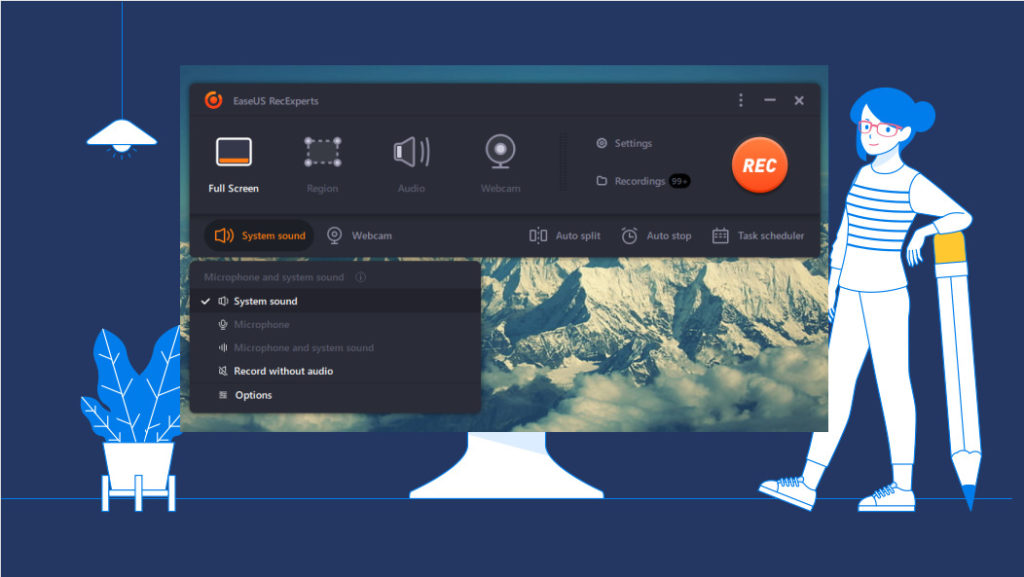
Step 3: Once the above is set, move your cursor to the Sound tab and then click on it. The interface below will pop up: 

Here you have two options to select from; System Sound and Microphone. Kindly select your preferred sound option. 


Step 4: Now that you’ve enabled sound, navigate your way to the Settings tab and click on it. A new interface with a couple of settings options on the left will appear on your screen just as shown below: 

Select General and then make necessary adjustments by choosing your preferred storage path, output format, quality, framerate, and GPU hardware acceleration. 

Step 5: Now tap on REC to instruct EaseUS RecExperts to start recording a Zoom meeting. 

Wait a while for the recording to complete then click on the red square icon 🟥 to stop recording. 

Stepwise Guide to Record Zoom Meetings on Mac Using EaseUS RecExperts

Download and install the latest version of EaseUS RecExperts on your Mac OS, then follow the instructions given below: 

Step 1: Open EaseUS RecExperts on your Mac OS, and then choose whether you want to record your entire screen or a portion of it. Full Screen allows you to capture your whole Mac screen while Region lets you record a selected portion. 

Step 2: Set EaseUS RecExperts to record audio by clicking on the Sound icon. A couple of options will pop up underneath the Sound section just as shown below: 

Choose your preferred sound option; System sound or Microphone, and then click on OK to complete the setup. 


Step 3: Now, launch Zoom and then tap on the REC button at the upper right corner of your screen to start screen recording. 

Step 4: When recording starts, a floating toolbar with Pause and Stop icons at the center in it will pop up. Here is an image for a better understanding: 

Click on the red square icon 🟥 to end the screen recording. 

FAQ

Some extended knowledge questions and answers are shared below to help you understand the topic better. Kindly check them out: 

Is it possible to screen record a Zoom Meeting without permission? 

Yes, of course! You can take a screen record of a Zoom Meeting without requesting permission from the host if you have the right screen recording software. There are countless software online claiming to offer this service. We simple you to use EaseUS RecExperts- the #1 screen recording software for Windows and Mac OS.

How do I record Zoom Meetings with audio as a participant? 

Including audio sound in your Zoom meeting recordings is easy but the stepwise guide on how to do that depends on what screen recording software you are using. We did introduce the EaseUS RecExperts software in the article above and a stepwise guide on how to use it was also included. You can refer to the guide or better yet, employ the step by step guide below: 

  • Click on the Sound tab
  • A drop-down menu with different sound options will pop up; Microphone or Sound system
  • You can choose to select one or both of them
  • Once that’s set, tap on OK 

Can I record a Zoom Meeting with my mobile phone? 

Recording Zoom Meetings with your mobile phone is possible. However, it’s crucial you bear in mind that you have to be the host of the meeting or a co-host to execute such action. If you are a participant, then you need to use third-party software to make a screen record of Zoom Meetings. 

Conclusion 

Ultimately, EaseUS RecExperts is the best screen recorder for Windows and Mac OS. With the simple user interface and mind-blowing features it supports, you can count on the software for excellent results. EaseUS RecExperts outputs are stored in high quality. 

Regardless of what career you choose to enter or at what stage in your life you are choosing to enter it, there are some basic requirements that will benefit you and the employers that you are hoping to work for in the future.

To this end, there is no better foundation for your career than to get yourself fully qualified in the relevant areas and to the highest standard that you can. This investment in yourself will be the springboard of your future career and all that you can achieve from it.

Choose your perfect qualification

When starting out on your chosen career path, it is important that you are fully supported in your education and that you obtain the right qualifications to give you a firm base and understanding of the work that you will need to undertake in your day-to-day job role.

Although there are many universities to choose from, it is important to make sure that you enroll in a program with the university that will suit you best and have the right program for your desired career. There are also universities such as https://online.pointpark.edu/ that offer an online program for many, if not all, of the programs that they have on offer, so it is worth seeing if there are any that will suit your requirements.

Benefits of opting for an online program

Indeed, there are a lot of benefits to choosing an online program over a campus-based program. The most important benefit is that you will be able to make your choices based on the program and the quality of the education contained therein rather than having to choose one by the university’s location. 

This means that you will not have the expense or disruption of uprooting your life and looking for new accommodation in a part of the country that is unfamiliar to you. You will be able to continue any work commitments where you are currently living as online programs are generally more relaxed with the timetables, and you will not have the stress of having to be at a certain place at a certain time to be able to catch an important lecture.

You will find that you still have the same level of support from your tutors, that you will be totally in charge of your learning pace, and that you will be able to study in the comfort of your own home or study center, or indeed, anywhere that suits your requirements.

Taking your career further

Of course, your own learning does not have to stop after the first qualification gained; in fact, you will find that should you want to progress your career and grow your knowledge and capabilities, you will benefit greatly from taking your education further and investing in more programs as your career grows.

Indeed, you will find that employers value staff members that are almost continually educating themselves and completing programs to better the businesses that they work for.

The latest technological innovation introduces advanced tools that streamline business processes efficiently. Do you want to benefit from prioritizing tasks through Microsoft 365 tools? Are you searching for the appropriate applications that help government officials to manage tasks?

Various Microsoft 365 tools can help businesses and government officials to manage different tasks and set priorities for better work quality. For instance, Microsoft Teams is one of the latest M365 tools used to communicate and collaborate on tasks. Also, the officials can utilize it for real-time communication, chat, video meetings, sharing files, discussing innovative business ideas amongst team members, and more.

Current Scenario of Government Officials Prioritize Their Critical Tasks

Consider a situation where government officials utilized traditional methods and tools to streamline their crucial tasks. In addition, they were using paper-based methods and tools to store and record the essential processes on the physical paper documents. So, searching for the required file or information for completing specific tasks becomes difficult since they explore a huge stack of physical documents. In this way, the entire document fetching process is time-consuming and decreases the efficiency of the business.

Government officials can easily access, store, and share files from cloud storage platforms like Microsoft OneDrive. Besides, they can easily plan, schedule, and organize video meetings and group chats, share confidential files, and record screens through Microsoft collaboration team functions. With advanced technology development like Microsoft 365 application suites, all these business processes become easy to manage and prioritize.

Other tools from Microsoft 365 suite act as the perfect selection for government officials to streamline, manage, and prioritize multiple tasks with higher efficiency and productivity.

Which are the perfect Microsoft 365 tools for managing work priorities?

Microsoft 365 Tools Managing Official Priorities

Perfect Microsoft 365 Tools for Tasks Priority Management

  •         Microsoft To Do
  •         Microsoft Power Automate
  •         Microsoft Planner
  •         Microsoft MyAnalytics

Microsoft To-Do enhance task priority and streamlines processes

There are numerous tasks and business processes that government officials want to manage, prioritize, schedule and plan. To achieve a streamlined business process, they can utilize Microsoft To Do, which helps them organize multiple tasks.

However, it also acts as a digital planner to help government officials manage and prioritize different business tasks. For instance, this tool includes predefined task lists from numerous processes and integrates centralized tasks from several Microsoft 365 applications. For example, it receives or integrates various business tasks from other Microsoft 365 applications like Exchange, Outlook, Planner, etc.

Besides, the primary purpose of this Microsoft To Do tool is to help government officials increase their focus on priority tasks. While using this advanced tool, they can access all the crucial emails marked as flagged and multiple planner tasks at a centralized place in predefined tabs.

Government officials will visualize all the running lists of tasks under one central place called the Tasks tab. Moreover, it becomes easy for them to manage tasks and track the status of running tasks.

In specific situations, government officials will plan to complete business processes effectively. For efficient task planning and storing vital business ideas and decisions, they can utilize the Microsoft To Do tool to jot down their innovative ideas, prioritizing critical tasks and discussion topics.

Microsoft Power Automate transforms complex processes into simple ones

Multiple businesses and government agencies run different tasks, including repetitive tasks completed within stipulated time intervals. For example, the tasks like taking employees’ attendance daily, routine checkout process, verifying the documents before submission, etc.

For this reason, Microsoft Power Automate provides advanced tools to help government officials automate these repetitive tasks. However, this tool will integrate into various Office 365 platforms through a dedicated process called workflows.

Microsoft Power Automate transforms these repetitive tasks into automation and helps officials utilize predefined workflow templates to meet business requirements. Therefore, with Microsoft Power Automate, government officials can save productive time and complete complex, challenging tasks easily and quickly.

Microsoft Planner improves the task allocation process

Government officials require a dedicated tool to help them create intuitive plans to execute multiple categories of tasks. To resolve this task planning issue of officials, Microsoft Planner help leaders and government officials create various types of tasks called buckets.

Besides, the officials can assign several tasks or business processes to different employees in multiple departments. Therefore, it is helpful for leaders and government officials to track and assign essential business tasks or processes to other employees.

Microsoft Planner also provides alerts and notifications while assigning tasks and due dates to complete those business processes. Moreover, this advanced tool helps develop services like Microsoft collaboration team.

For this purpose, you can consider assigning tasks to every member using Microsoft Teams for collaboration and work together for excellent results. In this situation, officials in government agencies can utilize Planner to create individual task buckets, assign them to numerous employees and track them for better performance. 

Microsoft MyAnalytics increases worker’s focus and efficiency

Every business or government agency has a specific requirement to track the individual tasks performed daily to enhance and boost productivity. Therefore, to track personal activities, Microsoft MyAnalytics allows government officials and their employees to track and review their daily activities to check their productivity levels.

For example, an employee conducts and participates in numerous business meetings that hinder their productivity in executing dedicated tasks. For this purpose, the MyAnalytics tool will help them to solve this process with an automatic time booking process.

Therefore, the standard recommendation hours for attending the business meetings are two hours, and the remaining time is to focus on critical tasks. In addition, MyAnalytics will automatically update and receive necessary details of business processes by reviewing a calendar and reserving time blocks for continuous workflow.

Besides, this tool can integrate with Microsoft Outlook and automatically access cards based on employees’ work experience and allow them to respond according to their activities. In this manner, government officials will receive a weekly email highlighting their activities completed in the previous week.

In this way, Microsoft 365 applications suite offers digital tools to government officials that help increase employees’ focus and efficiency in completing tasks with excellent qualities. 

Enhance Task Management and Prioritize Official Processes with Microsoft 365 Tools

Government officials can utilize the dedicated tools from the Microsoft 365 application suites like Microsoft To Do, Planner, Power Automate, and MyAnalytics to streamline business processes and prioritize various tasks. In this manner, these modern tools from Microsoft 365 suite help enhance the productivity and efficiency of business processes.

It also saves the government officials’ productive time, which they can utilize in other business tasks. So, suppose you want to improve the entire task management process and prioritize vital business processes. In that case, you can have a detailed discussion with Microsoft 365 consultants, which offer customized solutions for an effective task management system that increases the efficiency and productivity of employees and the entire business.


Nobody uses the SMS feature of mobile to chat. It has become very old significantly in school, and this is the time when you talk with photos and videos. Snapchat, one of the biggest chatting social media stages that have more than a hundred million users using it consistently, understood the change required and delivered it flawlessly. Moreover, the application was invited to such an extent that you can find it in pretty much every device in numerous countries.

Since the time Snapchat has been very popular all over the world, everyone has been starving for a greater amount of what the organization delivers. Now that the phone on the planet is equipped with the double sim facility, you should contemplate whether you could use it to install multiple Snapchat accounts on one Android smartphone without purchasing another device. Thus, we will get familiar with the way to run two Online Snapchat Clone accounts on one phone.

Different Methods to have multiple Snapchat accounts on one Android

online Snapchat clone

First strategy: Find if your phone has included a “Double” application/courier

A few producers make an in-built highlight for their smartphones and empower you to run two Snapchat accounts on one phone. In this manner, you can use multiple Snapchat accounts without downloading a third-party application.

On Samsung devices – One clear model is Samsung devices. They present a special component called the “Double Messenger” highlight. What you need to do is to empower Samsung’s Dual Messenger by going to the Settings application. Find Advanced highlights, then, at that point, tap on Dual Messenger. Here, you see a list of applications that you can clone for signing in with a different record. First, pick Snapchat to toggle it On. Then, at that point, it will request that you install the second Snapchat application. Now, you have got the two Snapchat installed on your phone. The optional one is an orange icon containing two circles.

On other Brand smartphones – Not all OEMs give you this element as simply as Samsung. But, you can find it using a few simple tricks. Here, you figure out how to find the double application highlights on other OEMs.

  • Xiaomi: Settings > Dual Apps
  • Huawei: Settings > Apps > App Twin

If you are using some other OEM, you need to open the Settings application and search for “double” or “two” options. Focus that some OEMs like Nokia, Motorola, and Google do not have this component. You can use these ways of having two Snapchat accounts on a single device. While Snapchat looks for such strategies to use multiple accounts on one device, it is not important for certain individuals.

Second strategy: Try a third-party cloning application (Android)

The following option is to use a Cloning application. These applications make multiple spaces on your phone to use multiple accounts on a single application like Snapchat. Here, we introduce a portion of these cloning applications.

Parallel Space App

This App is a well-known option among tech enthusiasts and Snapchat users. They use this application to have multiple accounts on a single device. To use the Parallel App application, you need to install it on your device. Then, open the application and tap on the Add button. Move your fingers down and click on Add. You will see a number “1” on Snapchat, which shows you that it’s one more instance of Snapchat. Pick Snapchat and open it parallelly. Presently, you have another Snapchat account; sign in and begin using it.

2Accounts – Dual Space and Dual Apps

You can use 2Accounts as another application to make another instance of Snapchat (or some other application). You can do the means very much like the previous application. Install and open the application, select the add button, tap on Snapchat, sign in, and use another Snapchat account.

Super Clone

The last application that we need to introduce is Super Clone. It is a decent choice to switch between two online Snapchat clone quickly. As you might comprehend from its name, this application clones Snapchat and permits a parallel space. Presently, you can run two iterations of the Snapchat application. Like other application cloning applications, you need to use a different email or phone number to sign in.

Could you have 2 Snapchat accounts with a similar phone number at any point?

As you read above, Snapchat empowers you to have two Snapchat accounts, if one of them is a business one and the other is an individual one. Or then again, you can use two different mobile devices to have two Personal Snapchat accounts. Likewise, you can use cloning applications that provide you to use different emails or phone numbers.

In any case, if you have only one mobile device and need to use one phone number, you can not have more than one Snapchat account at a time. This is because Snapchat has a registration cycle, in which the application will message you a verification code to finish the interaction. So you could not use one phone at any point number as a valid option for more than one record to receive SMS.

Wrapping up

A portion of the above techniques is outsider ones (also called ‘third party apps’) while others aren’t. So on the off chance that you are wondering and thinking twice about using any untrusted service, go for an online Snapchat clone as it wouldn’t cause any issue to your device and privacy. Also, don’t neglect to share some other trick you use to get to multiple Snapchat accounts on your device if that isn’t mentioned previously.

VR stands for virtual reality, which is a fully immersive computer-simulated world that provides users the sensation of being in that environment rather than actually being there. Many video game producers have employed the technology to immerse players in an interactive world, whether it’s in the driver’s seat of a car or at the front lines of a battle. 

With a smooth internet connection like AT&T internet, you can play multiplayer games and feel like being an active game player within the gaming environment with VR. Your perspective of the real world, on the other hand, is unaffected. With improved interactivity, you may move about freely and execute things as if you were in the actual world, resulting in an improved virtual reality experience.

Outside of games, virtual reality is employed in training simulators for pilots, soldiers, and medics. The Oculus Rift, a gadget that has expanded the VR experience by adding features such as superior visuals, improved latency, and a larger range of motion, has given virtual reality a new lease on life. Continue reading the sections below for additional information on virtual reality and to learn about the future of this technology. 

Evolution of Virtual Reality

Jaron Lanier, the founder of VPL Research, came up with the term “virtual reality” in the mid-1980s, when he began building the requisite equipment, such as goggles, to experience what he called “virtual reality.” However, technologists have been working on virtual worlds long before that.

Early Days of Virtual Reality

Today’s virtual reality technology is based on ideas that stretch back to the 1800s, almost to the dawn of practical photography. The first stereoscope, which used twin mirrors to produce a single image, was created in 1838. This evolved into the View-Master, which was patented in 1939 and is still in production today. 

The Sensorama, which debuted in the 1960s, was another VR innovation. The enormous booth, which was considered one of the earliest virtual reality devices, didn’t offer any games but was more of a visual VR experience. Users would sit in a seat, insert their heads onto a big screen, and then choose one of the few short movies with 3D display and other effects, such as a motorbike trip in New York City. Despite its superior technology, the Panorama was unable to raise the funds to take flight and silently vanished from the scene.

Later, the Nintendo Power Glove, the Xbox Konect, toys to life games like Skylanders have all shown us countless attempts of VR gaming.

The Big Comeback of Virtual Reality

In 2016, mobile-based virtual reality headsets accounted for over 85% of all virtual reality headsets sold globally, with the most popular mobile-based VR headsets being ‘Google Daydream’ and ‘Samsung Gear VR.’ In 2019, virtual reality (VR) had seen a substantial increase in popularity as technologists once again realized that technology can transform our social and professional lives. To breakthroughs like Ready Player One, VR is an immersive computer-generated environment that gives us a real-world perspective. 

Recent Virtual Reality Trends

The VR industry is expected to reach nearly $17 billion within a year or two, according to data from the International Data Corporation (IDC). Analysts believe that advancements in VR hardware, such as the development of smaller and more stylish devices, will encourage consumers and businesses to adopt the technology. Training simulators for surgeons and factory operatives, as well as immersive education experiences in the classroom, are examples of VR in use today.

The Future of Virtual Reality

Although there are a variety of ways to display virtual reality, one of the most common is through virtual reality headsets. These gadgets make a three-dimensional display in-depth for the viewer using a stereoscopic display. These technologies, however, do not create an immersive experience. There must be some level of virtual engagement to improve the virtual reality experience. VR designers will soon expand this sensory takeover to our other senses, such as touch and feel, to further enhance our sensation of immersion. Simultaneously, the gadgets we use to access these virtual worlds will grow less expensive and lighter, reducing the friction that might be a barrier now.

Augmented Reality

Augmented reality is more efficient as a promotional and entertainment tool than virtual reality since it can be accessed by almost everyone with a smartphone. By projecting virtual graphics and characters from a phone’s camera or video viewer, AR transforms the dull, real-world into a vibrant, visual one. Augmented reality is nothing more than a way to enhance a user’s real-world experience.

Mixed Reality

Mixed reality can be considered to be an extension of augmented reality. Using next-generation sensing and imaging technology, you interact with and modify both actual and virtual products and surroundings in mixed reality. Without ever removing your headset, you can view and immerse yourself in the world around you while interacting with a virtual environment with your own hands. 

So, if you’re wondering what’s next in virtual reality, it’s safe to say that extended reality (XR), which includes virtual reality (VR), augmented reality (AR), and mixed reality (MR), will be one of the most transformative tech developments in the next five years, rather than just virtual technology.

Is Virtual Reality Safe?

The answer to this question is dependent on different variables like the duration spent in the virtual world and the gadgets used. In general, too much time spent away from the actual world may be harmful. If you’ve ever wondered how long you could stay hidden in your virtual reality (VR) headset from the outside world, the short answer is: not very long. 

Because no two people’s VR experiences are the same, and not all VR headsets or gadgets are created equal, some games on different headsets will cause more problems for some individuals than others. Even if you don’t think you need it, the Oculus Rift and HTC Vive creators recommend taking at least 10 to 15-minute break every 30 minutes. Too long exposure to Virtual Reality can cause issues like:

  • Disorientation and dizziness
  • Nausea
  • Trouble focusing
  • Seizures
  • Headaches

To conclude

Virtual reality is one of the most exciting technological advances, progressing from basic entertainment tools to sophisticated gadgets used in medical, educational, and other essential applications. The evolution of technology does not appear to be stopping here, with many more advancements on their way to virtual reality.

Introducing a new product in the market is challenging. Many people prefer well-known products or old items available in the market already.
Various ways can help your startup be successful. One efficient and effective tool that can help you dramatically is a superb software consulting company.

Software consulting companies for startups differ from those working for small and medium firms. Your company should employ the right tactics for the development of your startup. This company examines your requirements and recommends suitable software for your business.
There are numerous software consulting companies in the market. Here are vital considerations to focus on when choosing the ideal software consulting company for your startup.

1. Do Extensive Research on the Company

The efficient and straightforward way of selecting the right software consulting company is by doing extensive research. Do broad research on the available companies. Compare the services that are offered in divergent firms. Check on the prices that are charged in these organizations.
There are divergent ways of inquiring information about your preferred software consulting firms. Many of these companies have websites. The websites are designed to link the firm with potential customers.

On their web pages, valuable information to the customers is well explained. You can read more about the organization on their web page. These companies, too, have social media handles like Twitter, Facebook, and Instagram, to mention a few. You can find out more about the firm on social media.

Alternatively, you can directly engage the firm through emails calls or pay them a visit to their premises. You can find their email addresses on their web pages or social media. Ask viable questions about software consultation.

Seek further clarification in areas you do not comprehend. You can ask about software. What are the techniques the firm uses in choosing the ideal software for startups? Which software is the best in today’s world? And any other viable query.

There are vital sections you should stress in your research. Read more about the founders and the top-most staff in the organization. You can find out about their career, personal life, experience, attributes, and biography, to mention a few. Probe further about the organization on google.
You can dig deeper into the existence of the software consulting firm. Where is the organization situated? Is the company certified and licensed with the relevant authorities? How long has the industry been servicing the software industry? These are essential factors that you should keenly probe before hiring any organization. Read here for more https://www.mikegingerich.com/blog/7-benefits-of-software-consulting-services-to-small-businesses/

2. Cost

For a business that is starting, the prices of a software consulting company are crucial. Startups do not have adequate finances to run big projects. The business runs under uncertainty of making profits or losses. Therefore, they should hire a software consulting firm that charges friendly rates.

As we have discussed earlier, there are numerous firms that offer these essential services to startups and well-established businesses. These organizations have different prices charged for consultation as software is concerned.

A good firm provides high-end services at affordable rates. This is economical as you spend less and reap maximally from their high-quality services. However, it would be best to refrain from firms that charge as low as their services are doubtful.

You can find out why the company is charging a certain amount of money from the sales managers. These are honest and will explain to you in detail about the price determinants. Ask about the services that are offered at the quoted price. It is wise to probe further into their pricing models. Choose a convenient way of payment that is suitable for a startup.

3. Communication

Matters related to software are not straightforward. They need technical expertise. It would be best if you worked with a company that you can access anytime in case of anything. Communication is critical between the software consulting company and the startup. Failing to reach the firm in time can create huge losses for your business. It would be best if you settled on an organization that is easy to access as software consultation is a long-term venture.

It would be best to ascertain the medium of communication between your startup and the company in the early stages of working together. This will make your work swiftly without any limitations.

4. Reliability

How reliable is the software consulting company you are interested in? A good organization should be a call far away and respond immediately. A reliable firm ensures your startup is always on the move.

A reliable organization is a firm that has been certified and licensed by the relevant authorities. An approved firm is a company that is trusted to deliver essential services to the public.

You can boldly confide in a certified company and have a license to operate. That is a reliable company that will value your hard-earned company. Click here to read more.

Final Thought

The above-discussed factors help find a good software consulting company for your startup. Following the discussed factors will help find a company like a pro. A firm that has economic sense as it will improve your business value through their services. Good luck in your endeavors.

Staying ahead with online marketing needs you to keep up with the ever-changing strategies used by advertisers like Microsoft and Google and it can be a bit of a tedious affair if you are not skilled with PPC advertisements. This is where it could be to your advantage to partner with PPC agencies and you want to make sure to find the best ones out there if you intend to get the right results. With ad spending growing higher for businesses looking to get their products and services in front of the right crowd, it helps if you can get the right value for every dollar invested into digital promotions.

With PPC, you have to spend money to make money which is one thing you want to understand about this special type of marketing model. But you don’t want to spend more than you should which is why having the right understanding of how to save with your ad budget is one of the key things to succeed with PPC.

While you want to come up with the right strategies to help you get the clicks required to increase your website sales and traffic, it helps if you know how to stay on budget when planning an ad campaign. This is where you can benefit from partnering with PPC agencies as they can help you stay within your budget and also get the desired results with your ads. When you access sites such as this: https://searchific.com/virginia-beach-ppc-agency/, it has contacts to PPC agencies that can help you with your advertising.

Working with PPC Agencies

You will need to find the best ones out there that are worthy of your partnership and this is where it could get challenging for you. You should know that you are as good as the team you work with. So you want to leave no stone unturned in your search for the best agencies to help with your digital marketing needs. And when it comes to the PPC agencies you can work with, below are a few things you want to consider.

Digital Marketing Experience

You want to factor in how well versed the agency is in matters that relate to digital marketing. And while you want to focus on your PPC needs, it helps if you work with an agency that has a complete team of professionals who solve all issues relating to digital marketing. This will be to your advantage as you can get them to assist you in other areas you need help with when it comes to growing your online business. Being able to understand the big picture will make it easy for the team to provide inputs to help you in areas that your business could benefit from.

Gathers Data and Analytics

Getting better insights into your ad performance will rely on your ability to work with data and analytics so you want to ensure that the agency you work with knows all the tricks to gather information and use them to get the results you need. They should know about the tools that are critical to measuring the key metrics you need to make changes to your ad performance. They should also share the findings and results from the data gathered and how they intend to use them in implementing changes.

Knowledge of Keyword Research

Keywords are the backbone of your ads and when it comes to PPC could make a very big difference when it comes to how well your ads perform. So to give yourself the best chance of success, you want to get it right with your keywords. And if you will be working with PPC agencies, you want to opt for those with a good understanding of how to use words that will get you the clicks you need from your ads. You will need to spell out your marketing goals so it can be easier to come up with the right keyword approach. And you can leave the hard work to the team at the PPC agency once you find one that is good enough to partner with.

Knowledge of your Advertising Channel

It will also be a good idea to work with an agency that has experience working with the channel you use for your advertising. While you can find those that have experts handling different ad channels, it will be to your advantage to partner with one that has experience in the platform you are targeting. Say for example you are looking for a PPC agency to help you with Google ads, you want to make sure to look out for Google ads in the section of services they provide.

Hiring PPC Agencies: What Sets Out the Best from the Rest

hiring ppc agency
You can expect to find hundreds of digital marketing agencies that provide PPC services if you search online which can make it a challenge to find the right one to partner with. But the process can be a lot easier if you choose to make use of reviews to help narrow your search to just the best ones with a proven record of success. Before you go ahead to strike a deal, you want to check out

The Level of Communication

How well is it easy to get in touch with the representatives of the agencies to discuss your campaigns and how they can help out? You can check for this information if you go through the reviews on the website. Their advice and suggestions will come in handy when it comes to understanding how to plan your PPC campaign and what to expect. So you want to make sure they are open to communication.

Success Rate

It will also help if you look at how well they have fared in the past working with other people’s ads. This will make it easy for you to know if they can help you get the results you need or not.

Proper Budgeting

Another thing to take note of when looking to hire a PPC agency is their approach to ad budgeting. Are they in the business of helping you spend more or save more concerning ad spending? This will help you in deciding who to partner with when faced with several firms to choose from. You want to avoid settling for the cheapest offer but work with one that can provide you the level of success you aim for and at the best rates. This page here has tips to help you save money on your Facebook ads.

Final Note

Getting the best results from your PPC campaigns will be a lot possible if you choose to work with PPC agencies. You will have to search for the best digital marketing agencies that can help you get the results you need from your ad campaigns.

Everyone wants to cut down their utility bills and this explains why some people seek alternative power supply. While there are a number of options to choose from, one option that has gained popularity in the last decade is solar energy. Also known as renewable energy, solar has become a reliable option for many households and offices due to the numerous benefits attached to it.

While renewable energy generates a lot of buzz, it can, and often does, take a long time to educate a consumer on why they should invest in it. The good news is that assuming that role will position you as an instructor rather than a pushy seller. Solar contractors, in actuality, have a plan, which is completely fine!

Customer acquisition costs are estimated to account for 20% of a system’s overall cost in today’s market. This expense has a substantial impact on a company’s profit margin. To boost profitability and assure long-term success, you have to reduce your upfront acquisition costs and be effective in your capacity to convert interested prospects into paying customers.

How do you achieve this one may wonder? It’s simple and you can use effective solar sales pitches to convert interested prospects and leads to customers. This task isn’t as easy as it sounds and that is why you need to hire the services of professionals. To find reliable professionals may not be easy, going by the large number of companies offering these services. However, if you need recommendations on reliable professionals to handle this aspect of your business, you can visit: https://www.solargraf.com/winning-solar-sales-pitch/ for assistance.
Additionally, if you would like to know some of the steps involved in recording an effective sales pitch, you will find this article helpful. Please read on as we explain more.

How to Improve Your Solar Sales Pitch

how to improve solar sale pitch
Here are some tips to guide you:

Sell a Cheaper Utility Bill and Peace of Mind, not Solar Panels

A solar sales representative can talk about the advantages of solar panels and modules for a long time, but what they should actually be selling is the advantages of solar electricity as a concept, not as a physical addition to a home.
Truth be told; solar panels are really not cheap, so a homeowner’s decision to invest in renewable energy isn’t one that can be made in a day. You’ll want your sales pitch to assist them in making an investment choice by outlining all of the ways they’ll save money by reducing their reliance on fossil fuels and switching to clean energy.

You should have a sales pitch prepared for different client profiles. Look around to see what prospects want from their solar system. Is it to save costs? Or are they more environmentally conscious? Is it possible that they’re seeking a solar-plus-storage solution? Whatever it is, let them know that while going solar is an expensive investment, it will save them money in the long run and also assist them in contributing to the success of clean energy programs and goals. You can also read this article to find some benefits to discuss in your pitch.

Before they ask, Respond to the Homeowner’s Top Queries

Build a solar sales pitch that is informative and flexible depending on the path your conversation takes by becoming well-versed in your target customer’s concerns and learning from prior client experiences.

Homeowners will want to know why they should use renewable energy now rather than later, how it will benefit them and their wallet, and, most crucially, why they should buy their system from your solar company rather than someone else’s. Outline their specific requirements immediately from the start of the talk, and then go on to the specifics once they’ve had a feel of the overall picture.

Good Sense of Urgency

While each sales pitch relies on establishing a sense of urgency in order to close the deal, the solar industry is in a peculiar situation where the sense of urgency is extremely easy to exploit. Solar subsidies come and go on a regular basis, the ITC step-down has been moved back, altered, and extended several times, and net-metering tariffs are a source of disagreement in many areas. If you operate in a place where net-metering rates are now favorable, that should be your key selling point, as no one can promise that they will remain so forever.

Allowing the homeowner to understand that the value of solar panels could change at any time and that they would likely benefit from being lumped in at a lower price will build trust with your potential customer and demonstrate that you care about getting them panels at the best possible price. Urgency can also be created based on the season and the client’s requirements.

To Sum Up

When it comes to developing a good solar sales message for your green energy firm, you should make sure you cover all of your bases during the initial conversation instead of waiting for questions to come in. Create a sense of urgency, highlighting the advantages of solar installation as a whole, and be prepared to answer any questions.

Once you’ve piqued client interest, make sure you’ve prepared a lovely proposal for the homeowner to review and e-sign. In minutes, you can generate a full quote with Good, Better, and Best options, model shading, offer finance, and order permits all in one interface.

Google Maps is a great tool for getting directions and navigation on the move, but it can now also help you find new areas of interest, restaurants, and other attractions in your area. With a few taps, you can customize your restaurant discovery experience to only see restaurants on the map that fulfill specified criteria. Check how to find top-rated restaurants in your area using Google Maps.

With Google Maps, you can not only identify the best-rated restaurants in your area, but you can also check which ones are open at a specific hour. Tap the Explore tab to get started, it allows you to easily locate Restaurants, Coffee, and Attractions.

Google maps also get a new For You tab, which informs you about new matches, restaurants that have recently opened, and locations that are trending in your area. The app identifies zones you might like to visit and allows you to save any areas you want to visit. This is a step-by-step tutorial to finding the top-rated restaurant in Google Maps.

How to Find Top-Rated Restaurants in Your Area using Google Maps

When viewing a location in Google Maps, users can tap on the “Explore” tab to get recommendations for restaurants, bars, and cafes within the area. If you also want to start using Maps to explore your foodie interest. Learn how to use Google Maps to locate the best restaurants in your region.

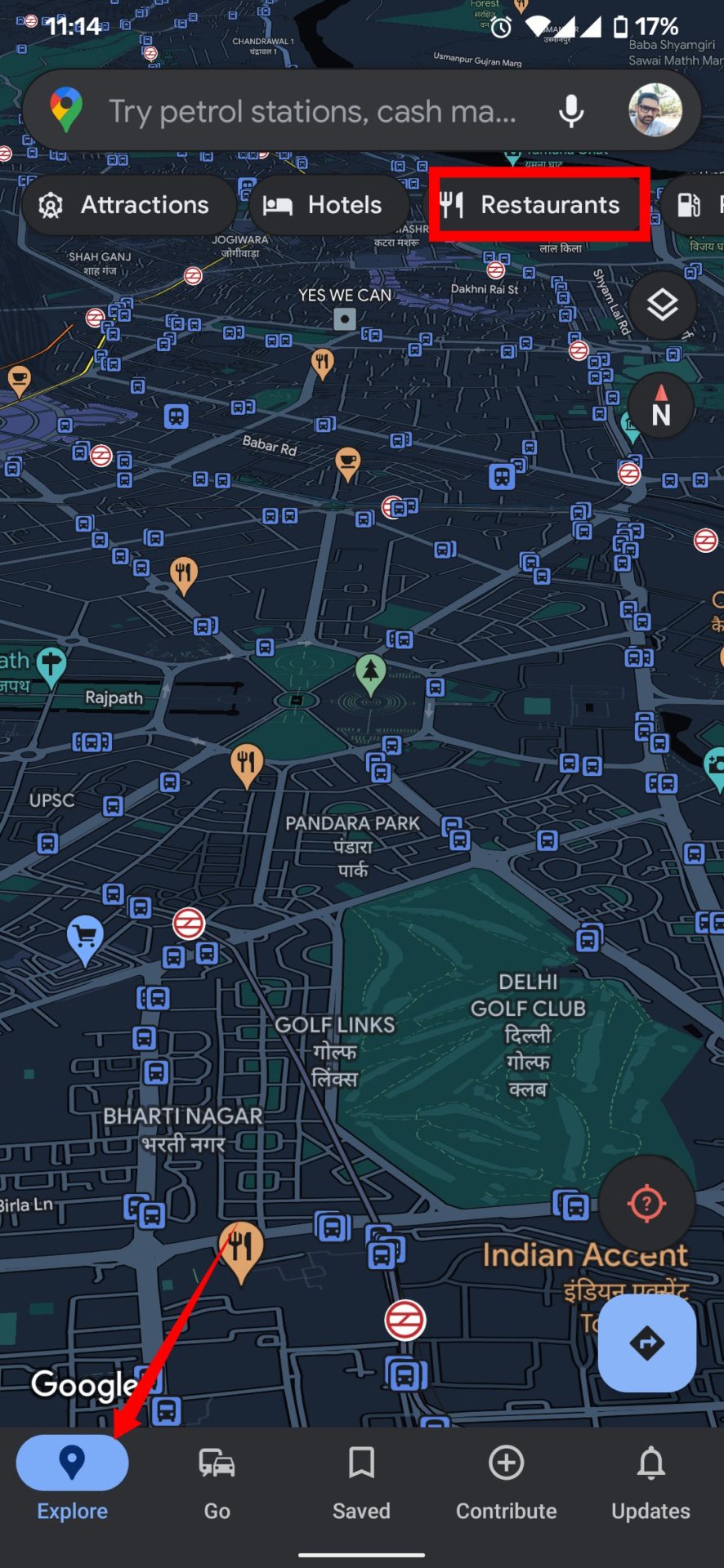
  1. Open Google Maps.
  2. Tap on the Restaurants tab at the top.
  3. To see all the restaurants in a list, tap on the View list option.
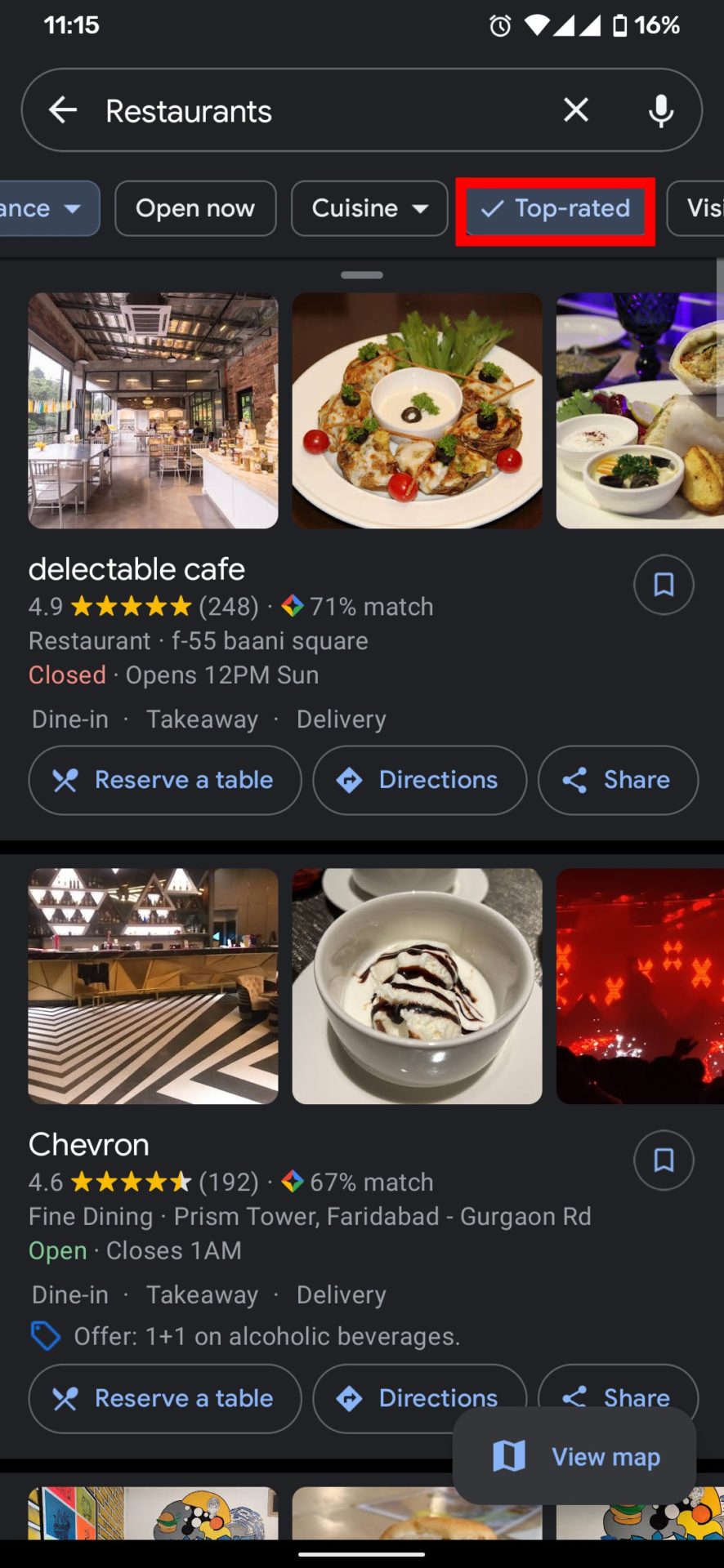
  4. Now you can see a list of restaurants with options such as directions, business hours, and phone numbers.
  5. At the top, swipe left, click at Top rated to find the top-rated restaurants near you.

How to Customize Restaurant Preferences in Google maps

You can customize the restaurant preference by choosing the restaurants that serve Chinese, North-Indian, Italian, Vegetarian, and many more. You can even search by rating and hours.

  1. Open Google Maps.
  2. Tap on the Restaurants tab at the top.
  3. At the top, swipe left, tap on the More filters options.
  4. Now you can filter your preference by ratings, custom hours, or by your past visits.
  5. You can even choose the type of Cusine you love.

How to Set Food and Drink Preferences in Google maps

You can customize food and drink preferences in Google Maps to provide accurate recommendations. Here are how to customize food and drink preferences in Google maps.

  1. Open the Google Maps.
  2. Tap your profile icon and tap Settings.
  3. Scroll down to the bottom of the page and click Manage your preference.
  4. You got three options, Dietary, Interested, and Not Interested.
  5. Tap on the Dietary to choose from Alcohol-free, Vegan, Vegetarian, or more.
  6. Now tap on Interested and click on Add topic.
  7. Select the type of food or cuisine you like the most and tap Add preferences when you’re done.
  8. You can follow the same step for Not Interested to choose what you don’t want to see.

Wrapping Up: Find the Most Popular Restaurants in Your Area

It might be quite useful to see the top-rated restaurants on Google Maps. With this guide, you can easily find top-rated restaurants in your area using Google Maps and customize your food preference.

Have any questions? Do let us know that in the comments below. Stay connected with us via Facebook and Twitter to read more such helpful posts.