Author

Sumit Bahl

Browsing

An RV is the perfect vehicle for a family vacation because it allows you to experience the outdoors up close. While sleeping in a comfy bed in your motorhome, you can hear the moose mooing in the forest or enjoy the smell of campfire smoke. You can also use your RV for various outdoor adventures, as it’s cozy and spacious enough to put all your stuff.

Most RVs require a powerful engine and complex systems. As a result, your ride will be comfortable and enjoyable. But it also means that the cost of gas and repairs can add up very quickly. Also, these vehicles can have mechanical problems that can ruin your trip.

During your trip, you can face different vehicle malfunctions and breakdowns. Of course, not every glitch is ‘fatal’ and will ruin your trip. But, if some more complex failures occur, it is best to call a professional for help. On this link, see how to find the best mechanic available. But before you save the mechanic’s phone number, prepare the toolbox for your motorhome.

Safety Gear and Essentials

You should never go without a first aid kit and essential safety gear like gloves. You could use gloves when you do some dirty work around your RV, including fuel, oil, caulk, etc. Gloves should be made of rubber, but it’s even better if you have nitrile ones. They are thicker and more durable.

A multi-purpose means is also handy for your car toolkit. The best example is a utility knife, which is great for cutting small things like ropes, strings, or tape. Another gadget is a Swiss knife. Carry it on your belt, and you have all the tools you need in mini versions – pliers, a screwdriver, and a knife. If you’re handy enough, you can even open the cans with it.

A battery tester is another tool that you should have in your RV. This small device is essential for lead-acid batteries and should be included in your RV’s tool kit. Depending on the RV, you may also need a battery tester to check the voltage if you run into an electrical issue.

Hammer and Rubber Mallet


The hammer is essential not only in your RV but also in the home kit. It has many uses when necessary to drive or remove nails and pins. A handy piece is a claw hammer, with a head sharp on one side and dull on the other. It comes in handy, not just for hammering but also when you need to bend or slacken something. It can even replace a wrench in some cases.

Another hammer-like common type of RV gadget is a rubber mallet. This small and lightweight tool has the same functions as a hammer but is less likely to damage the RV or vehicle. It’s ideal for securing or removing wheel chocks underneath the vehicle’s tires.

So if you have a toolkit in your RV, you should include a hammer/rubber mallet combo. This tool is convenient for camping and offers several uses in an RV. For example, it can drive stakes into the ground or secure tents.

Pliers

A pair of needle-nose pliers is also essential. The extended version of this gadget is great because it can help you reach tight areas in the RV. You can also get a mini version, which comes in handy when you grip or hold something.
The pointy tops of pliers are also helpful for more delicate jobs like minor electrical failures in your motorhome.

But do these repairs only if you have previous experience and proper safety gear. Even if you have a soft start RV device that start your vehicle with no power spike, be careful. Also, make sure that the plier’s handles are well-insulated.

Set of Screwdrivers

You should have a set of different types of screwdrivers in case one is damaged or needs to be replaced. But you can never carry as many screwdrivers as you need. The entire assortment of these tools doesn’t take much space, but if you know that less is more, you can opt for some multi-purpose tool instead.

Shop around for multi-bits. Look for those that contain as many add-ons as you never know when you might need them. So you’ll always have something to screw, tight, or unscrew in your motorhome. The multi-bit set can be kept in the utility drawer. You can even use a cordless drill with an add-on for changing the tops. That will speed up any job and help with too tighten screws.

Portable Air Compressor


Proper tire inflation is vital for RV safety. You should check your wheels before hitting the road, even when everything seems fine with the wheels. Yet, the tire often punctures due to a bad road or some sharp object you came across. That’s typical trouble when you go on a trip, and it shouldn’t surprise you.

Having a spare wheel and a proper tool will help you quickly get back on the road. An air compressor is essential for inflating the tires on your motorhome. It will be helpful in checking tire pressures and changing a flat. While many gas stations have free air compressors, they are not always available. So you might think of investing in a portable air compressor.

Tips on choosing an air compressor are listed below:
https://www.familyhandyman.com/project/how-to-choose-an-air-compressor/

Socket and Ratchet Set

Sockets are a must for any tool kit. You need socket wrenches for tightening nuts and bolts in an RV. In fact, you should always have a good set of these to fix any problem you may encounter on your RV. They will help you stay safe while doing some repairs on the mechanical parts of your vehicle.

An RV acts as a small living space on wheels. As such, you need to take good care of it and maintain it well. You don’t need a mechanic for simple glitches, like replacing a tire or fixing a minor electrical bug. But a proper toolkit is a must. It can save you a lot of trouble, nerves, and money.

Falls, slips, drops, are just some of the many sad things that can happen and cause extreme, sometimes irreparable, damage to your smartphone. This is why protecting your device is extremely important.

Handy smartphone skins are getting more popular and are fast becoming the go-to for most people. You can visit https://www.tfskins.de/ to find out how to get beautiful phone skins for your device.

But there are so many types of protective coverings to use on your device that will protect it from scratching and breaking. Below are some of them and the protections they offer.

1. Rugged Cases

People who are quite clumsy may find it beneficial to invest in a rugged case. A rugged case typically has reinforced corners and air pockets that significantly reduce the damages that can happen to your phone when it falls. Gripping your phone will also be made easier with this covering. You can even hold it properly with your hands wet.
However, cases like these are usually heavy and bulky. While your device may be adequately protected against falls, you may find the added bulk to be quite the hassle. Sliding your phone out and into your pocket can also become an issue. Hence, if you choose to get one of these, investing in a holster or belt clip would be a great idea.

Furthermore, they often tend to cover all the phone’s angles, this includes the buttons as well as some parts of the screen. Therefore, pressing the phone’s buttons may be more difficult, the touchscreen sensitivity can also be reduced.
Conclusively, this protective covering may protect your phone, but using your device will become a lot harder.

2. Basic or Slim Cases

Some people do not like covering their phone’s beautiful designs, especially when the phone is very sleek. Others do not want to have to deal with the extra bulk some protective coverings come with. If you fall under any of these categories, then you may choose to go with a slim case.

If you do, bear in mind that these do not provide as much protection as studier cases. You will be sacrificing adequate protection for style in this case. Your device will still be protected against falls (although minimally) but you can count on it being adequately protected from scratches and stains.
Getting one of these shouldn’t be an issue as there are quite a lot of them available in the market now.

3. Skins

If you fall under the 2nd category mentioned above (you do not want your phone to get too bulky), then another option for you is smartphone skins. Skins are made with vinyl and stick directly on the device. So, they do not make the device heavier, nor do they impede its functionality.

Just like basic cases, they protect your phone from scratches and they might also reduce how often your device falls. Some smartphone skins are made to have extra grip so that your smartphone doesn’t fall from your grip now and again.
Removing them from your device is also quite easy and a good one typically won’t leave any residue when removed. Because you can do this and they are not so expensive, you can choose to change the skin whenever you want.

You can change it to match an occasion like your birthday or wedding, or a season like Christmas and thanksgiving, or even your outfits. This makes it the most stylish alternative to other protective cases.
You can check out this page to read more about it.

4. Folio Cases

Folio cases are stylish as well as pocket-friendly. They protect your device all around, this makes them a perfect choice for people who love to keep their phones in their bags. The level of protection typically varies on how the case is made.

While you can choose to go all out and buy one of these made with real leather, most folio cases widely available are made with PU (polyurethane). PU is commonly called vegan leather, and although it is a good material for smartphone protective cases, it cracks over time and its smell can be quite strong at first.

They usually support your device’s sleep-wake feature. So, typically, once you open your case, your smartphone will come alive and once you close your case, it will sleep. If you are concerned about the case getting opened while in your purse or bag, you have to think well about the closure to opt for.

You have the options of stud, elastic, tab, and magnetic closures. The designs magnetic closures allow are quite stylish. However, they aren’t as sturdy as stud, tab, or elastic closures.

5. Screen Protectors

While cases and skins can protect the body of your smartphone from stains, scratches, and getting broken, they typically don’t do much for the screen. Some bulky cases may even transfer the impact of a fall to the screen.
To prevent this, most people use screen protectors for their devices. A lot of smartphones even come with their screen protectors and even when the protector is due for a change, getting one shouldn’t be an issue as they are widely available.

Screen protectors can protect your device’s touchscreen from cracks and scratches. But sometimes, they may impede on the usability and aesthetics. The aesthetic often gets affected when air bubbles form under the protector during application. While usability can be affected if you do not use the right protector for your device. Therefore, ensure to use a protector made for your device.

To prevent affecting your device’s aesthetics, make sure bubbles do not form while applying the protector on the screen by following the instructions given. Apart from following the instructions, also ensure you take your time and do not rush it.

Conclusion

Your smartphone can fall from your grip and serious damage can be done to it. Even if you are not clumsy and your device hardly falls, it may get scratches from being placed on some surfaces. To avoid any of these, you have to protect your device with any of the protective cases listed in this article.

WhatsApp automatically saves the voice messages you send or the ones you receive. These voice messages occupy a significant space in your phone storage and periodic cleaning of all these voice messages is very important. Check out How to Find and Delete WhatsApp Voice Messages in 2022.

WhatsApp voice messages are stored in a specific folder on your phone storage memory. With the recent update, WhatsApp changed the directory where the messages and media are saved. It’s very important to follow the below steps to find the location of WhatsApp voice messages.

How to Find and Delete WhatsApp Voice Messages in 2022

There is more than one way to delete voice messages on WhatsApp. The first one is to delete the voice message from the WhatsApp chat itself or you can delete the folder that contains messages from the file manager. Check how to delete WhatsApp audio messages on Android.

Method 1: Delete Voice messages on WhatsApp

The chat is the first place you should go if you want to find the WhatApp audio you want to delete. After finding the chat, long-press on the audio and look for the trash icon to delete it.

  1. Open WhatsApp.
  2. Open chat and find the voice message you want to delete.
  3. Long-press on the audio and look for the trash icon at the top.
  4. You can only see the Delete for me or delete for everyone option depending on the time.
  5. Use any of the options to delete voice messages from WhatsApp.

Method 2: Find WhatsApp Voice messages and delete it

Sometimes above method only deletes the media from WhatsApp but not from the phone storage. These voice messages are stored in your phone storage. Check how to find WhatsApp Voice messages and delete them.

  1. Install Files by Google and open it.
  2. Scroll down and click on the Audio option.
  3. Swipe left on the tabs and click on the WhatsApp Audio tab.
  4. You will see a list of your audios.
  5. Click on the three-dot in front of the audio and select Move to Trash.

Wrapping Up: Erase Your WhatsApp Audio Files

This is the best way to find and delete WhatsApp voice messages in 2022. To optimize the performance of the app and the mobile device as a whole, you should erase audio and voice notes from your smartphone on a regular basis.

Your internet bandwidth is being drained by something? These tips will help you identify what is using your bandwidth and troubleshoot it.

There is an online game being played by the kids. You are watching a movie and your spouse is downloading something. Your network is attempting to compete with their bandwidth… but it just does not work. If you had chosen a reliable internet service provider that offers an amazing package, all this would not have happened. If you are wondering that it could cost you a fortune, then that is not the case. There are plenty of providers that offer reasonable packages. Moreover, some providers even let you bundle internet with cable and phone, which means you can save A LOT. Yes, that’s right! For instance, Spectrum triple play allows you to bundle all these without blowing out your budget. The best part is that there are no contracts, ultimately, no risks. 

Anyway, the problem can still be fixed. 

Your internet bandwidth can be drained by many things. The people in your network are often the ones you know about. But sometimes it is malware or an intruder on your network.

Sometimes it gets so bad that you wonder, “What exactly is using my bandwidth?!”. If you are in such a situation, we might help you. You can check and troubleshoot your home network’s bandwidth usage by following these instructions.

  • Monitor Bandwidth Usage Through Your Router

Your router is the best place to start to figure out what is using your bandwidth. Your router manages all of the internet traffic coming into and leaving your home.

Each device connected to your network is listed on your router’s settings page. The IP address and MAC address of devices can be seen, as well as their connection status. With a router, you can also see network information like download speed and upload speed, as well as how much data this device is using or has used.

Each device is shown on the local network page of the router, for instance.

Unfamiliar with any of the entries? Just delete them and remove them from your network. Do not delete your own devices while you are at it! If you do, it will not matter. To log back into the network, you might need to retype your security credentials, an inconvenience that most devices experience.

  • Use Capsa To See Your Bandwidth Usage

Second, you can use a third-party program to see what is consuming your bandwidth. Capsa is an app that provides free network analysis that helps you capture every information packet that interacts with your device.

  1. Pick the network adapter that will work with your system. Most people prefer Ethernet. Wi-Fi may be more appropriate for you. Just see which works for you. When done, proceed to the next step. Select Full Analysis, then click Start to begin.
  2. Head to Protocol Explorer > [your adapter type] > IP in the Node Explorer. Click here to stop expanding the tree of protocols.
  3. Click Protocol to begin analyzing data. Each protocol in your system is displayed on the Protocol tab
  4. On the bottom of the analysis toolbar, select MAC Endpoint. You can open the detailed packet analysis screen by double-clicking the IP address of your device.

The good thing is that a lot of common traffic has easily identifiable addresses. Moreover, Capsa will mark it for you in other places.

This information can also be organized differently. Navigate to your device’s IP address from the IP Endpoint tab in the analysis panel. All incoming and outgoing connections, as well as the geographic endpoint, are shown in the analysis toolbar. It can be fascinating to read the Node 2 column.

There are some limitations to the free version:

  • Tracks only 10 private IP addresses
  • Tracks only 1 network adapter
  • Each project is limited to 10 IP addresses

For the most part, however, these limitations should not interfere with your aptitude to identify what is using your bandwidth.

  • Malware Scan Your Computer

Your bandwidth problems might not be related to your local network. You may be infected with bad malware that is using up your bandwidth when communicating with external servers or sending spam emails. You should clean your system if you have malware, regardless of bandwidth consumption. Malware can be consumed in a number of ways, but is not always “all-consuming.”

A good antivirus program should be installed on your computer. Regardless of which antivirus you use, you should perform a full system scan. Additionally, we strongly recommend downloading Malwarebytes and performing a full system scan. If the full system scan reveals any nefarious items, quarantine and remove them. You can then see if your bandwidth has increased. The speed may increase suddenly.

  • Uncovering network issues with Netstat

Using the Command Prompt and the netstat command is another great way to identify processes using your bandwidth. Using the Netstat command, you can examine all of the network activity on your computer (except for the traffic going through your router).

  1. Click the Best Match option, right-click and choose Run as administrator from the search results. Type command into your Start menu search bar.
  2. Enter netstat -o in the Command Prompt when it opens. Below is a list of all of the active network connections on your computer, their port, their external address, and the process they belong to.

Examine the list to see if you find anything unusual. Using your browser, you can search for the address copied and pasted. Servers and cloud servers of one type or another account for the vast majority of entries because they are the backbone of the internet.

Use urlscan.io to analyze the address quickly. This tool will reveal who owns the address.

The PID (Process ID) can be noted as well. Locate the equivalent process under the Services tab in Task Manager. The PID can have many open connections in the Command Prompt, so if there is one you do not recognize, you may want to try stopping the process and seeing whether it resolves your bandwidth issues, or you may want to search the internet to figure out what the process is and if it is something your system requires.

  • Use Windows Resource Monitor to monitor network activity

You can also access another bandwidth troubleshooting tool while you are in the Task Manager by clicking on the Performance tab, then clicking the Open Resource Monitor button at the bottom.

You can check your computer’s performance with the Resource Monitor.

For most people, bandwidth usage is usually dictated mainly by Chrome and Spotify, as shown in the Send and Accept columns. There is nothing wrong with seeing popular programs such as Chrome, Malwarebytes, and Spotify at the top of the list since these are trustworthy programs. However, if you see an unknown application or process draining your bandwidth, you should investigate.

  • Don’t use apps that are known to waste data

Apps are known for using a lot of data. YouTube, Instagram, TikTok, Zoom, Netflix, Instagram, and some social media apps like Facebook can all be very data-intensive.

What is the average time it takes to use 1GB of data? Unfortunately, 1GB can be consumed very rapidly on a mobile connection (especially over 5G) and even more rapidly over Wi-Fi or Ethernet.

One gigabyte of data could be used on a phone or a PC by:

Visit thousands of websites!

Use popular messengers such as WhatsApp or Facebook Messenger to send over a million messages. Thousands of photos can be uploaded or downloaded (depending on the quality). Participate in an hour-long Zoom meeting. Stream video for hours. 

With YouTube set to medium quality, you could only watch half as long, while you could watch 10 hours of Netflix with a lower quality setting. Tap the user icon at the top right to open YouTube, and then choose settings to view the video longer. Then, under “General” select “Limit mobile data usage”.

What is Netflix’s mobile data usage? You will run out of data faster with Netflix as it uses a bit more than 1GB per hour. You can, however, limit the quality of your Netflix videos just like you can on YouTube.

Now that you know how much data these apps consume, be careful with the usage.

Final Thoughts

Having no idea how much data is consumed at home can be quite frustrating. We hope that the aforementioned tips and tricks can help you save your bandwidth. If you have questions, please leave a comment in the section below. 

Free on all platforms, the Warzone is Call of Duty’s massive new battleground. Up to 150 players can participate in two new game modes: Battle Royale and Plunder, with a chance to win real money. Grab a weapon and head off to battle for the top spot on the leaderboard.

The most critical feature of shooters, particularly battle royale games, is aiming, whether you’re new to the game or a seasoned veteran. Even if you have the ideal position, you will lose the gunfight if you miss your shots. However, you can survive even the most dangerous conditions that Warzone may throw at you with a skilled aim.

The trouble with practicing your aim in battle royale games is that there is often a lot of downtime between firefights. You won’t get much time to perfect your aim if you’re in a region with no foes or if you perish before getting into a serious conflict.

These tips and some undetected warzone hacks can help you improve your aim in Call of Duty: Warzone

Determine the appropriate Warzone Sensitivity

No matter what you play Warzone with, sensitivity is one of the most crucial parts of your aim. Your aim will be sluggish if your sensitivity is set to slow, preventing you from efficiently tracking fast-moving players. In the case that your goal is too high, your crosshair will race past it as you overshoot. Shooting the bots in either Modern Warfare’s multiplayer mode or Warzone’s practice mode will allow you to fine-tune your sensitivity.

  • Concentrate on your goal

Put another way, and you must always have the white crosshair in the centre of your screen where you expect attackers to be. Many battle royale players mistake looting while aiming at the ground. If someone leaps in front of you while your aim is on the ground, you’ll have to aim up to hit them, which takes time. 

You won’t need to alter your aim if you’ve got the crosshair focused where an adversary could appear, allowing you to snap onto them instantly. Once you’ve mastered focusing in Warzone, make sure your shots deal the most damage possible. The fastest way to kill foes is to hit them in the head, but it’s also the toughest.

  •  Practice your aim with the 3D Aim Trainer

You can download various aim trainers to warm up and perfect your mouse and keyboard aim. We recommend 3D Aim Trainer since it is not only free, but it also accurately simulates playing Warzone. You can adjust your FOV to match Warzone and practice with various Modern Warfare weaponry.

  • Sensitivity settings for your mouse and game controller

Keep experimenting and fine-tuning your sensitivity levels and settings until they are just right for you. Low sensitivity settings are a good choice if you’re just starting because they allow for more exact control.

  • On a PC, disable mouse acceleration and V-sync.

The Mouse Acceleration and Vertical Sync options in the game menu and your PC’s operating system settings should be turned off when playing on a PC. These are almost always going to cause you to miss your mark.

  • There are three options for Aim Assist

Standard, Experimental, and Enhanced Aim Assist modes are all available on the CODMW controller. With varying degrees of assistance, these Aim Assists work by slowing down your aim while you’re pointing close to a target.

  • Make Headshots Your Goal

When it comes to quickly killing your enemies, mastering the art of a headshot is a must. Prepare extensively to immediately locate your target, even in a brief interaction.

  • Strafe Your Shots to Align Them

Don’t use your hands to aim your weapons! You can practice keeping your aim still in a gunfight by strafing to better understand your horizontal aiming.

  • In the mid-to-long range, ADS and the close range, Hipfire

It isn’t always necessary to aim down your sights before firing. While its advantages in mid-and long-range battles, ADS will limit your field of vision, require a second to aim your gun, and make it more difficult to aim for closer targets.

  • Become Familiar with the Features of Your Gun

Test the effective range, shooting patterns, and other firearms data to become more familiar with them. You can also use attachments to customize these numbers.

  • Reduce Recoil by Mounting Your Gun

By mounting your weapon to the sides of obstacles, you can lessen your weapon’s recoil when firing. Make it a habit to mount your weapons to improve accuracy and hit your targets more frequently.

Conclusion

The best approach to improve your aim to engage in combat. Test your play skills in multiplayer mode (ideally TDM and other straightforward game modes). Although distinct from the multiplayer, CODMAN’s single-player campaign can also be used for practice. Playing through a cinematic battle between practices may be a refreshing change of pace.

Google Maps is one of the most widely used services nowadays. Apart from mapping and navigation, Google Maps allows users to provide reviews and upload images of places they’ve visited for others to see. For some reason, Google Maps does not officially allow you to download photos. However, with a few simple steps, you can easily download images from Google Maps.

Users can share their favorite photos and videos and add them to Google Maps. It will help users to understand a place before they visit it. Restaurants owners upload photos of their menu and food, while some users can add media for places of interest such as businesses or parks. Follow the below steps to download Google Maps images.

How to Download Images from Google Maps

If you are a frequent Google Maps user then you might see a lot of images uploaded by users about various places. Here are the steps to download images from Google Maps.

Download an Image from Google Maps on Desktop

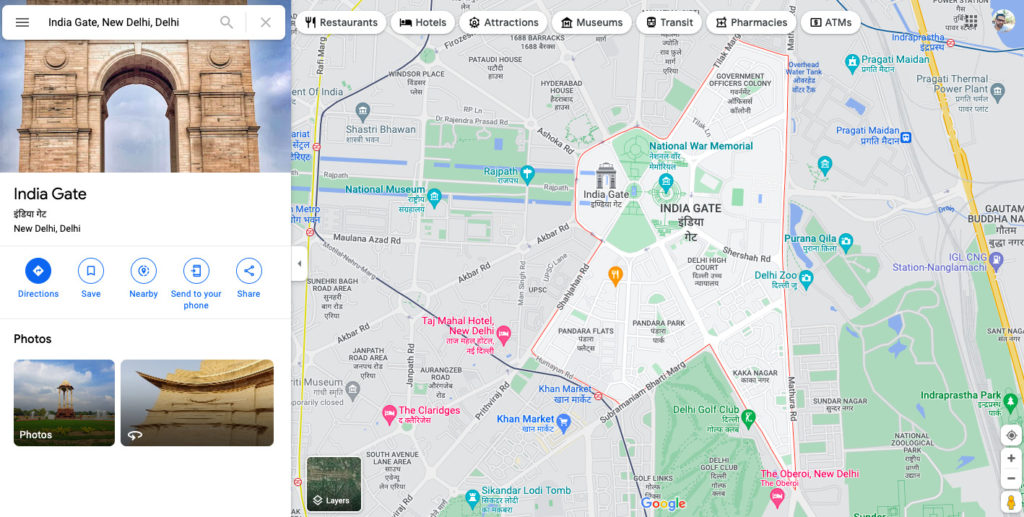
  1. Open Google Maps in your web browser and search for any place that has photos you are looking for.
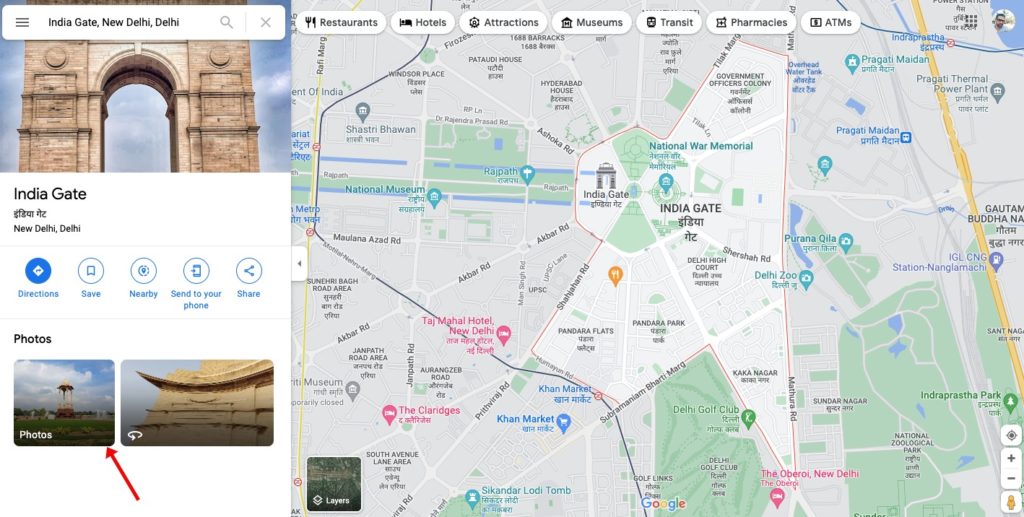
  2. You will now see images related to your search query. Click on the Photos folder to see all the images uploaded from that place.
  3. From the list of photos, find the one that you want to download and click on it.
  4. Click on the three dots menu next to the uploader’s and image name and click on Report a problem.
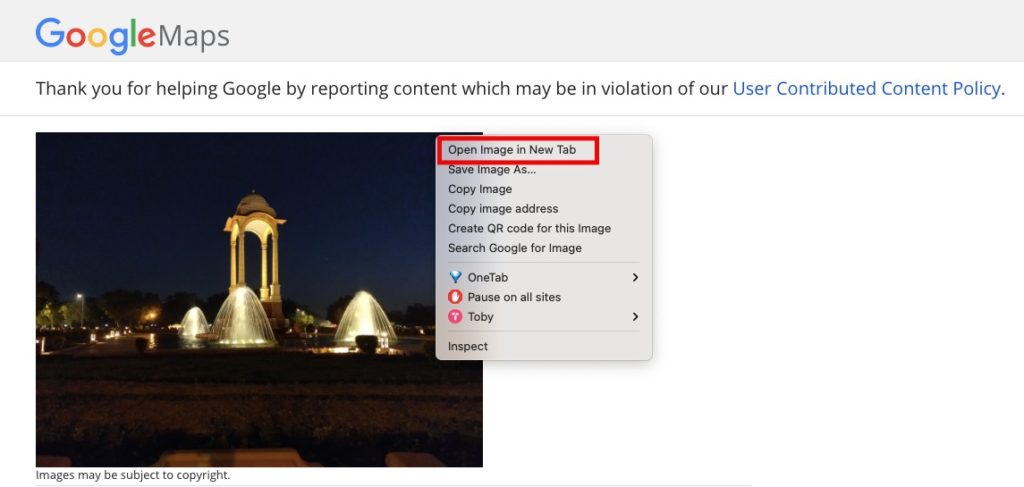
  5. It will redirect you to the new page. On the following page, right click on the image and select Open Image in a new tab.
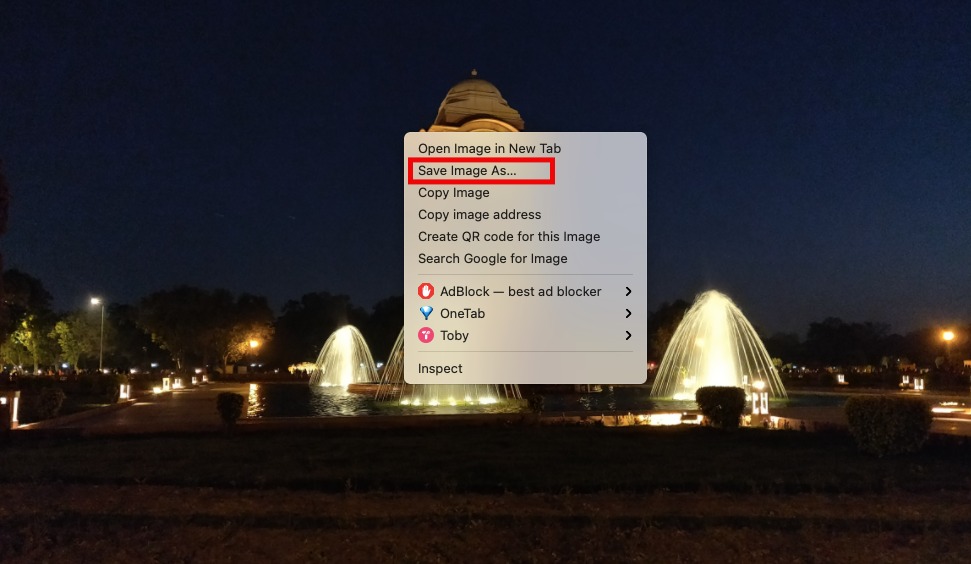
  6. Now right click on the image and click on the Save Image As option to save Google Maps image.

Download Image from Google Maps on Android and iPhone

  1. Open Google Maps in Chrome in Desktop view. Use the incognito tab if chrome is automatically proceeding you to Google Maps app.
  2. Search for any place and click on the Photos folder to see all the images uploaded from that place.
  3. From the list of photos, find the one that you want to download and click on it.
  4. Click on the three dots menu next to the uploader’s and image name and click on Report a problem.
  5. Once the photo opens, long tap on the image and click Open image in new tab.
  6. From the popup, Long-press the image and click the Download Image option.
  7. Done! this will save Google map images on your device.

Wrapping Up: Download Google Maps Images

This is the easiest way to download photos from Google Maps. Have any questions? Do let us know that in the comments below. Stay connected with us via Facebook and Twitter to read more such helpful posts.

One of the most competitive battle royales that will keep you excited for yours is Apex Legends. But if you want to win or stay ahead of your opponents, you must understand the gameplay, choose your legend carefully and even spend some time mastering your moves. 

So, we have taken the time to gather some of the best pro tips available in this article. They will help you improve your tactics and strategies in Apex Legends. Also, we recommend that you get the best Apex hacks with aimbot to help boost your performance.

6 tips to dramatically improve in Apex Legends

  • Be a great team member

Apex Legends has several legends with unique abilities that sum up to help any team to overcome any in-game situation. For example, some characters have healing abilities to heal a badly injured teammate. 

But an important aspect of the team play in Apex Legends stems down to team members being able to communicate. Therefore, you must learn to communicate useful information to fellow teammates using the Ping system. For example, you can inform them about the location of enemies or loots.

  • Practice more for better results

An excellent platform for players to hone their shooting skills in Apex Legends is the practice range. If you’re having a hard time figuring out what weapons to choose, then you can head into the practice range and experiment with the different weapons available in the game.

You can also learn your favorite gun’s recoil pattern. Once you know the recoil pattern of different weapons, it becomes easier to understand what adjustments to make. You can also use the range to try out the different agents’ abilities.

  • Do more snapping

While in the practice range, you can use the opportunity to practice a technique that can fetch you more wins when used effectively. Apart from learning about the different weapons and agents, also practice snapping.

Snapping involves players shooting at targets and then quickly moving out of the spot. This technique will help you a lot when you’re caught in close-range battles where you have to shoot at several enemies within a limited time.

  • Improve your strafing technique

Snapping is done when a player aims for a target in the distance while behind cover, then runs sideways towards a nearby cover while releasing a burst of shots at the target. This will help you improve your aim dramatically.

You’ll also be able to make some neat shots without being unnecessarily exposed to bullets from enemies. Finally, if mastered efficiently, you’ll be able to increase your kill rate within a significantly low period.

  • Master your legend’s abilities

One of the most important tips that will help you get the best out of Apex legends is to master the different abilities of your chosen legend. Apex legends have characters with several unique abilities that help them serve their team in a special role.

The different abilities possessed by the different Legends are their passive ability, tactical ability, and an ultimate ability. Moreover, these abilities influence their playstyles greatly. For example, Gilbrata’s dome shield makes him a good legend for defenders. The more you know about the legends, the better your choice of legends and their different combinations.

  • Know how different weapons work

If you think you’ll thrive well by knowing your agent’s different abilities without a good knowledge of the guns, then you’ll fail miserably. You need to have a basic knowledge of how the different works and in what situations they’ll serve you best.

Sniper rifles will serve you best in long-range combat encounters, while you’ll need SMGs and shotguns in close-range fights. A good recommendation from us should include the Longbow and the Peacekeeper. You should also do well to get suitable weapon attachments to enable you to get the most out of them. 

Conclusion

Apex legends will give you several hours of fun when you get a good knowledge of the ins and outs of the game. So, you must take some time out to learn the maneuvers and special in-game mechanics associated with the game.

To get on with this, dedicate some time learning how the different guns available in the game work. You’ll also have an added advantage when you know how to use your Legend to the fullest in different situations. Also, learn how your Legend’s abilities can support the team.

Manufacturers are generally looking for ways to streamline their processes, increase productivity and reduce costs. One way is through the use of software like enterprise resource planning that will help automate some of the tasks so employees can focus more on other important endeavors. Get the most out of modern technology by implementing this within your business.

As industries try to embrace changes on various levels, the trend of business-to-customer is becoming critical. IT-powered solutions and automated tech are being used to improve safety, efficiency, and productivity in some companies. Various solutions are available, including time tracking, inventory, shop floor scheduling, customer relations management, and accounting.

About the Software

The manufacturing production floor software is a shared resource that makes it possible for you to assign, track and coordinate individual manufacturing processes throughout the production area. This process includes the following steps:

– Assigning the tasks which need to be done
– Managing inventory and product data
– Creating reports to show what has been completed so far
– Coordinating different parts of the manufacturing process

Benefits of MPF software

MPF software is a computer-based system that is often integrated with other business processes. More and more businesses are moving towards these systems like the ones on https://logicdata.com/products/departments/shop-floor-control/ to decrease the labor-intensive work previously done manually. Examples of improving their efficiency include implementing time tracking, automatically collecting data, and reducing waste in the manufacturing process.
It monitors the tools used in real-time such as team schedules, managing the entire workforce, and better planning. Some of these can boost the performance of your entire assembly line. GPS tracking and employee monitoring are also some of the features you may want to check out. The data can be automatically sent to an online timesheet in some software, which will be included in the analytics report.

With the help of the ERP software, many employees may find it easier to clock out or clock in from any of their devices. The timecards can be accurate and straightforward and can generally be used by the whole team through applications and programs.

Other functionalities that you may want to consider include payroll and invoicing. The payments and timesheets can be handled on the same dashboards nowadays. With accurate data collected, owners can better manage their budgeting for their following projects.

About the Manufacturing Solutions

Some platforms are cloud-based and are more focused on the entire manufacturing process. This is often notable with CRMs that can handle more orders and ensure centralized product data for more transparency and accuracy. See more about CRMs by going on this site.

With the right apps and programs, you’ll be able to know more about the current procurement processing, supply, and demand, as well as the supply chain control that you may have in your business. These are often available regardless of the goods that you’re making, whether they are in the form of medical devices or home appliances.

Heavy Industry Targets

An ERP often targets heavier industries like plastics, aerospace, machine building, rubber, wood, and furniture manufacturing. These can boast various tools that you can customize based on the current needs of the business.
These powerful features may include product configurators, CAD interface, job costing, inventory, quality control, shop floor management, and many others. These can also provide company messaging, advertising, and more control with the company’s CRM that you may add as extras.

Targeted to Small-Sized Businesses

You may be a small business that’s still starting out, and you don’t have to worry since there are many options for you. If you want an ERP that can handle the manufacturing orders, bills, material costs, job costing, and inventory, some platforms will be able to manage your needs more effectively.

With the creation of multilevel work orders, you’ll have much more visibility on the production from start to finish, which can help you a lot.

How to Choose the Right Software?

The first thing to do for an ERP selection is to conduct a risk assessment. Check out various platforms and see if they are well-suited for your business. You may want to consider the platform you will be using, compatibility, the time required for training, cost, and more.

Next, ask yourself what your goals are. Will you be using the software for only one system or across various systems? The software market has been growing exponentially over the last few years, so it’s important to research before choosing a vendor.

About the MES

Manufacturing production floor software, also known as Manufacturing Execution Systems (MES), is a software solution that helps manufacturers automate and control the manufacturing process. Some might be confused with the ERP and the MES. However, MES systems will help you manage shop-floor manufacturing operations. The reports are real-time, and you’ll see the activities that are currently on the production line.

On the other hand, ERP will create basic production schedules, delivery shipment, and material used for manufacturing, depending on your business. There is some overlap between the two, but you’ll generally find a program that will have features of both the MES and the ERP.

MES systems are most commonly used in factories to monitor and control the manufacturing process for companies with several products that need to be produced on an ongoing basis. MES systems use data from sensors and other devices, such as gauges, controllers, computer-aided design (CAD) systems, and bar-code readers to monitor production rates.
With the ERP tools, there’s an option to schedule deliveries, prepare tools, and monitor the progress of various jobs on the production line. This will help you get real-time data and an arsenal for more control on your shop floor schedules.

The ultimate goal for most businesses is to increase their manufacturing productivity. It’s a challenge, but it’s much easier than many entrepreneurs think with the right tools and software. It’s time that everyone starts thinking about the best IT-related programs and software as some of the most valuable assets that they will own for increased productivity.

If your business has an online presence, you will definitely know the importance of SEO. This is because it is one of the best approaches to get your website up on Google search results. It’s a common fact that if your SEO strategy isn’t up to par, your website will be buried deep in the search results and no one wants to be at the bottom of search results.

While a low web ranking is not desirable for a company, it has an impact on both current and potential clients. Google and other search engines demand fantastic websites that are not just visually stunning but also resourceful and informative. The knowledge of this should motivate you to come up with high-quality material and engaging media.
Knowing what SEO accomplishes for businesses with an online presence can help you choose the best SEO Company that provides excellent services. Finding a decent SEO firm necessitates a thorough search as well as a clear understanding of what to look for. If you’re not sure where to start, check out Johnny Chen on line for some help.

Tips to Know a Good SEO Company

Here are some tips to help you:

Provision of Data-Based Result

Expertise is necessary, but actionable results that are based on complete, accurate, and current data are the most critical component of SEO. Whether you need to improve your on-page content quality or to correct a technological setting that hinders a site from expanding its visibility on Google, the only way to get practical results is to use all data available. Any other method is just conjecture.

Resourceful Team Members

A good firm comprises resourceful team members who are aware of current events and how to use them to meet set objectives. Hiring a team that uses out-of-date strategies will not produce the desired outcomes, as digital marketing is a constantly changing sector that necessitates regular revisions of strategies and approaches. Before you work with a company, you might want to see proof of their successful performance. You can also verify their statements by reading reviews from previous customers.

Uses Multiple Strategies

There are several methods that can lead to better high search engine rankings when it comes to SEO. Backlinks that are risky can be removed or modified from a search standpoint. Poor-quality content websites that negatively impact search engine on-page site indicators may not be indexed or get deleted.

Alternative options include determining which core techniques to use or what site structure to use so that both humans and search engine bots can access the site. You may learn more about some of these strategies by reading this article.

Advantages of SEO to Businesses

The following are some of the benefits attached to this method:

Increases the Number of Leads for Your Business

The nicest aspect of improving your SEO efforts is that you’ll get more leads because you’ll be easier to access. The easier it is for people to find you, and the higher you rank in local search results, the more quality leads you’ll get. You may be sure of converting some of the leads into regular customers with good-quality content.

Increases the Visibility of the Brand

Your company’s visibility to prospective customers would be improved by good SEO. Even if people do not click on your website, you will notice that it ranks pretty high on search engines. With visibility comes patronage and your business will certainly grow.

Improves User Experience

SEO is more than just getting your site on the first page of a search engine. It also aids in the loading of your web pages, the use of appropriate backlinks, and the creation of high-quality content. Your website visitors will have a fantastic user experience as a result of this.

Reduces the Cost of Advertising

Concentrating on SEO is a terrific way to save money on advertising while still generating leads. SEO is, in fact, one of the most dependable strategies for getting leads at a low cost. For other ways to promote your business, you can check here: https://www.wikihow.com/

Conclusion

Search engine optimization is one approach to advertise your website or business online. This ensures a high search ranking and visibility to prospective customers. You will find tips to help you select a good company to do the job in this article.

Starting a new business can be really intimidating, since there are too many things to take care of, each process varying in difficulty and complexity.

Hiring staff and employees, choosing the right platform to build a website, having the right design according to your company’s niche, engaging in an affordable yet effective marketing campaign, and managing the security aspects of the business to avoid problems similar to this one, can make a huge difference.

And of course, dealing with all the responsibilities and needs of the business while ensuring that the company is profitable and maintainable, are just some of the examples of how hard maintaining a company can be.

That is why a lot of starting companies tend to rely on external suppliers and service providers, mainly because they are capable of solving or dealing with some of the troubles and responsibilities new companies have no idea how to tackle down.

And of course, that can be an intimidating experience in itself, since hiring the wrong supplier or service can make the journey a lot harder and much more complicated. When it comes to the technology field, a very important thing to do is choose the provider based on your company’s own field and needs.

For example, if you check out ABQ-IT – managed IT services for medical companies, you’ll get to know more about an IT company that specializes in providing services related to companies inside of the medical industry.

That being said, there are some general rules of thumb you can follow to enhance your hiring experience, and we will showcase some of them to help you out in case you are planning to hire a tech-based provider.

With that out of the way, let’s start with the first thing you should have in mind: Choosing a local company.

Why Choosing a Local Company is Important

Although a tech company can still manage your processes wherever they want, having a tech company near you can enhance the whole experience considerably, and whenever problems or administrative aspects of the transaction are necessary, it definitely makes things a lot easier to deal with.

Also, whenever troubleshooting or customer service is needed, having the option of being visited by a specialist, or just visiting their headquarters, will bring solutions a lot faster. Generally speaking, if you are closer to them, you’ll often be perceived as a priority!

Check Out Companies with History

History often translates to experience, so to summarize things up, you want a provider that has been present in the field for quite some time now. This ensures that you are working with a provider that is reliable and is familiar with several aspects of the industry.

It is also easier to find companies with a reputation once they have settled down and worked with several customers. If you can get your hands on a recommendation, even better!

Consider Your Company’s Growth

Something important that a lot of starting companies tend to ignore is the fact that business growth can happen as time goes by. And you want to hire a tech company that is capable of dealing with your company’s current performance, while being capable of handling its growth, whether slow or fast.

This is mainly because of how complicated, time-consuming, and laborious it can be to change to another tech company. It might also cost a lot of money as well. In short: Make sure that the company you are going for has the power to escalate its services based on your company’s size and growth!

Never Go for Long-Term Contracts

It is always better to have the option of changing providers if something happens or you are just unsatisfied with the service, but some companies will try to lock you down with a long-term or short-term contract. Although this might work out in some circumstances, it is always better to not be shackled with this type of situation.

Take Your Time to Research

A really good piece of advice is to always take your time before hiring companies. Of course, considering these last three pieces of advice is a good start, and you can also take into consideration this one article at https://www.businessinsider.com/stolen-data-of-533-million-facebook-users-leaked-online-2021-4, but by taking your time you pretty much ensure the best decision available for you.

Something you can do is create a list of all the potential providers available near your area, and rank them based on:

# Their reputation
# Prices
# Services
# Scale
# How well they suit your needs

If you do so, you will have a more solid idea of which companies are more preferable for your current circumstances. Afterward, you can contact them and ask questions, to see which one is actually the most suitable for you. Then, you can pick one based on the factors mentioned before.